






GA4 duplicate conversions can occur when multiple tracking implementations, like GTM, hard-coded scripts, plugins, and custom JavaScript, fire the same purchase event independently. Combine that with broken cross-domain attribution across multiple websites and a third-party booking platform, a single booking can appear 4-5 times in GA4 while entire paid channels go unattributed. This case study documents how all three failures were identified and fixed.
Overview
The client, a Florida-based water sports company, offers jet ski rentals, dolphin tours, and boat rentals, running bookings across three branded websites with Peak Pro as the checkout platform.
With no internal analytics team, the owner handled everything herself, from marketing strategy to tracking implementation and website updates.
Over time, multiple agencies and freelancers had touched the GA4 setup. Each left their mark. Nothing ever got cleaned up.
Then GAfix.ai ran an audit, connecting to the GA4 property and scanning 50+ checkpoints across GA4 and Google Tag Manager. What it surfaced:
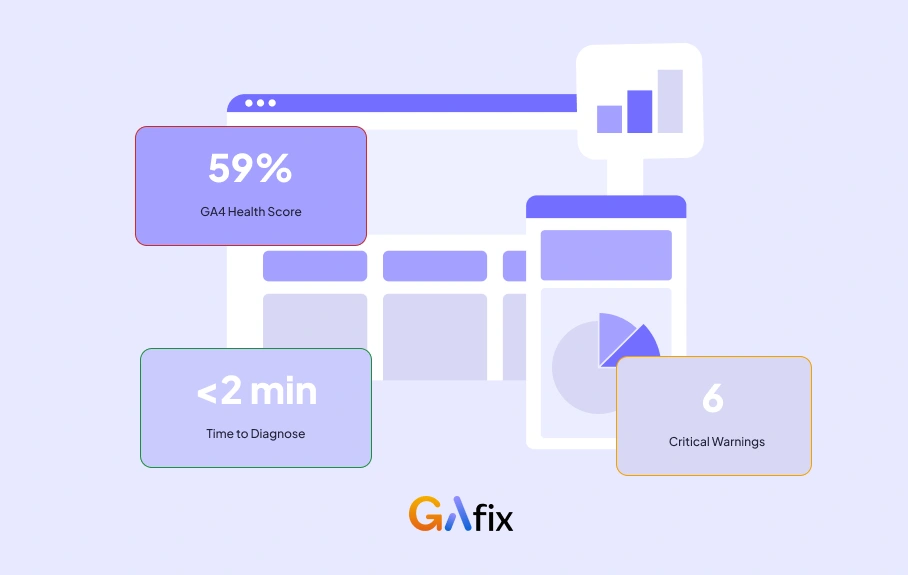
- 59% health score, 6 critical Issues - including GA4 duplicate events firing across multiple tracking implementations
- Under 2 minutes to complete the full scan
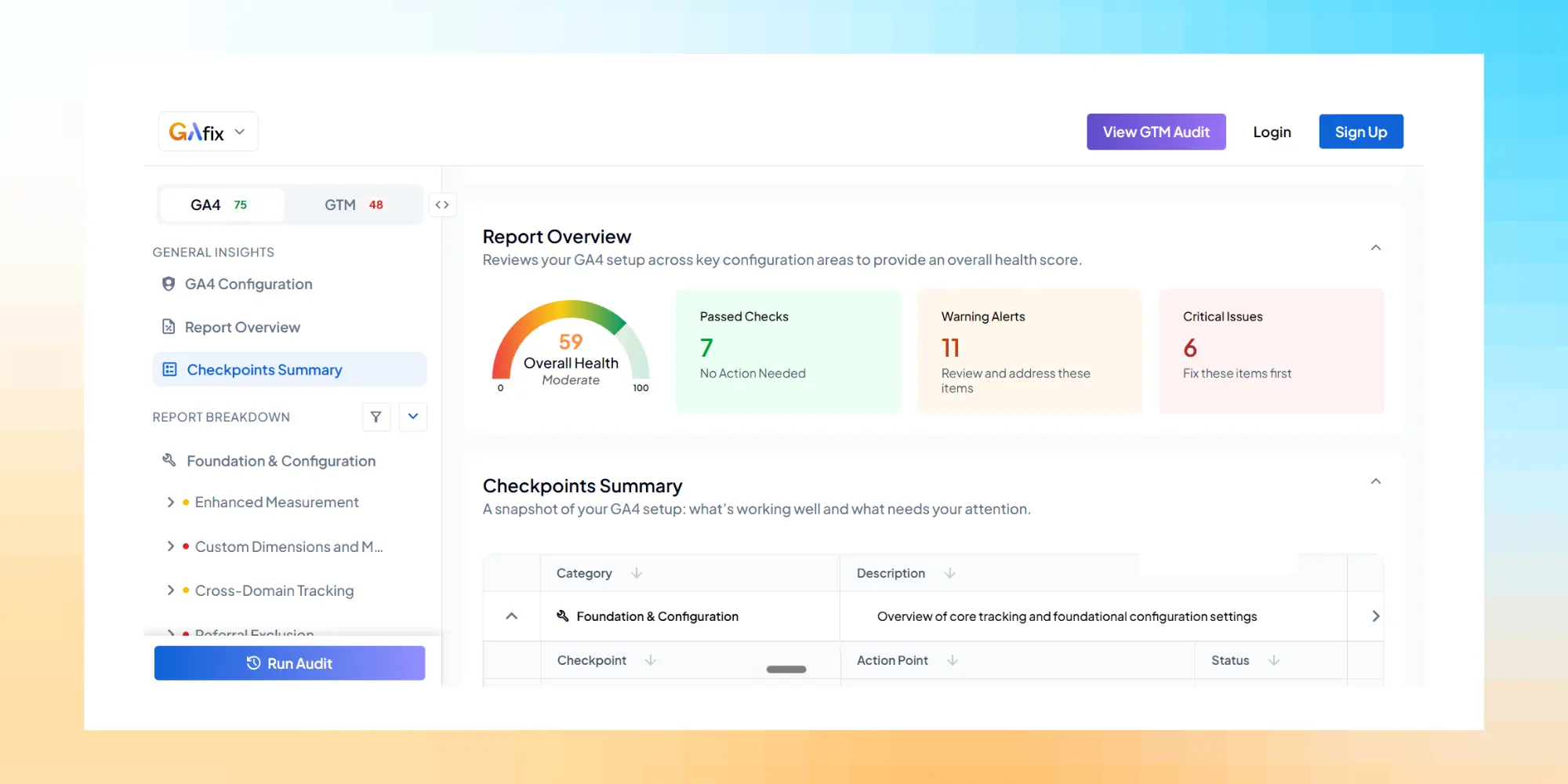
What months of hired help couldn't diagnose, the audit flagged immediately.
The Challenge: When Everyone's Fixed It But Nothing Actually Works
By the time GAfix.ai got involved, the WordPress site had four separate tracking systems running at once:
- Google Tag Manager (GTM)
- Hard-coded scripts embedded directly in the page source
- A plugin - Pixel Your Site
- Custom JavaScript
All four were live, firing simultaneously, and none knew the others existed. This is a classic accumulation problem: each new hire adds their own solution without removing what came before - until every booking generates duplicate GA4 conversions.
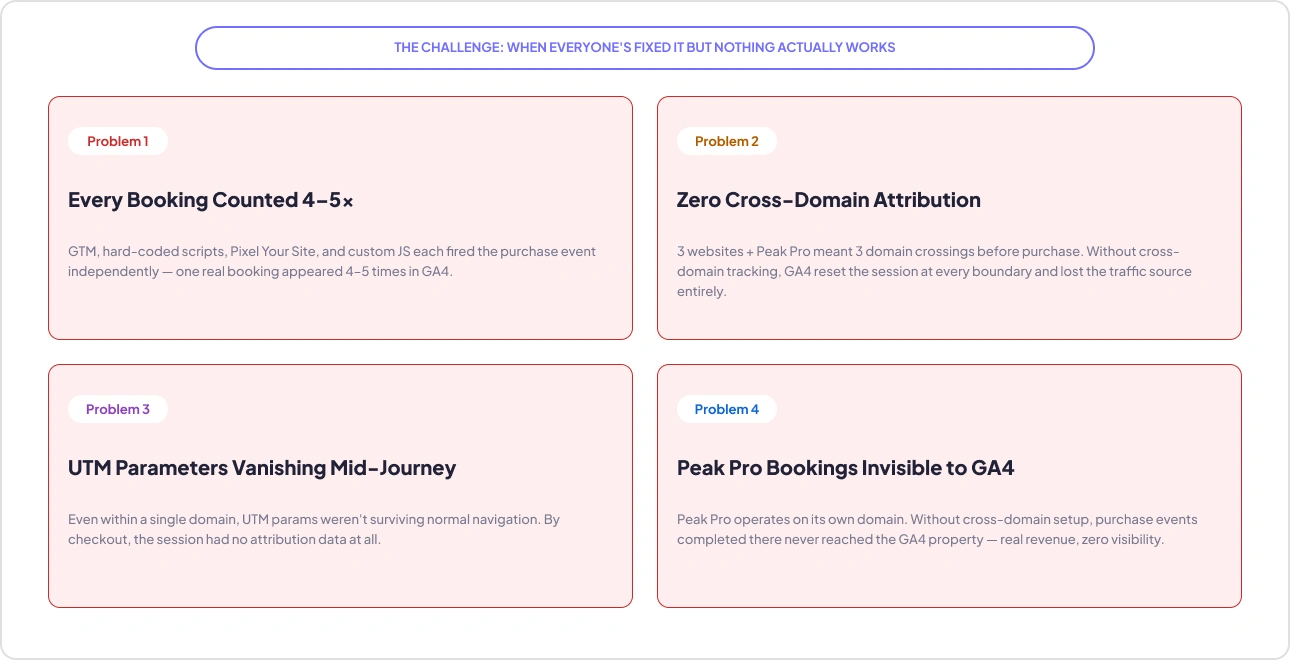
Problem 1: Every booking was being counted 4-5 Times
One customer completes one booking. GA4 records the purchase event 4–5 times.
- GTM fires the purchase event
- The hard-coded script fires it again
- Pixel Your Site fires its own version
- The custom JavaScript fires one more
Business impact: Google Ads and Meta smart bidding consumed the inflated counts. A campaign that drove 10 real bookings could look like it drove 40–50 - so the budget scaled toward campaigns performing a fraction of what the dashboard claimed. The business was optimizing for phantom conversions without knowing it.
What most businesses miss: None of these problems throw errors. GA4 populates. Reports look active. Events fire. The data looks healthy until you audit against what should be happening. That is why a 59% health score can coexist with a setup that looks flawless on the surface.
Problem 2: Three Websites, One Booking Platform, Zero Connected Attribution
Visitors don't stay on one domain. A typical journey crosses three domains before a purchase fires - and without cross-domain tracking, GA4 resets the session at every boundary.
- 3 branded domains + Peak Pro, with no cross-domain configuration in place
- Every domain crossing reset the GA4 session and erased the traffic source
- Result: a user who clicked a Google Ad arrived at checkout as a new, sourceless session - so real paid media showed up as direct/unassigned traffic
Problem 3: UTM Parameters Vanishing Mid-Journey
Even within a single domain, attribution was leaking.
- UTM parameters were stripped from URLs during normal site navigation
- Campaign tags were lost before the session ended - so by checkout, there was no attribution data left to record
Problem 4: Peak Pro Bookings Invisible to GA4
Peak Pro runs on its own separate domain. Without cross-domain setup between the client sites and Peak Pro, purchase events completed there were never reaching the GA4 property.
- Real revenue, real bookings - and zero visibility in GA4
- Attribution from the booking platform: effectively zero
The compounding cost: the setup was over-counting cheap events and missing the ones tied to actual revenue. Paid media budgets were being allocated on two layers of corrupted data - inflated signals and missing signals at the same time. Before this engagement, the owner had hired 3–5 different people, and none of them solved it.
The owner described the experience with characteristic directness:
"I feel like a rat on a wheel. I just keep on going around and around trying to fix the same problem."
She'd hired 3–5 people before this engagement. Every single one failed to solve it. Her explanation for why captures the core issue precisely:
"No one could ever tell me exactly what was broken about it."
The problem wasn't a lack of effort. It was a lack of the right diagnostic starting point.
The GAfix.ai Audit: 2 Minutes to Surface What Months Couldn't
Before any fixes were touched, the team ran the GA4 audit on GAfix.ai to capture the baseline. The process:
- Connect the GA4 property
- GAfix.ai scans 50+ checkpoints across the GA4 configuration and the GTM container
- The audit runs before any changes, capturing the true starting state
The result, in under 2 minutes: a 59% health score with 6 critical Issues.
The audit pinpointed the cross-domain attribution failure, broken UTM persistence, duplicate event firing, and complete loss of traffic-source attribution - each with severity levels and a plain-language explanation of why it mattered.
A specialist doing this manually would have spent days reviewing every tag and script, tracing where UTM parameters broke, and figuring out why Peak Pro events never reached GA4. GAfix delivered the same picture in minutes. It didn't do the implementation - it removed the investigation phase entirely.
The Fixes: Three Changes That Changed Everything
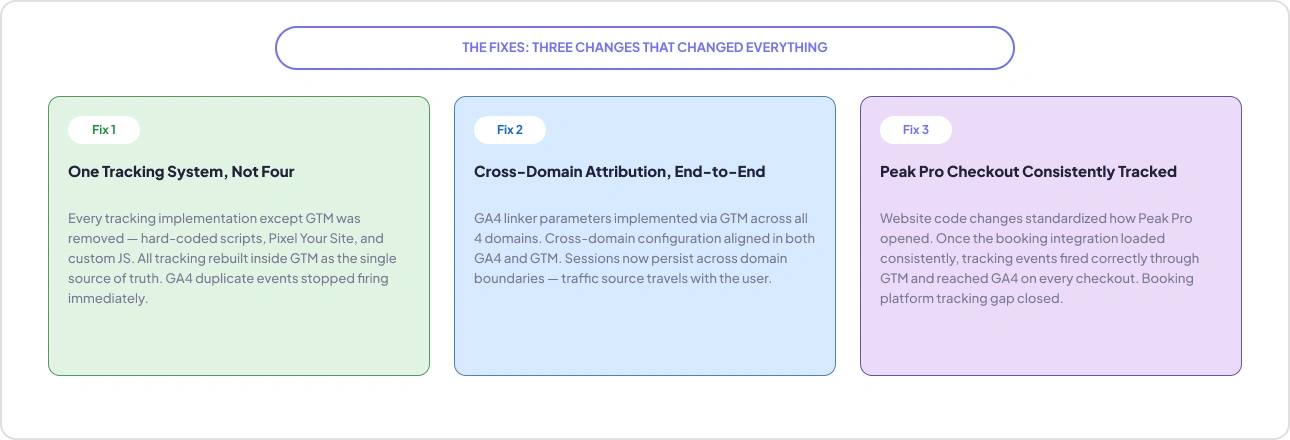
Fix 1: One Tracking System, Not Four
- Removed every implementation except GTM - hard-coded scripts pulled from the source, Pixel Your Site uninstalled, custom JavaScript deleted
- Rebuilt all tracking inside GTM as the single source of truth
- Outcome: the 4–5x duplicate firing stopped the moment only one system remained
Fix 2: Cross-Domain Attribution, Configured End-to-End
- Implemented GA4 linker parameters via GTM across all four domains (3 business sites + Peak Pro)
- Aligned cross-domain configuration in both GA4 and GTM, and verified linker parameters passed consistently across every URL transition
- Outcome: sessions now persist across domain boundaries - the traffic source travels with the user, so a Meta-Ad click that books through Peak Pro shows up as a Meta conversion
Fix 3: Peak Pro Checkout, One Flow, Consistently Tracked
- Peak Pro had been loading inconsistently - sometimes a new tab, sometimes the same tab, sometimes an embedded widget - so events couldn't fire reliably
- Standardized the integration through website code changes so the booking flow loaded the same way every time
- Outcome: purchase events from Peak Pro now fire correctly through GTM and reach GA4 on every checkout
The Results: Clean Data, Real ROAS, and Full-Funnel Visibility
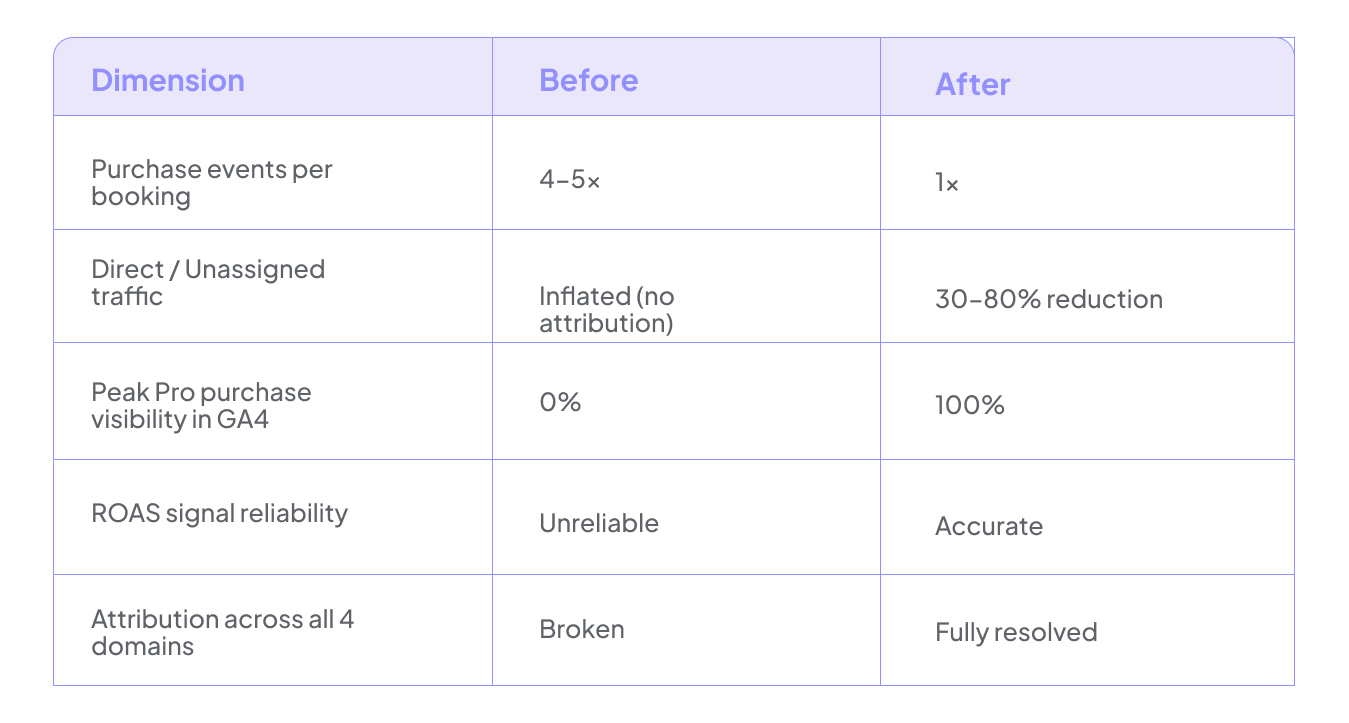
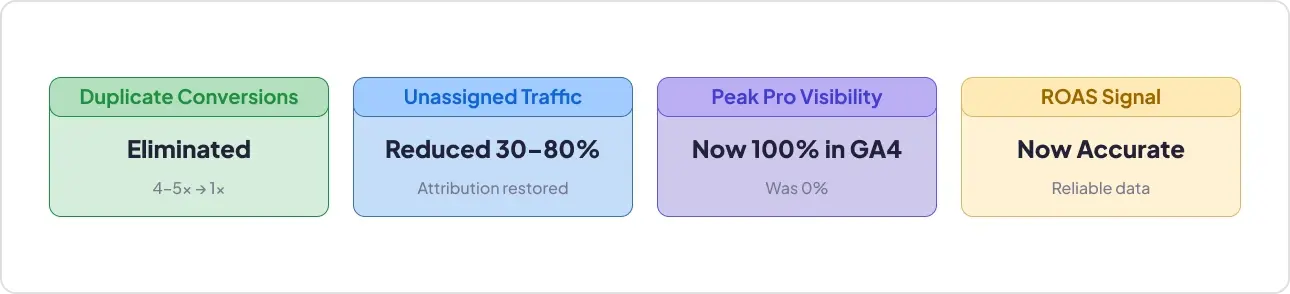
Duplicate Conversions Eliminated
The 4–5x inflation is gone. Google Ads and Meta Ads now receive accurate booking counts. Smart bidding algorithms are optimizing against real performance data instead of phantom conversions that made weak campaigns look profitable.
Direct/Unassigned Traffic Reduced by 30–80%
Traffic that was landing in direct/unassigned because of broken cross-domain attribution resolved back to its real sources. Channel performance comparisons are now reliable. The team can see which campaigns actually drive bookings and which don't.
Purchase Events from Peak Pro Now Visible in GA4
Full-funnel visibility is restored, including the portion of the journey that happens on the booking platform. Revenue that was previously invisible in GA4 is now attributed correctly.
Better ROAS, Reduced Wasted Spend
Campaigns are now evaluated against real booking counts. The inflated conversion signals that were driving Google Ads and Meta budgets toward phantom performance are gone. Budget allocation decisions have a solid, trustworthy foundation for the first time.
After the work was complete, the client sent a note that captured her reaction:
"I checked your work with AI, and it gave you an excellent rating for your expertise."
And on the value of having an expert in the loop alongside the tooling:
"I love AI, but smart humans still win."
She committed to keeping GAfix.ai as an ongoing part of her analytics toolkit, running it regularly for monitoring, not just as a one-time diagnostic.
Key Takeaways
1. Duplicate Tracking Is Invisible Until You Audit for It
Multiple implementations fire their own events independently with no errors thrown. GA4 records every signal it receives. The only visible symptom is a conversion count that seems high, which most businesses read as good news. It widens the gap between perceived and real ROAS over time.
2. Cross-Domain Tracking Doesn't Fail Loudly
It fails as direct traffic and unassigned traffic. Every domain boundary without a properly configured cross-domain linker is a silent attribution gap. GA4 doesn't flag it. It just drops the traffic source and starts a new session. For any business running multiple branded domains or routing users through a third-party booking platform, the GA4 unassigned traffic fix and the cross-domain tracking fix are not optional but prerequisites for reliable attributions.
3. Third-Party Booking Platforms Need Explicit Tracking Configuration
If checkout happens on a platform like Peak Pro, FareHarbor, Rezdy, or any other system on its own domain, GA4 cannot track it without cross-domain setup. The booking completes, revenue hits the bank, but the GA4 booking platform tracking sees none of it.
4. A 2-Minute Audit Can Find What Months of Manual Investigation Missed
Three to five agencies and freelancers worked on this setup over time. None of them surfaced all four issues clearly enough to fix them. GAfix.ai identified almost everything with severity levels and clear remediation guidance in minutes. The tool doesn't replace the expert doing the implementation. But it removes the investigation phase entirely.
Run Your GA4 + GTM Audit
If you're running paid media, operating across multiple domains, or relying on a third-party booking platform, there's a strong chance your conversion data is being inflated, misattributed, or missed entirely. A GAfix.ai audit finds those issues in under two minutes.
Frequently Asked Questions
What causes GA4 duplicate conversions on booking platforms?

Multiple tracking systems (GTM, hard-coded scripts, plugins, custom JS) firing the same purchase event independently could be a reason. One booking can log as 4–5 conversions in GA4.
How do you fix duplicate purchase events in GA4?
Consolidate all tracking into one system, usually GTM, and remove the rest. Once only one implementation fires the event, duplicates stop immediately.
Why does GA4 show unassigned traffic for cross-domain bookings?
Without GA4 linker parameters, each domain crossing resets the session and drops the traffic source. Configuring cross-domain tracking in GTM restores attribution — and reduces unassigned traffic.
Confident Decisions Start with Accurate Tracking
Ensure your GA4 and GTM are correctly configured, reliable, and ready for scale.
.webp)

Subscribe To Our Newsletter


