


.webp)



You see traffic coming from your successful campaigns, but you never see the lost conversions that have disappeared from your analytics.
It is not because your website broke; the fault lies with modern browsers that are quietly blocking your tracking.
This brings us closure to the digital measurement revolution, which restores lost conversions and regains revenue attribution.
With the official rollout of Google Tag Gateway for advertisers via Akamai and the beta launch of Google Tag Gateway via Google Cloud Platform, Google is attempting to move towards the first-party tracking shift.
Let’s see how you can prepare for this and how it can benefit you to regain the accuracy of digital measurement.
The Core Problem: Third-Party Tags vs. Modern Browsers
Traditionally, tracking was loading tags from external domains like googletagmanager.com. Modern browsers now treat these as third-party requests and often block or limit them by default.
When this happens:
- Conversions don’t get recorded
- User journeys break
- Attribution becomes unreliable
- ROAS looks lower than it really is
Even with a correct tag setup, data can be lost simply because the browser refuses to send it. The key shift is this: tracking challenges are no longer just about which tags you use, but about how data is delivered. That’s why first-party tracking models, such as Google Tag Gateway, are becoming essential in today’s privacy-first web.
What Is Google Tag Gateway?
Realizing the importance of using your own infrastructure, this Tag Gateway was launched as a redirection solution to deploy tags and Google Ads. This enables tracking data to reach at your domain first, instead of sending tracking data directly to Google domains.
So instead of:
browser → googletagmanager.com
You get:
browser → yoursite.com/metrics → Google
Because the request appears to originate from your own website, browsers treat it as first-party and allow it.
How Google Tag Gateway Works (Simple Technical Flow)
Earlier, there was no Gateway, and the process looked like:
- The user visits your website
- The browser tries to load Google scripts
- The browser blocks the request
- Data never reaches Google
With the integration of first party routing model, Google Tag Gateway, the tracking continues and gives accurate insights. The process is:
- The user visits your website
- The browser sends a request to your domain path
- CDN or load balancer forwards the request to Google
- Google receives data normally
Why Google Tag Gateway Matters in a Cookieless, Privacy-First Future
No doubt, Google Tag Gateway is a strategic shift towards a privacy-first future. Here are the benefits of this implementation:
1. Fewer Blocks from Browser Extensions
Since analytics requests are routed through your own domain instead of a Google-owned domain, most tracking blockers and privacy-focused browser extensions have a harder time recognizing and stopping them. This allows more hits, events, and conversions to reach your analytics tools, at least with how blocking technology works today.
2. First-Party Routing Improves Data Continuity
When tracking requests look like they’re coming directly from your own domain, they’re more likely to be accepted by browsers. In practice, this means fewer dropped hits, fewer broken sessions, and less stitching work later when you try to understand how users actually moved through your site.
3. Apple ITP Still Applies (With Important Nuances)
If the Gateway is only paired with client-side GTM and GA, Apple’s Intelligent Tracking Prevention still shortens cookie lifetimes. The difference shows up when Gateway is used alongside a server-side GTM container. In that setup, cookies issued from the server environment can persist longer, which improves user recognition and stabilizes attribution.
4. Not Always Necessary for Mature Server-Side Setups
In their server-side tagging stack, several teams already have first-party endpoints, proxying, and extended cookie lives operating consistently. This may not change significantly in certain circumstances. It can still simplify architecture, but the practical measurement gains are often modest.
5. Shifts Measurement Toward First-Party Data
At its core, Google Tag Gateway helps push more of your measurement into a first-party context, which is increasingly where sustainable analytics lives. Sustainable analytics depend more on first-party signals as third-party cookies vanish.
Deployment Paths: How Businesses Can Implement Gateway
Google Tag Gateway is designed to fit into different technical environments, which makes adoption easier for most organizations. Businesses can choose between two main deployment paths depending on what infrastructure they already use.
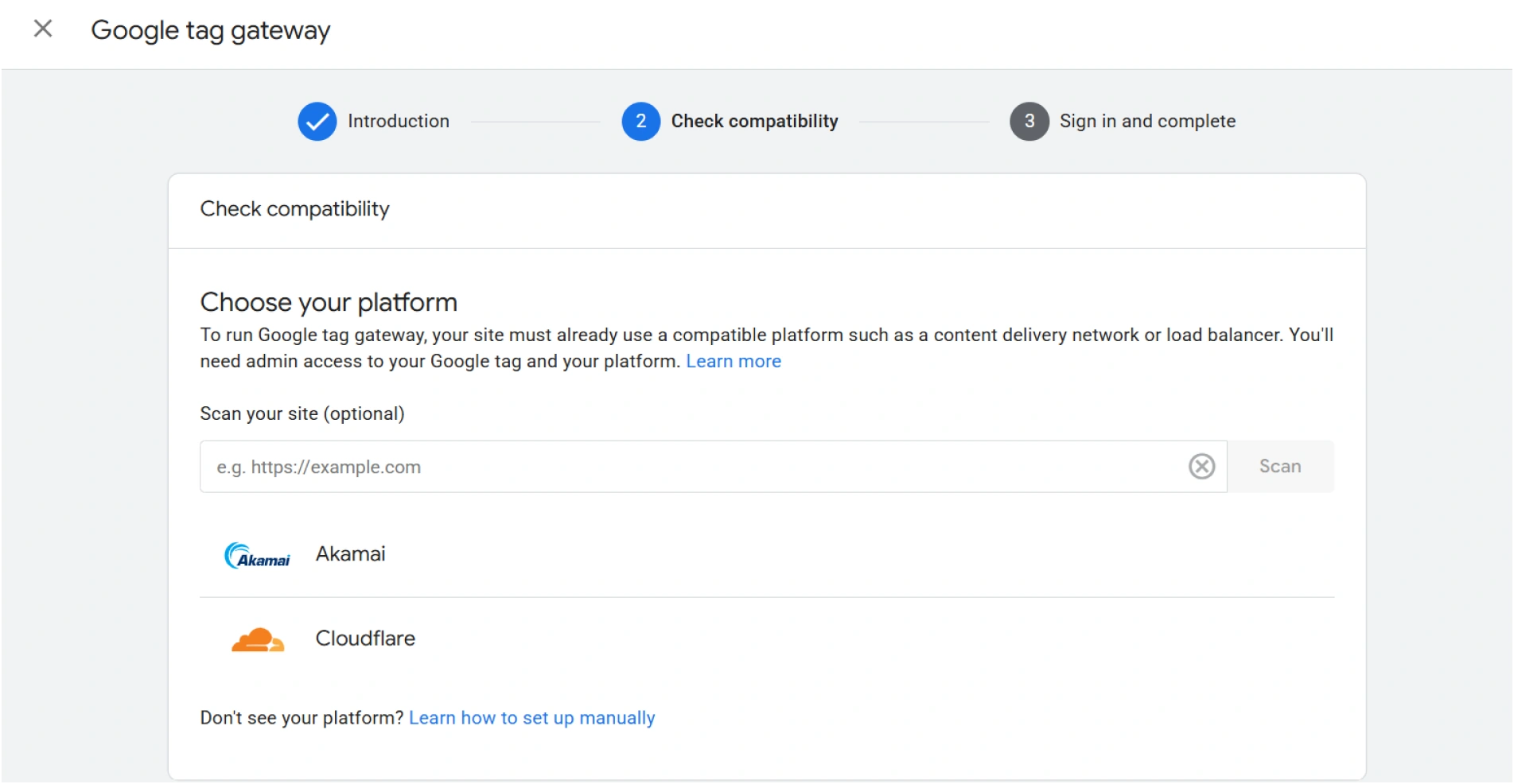
Option A: CDN-Based Routing (e.g., Akamai)
If your website already runs on a CDN, this is usually the simplest route. A small rule is added at the CDN level so tracking requests sent to a path like /metrics are forwarded to Google.
- Existing tags remain unchanged.
- Easy to put into practice
- No servers to oversee
This technique usually works well for companies that wish to switch to cookieless tracking without having to rethink their tagging architecture or commit a lot of engineering resources.
Option B: Load Balancer via Google Cloud Platform
Google also provides a Google-managed approach that uses a cloud load balancer. A guided, one-click flow inside Google Tag Manager or Google Tag Settings handles most of the routing behind the scenes.
- No CDN customization required
- Google-managed infrastructure
- Simple setup process
This option usually makes sense for teams that don’t control their CDN or don’t have the capacity to support custom routing work.
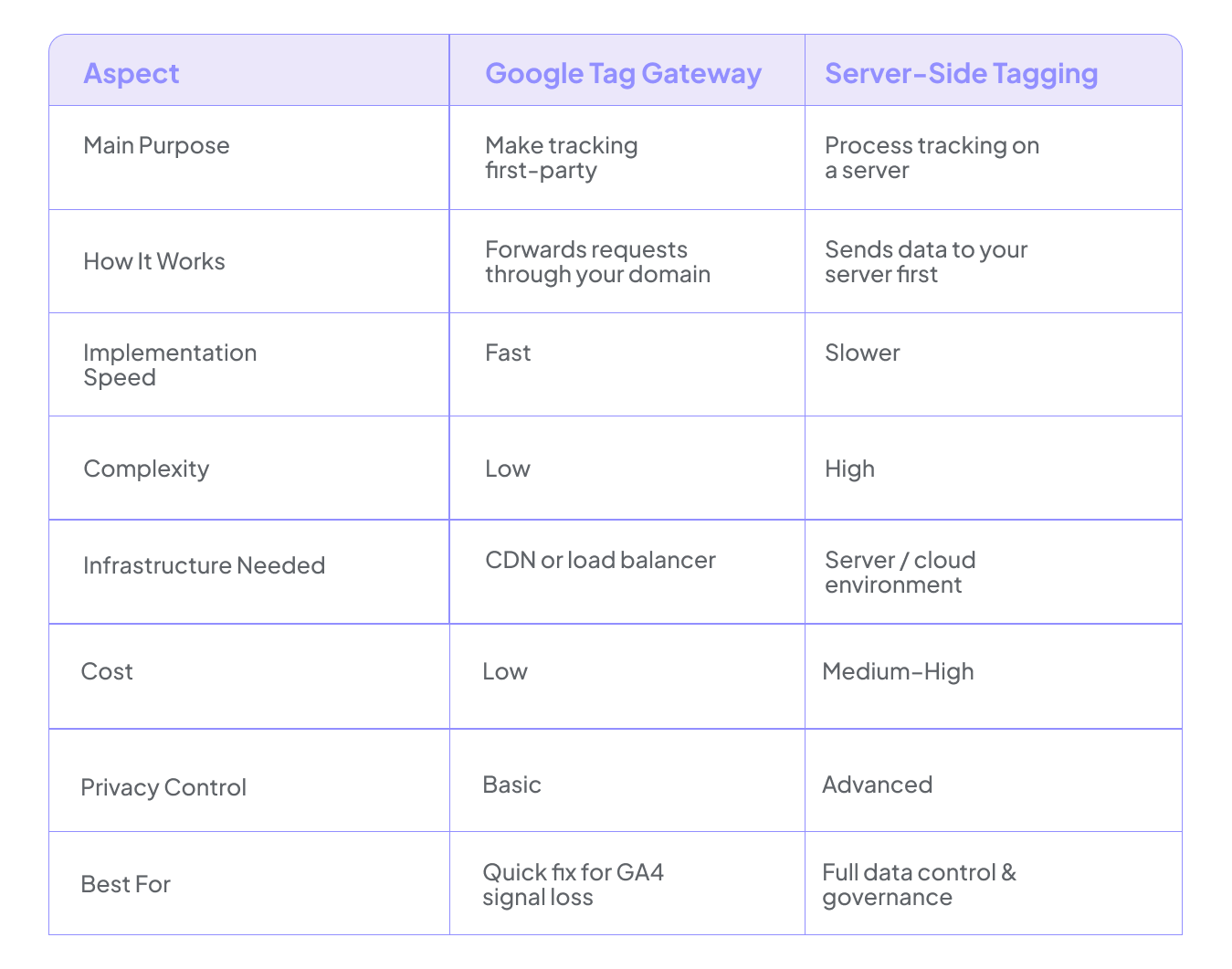
Google Tag Gateway vs Server-Side Tagging
On the surface, Tag Gateway and server-side tagging can feel interchangeable. They’re not. Understanding where each one fits helps avoid misalignment when the real goal is to fix GA4 signal loss rather than just change where tags run.
Getting the Most Out of Google Tag Gateway
This can make data delivery more dependable, but the outcome still depends on how it’s implemented and governed.
- Pair with enhanced conversions: Sharing consented, hashed identifiers like phone numbers or email addresses can help restore some lost conversions and stabilize attribution.
- Prioritize first-party data: Customer-provided information and logged-in user signals typically outlast third-party identifiers in terms of durability.
- Monitor data quality: To ensure that silent breaks don't persist, keep an eye on event volumes, important metrics, and conversion trends.
- Stay privacy-first: Regional compliance and consent handling should not be overlooked since they influence what can be measured in a safe and legal manner
- Treat tracking as infrastructure: Just like any other fundamental system, review, test, and maintain your configuration.
Gateway can make delivery more resilient, but that doesn’t automatically make the data reliable. Ongoing validation and disciplined data practices are what keep reporting grounded in reality rather than assumptions.

Final Thoughts!
As privacy enforcement tightens and browsers restrict tracking, older client-side methods no longer tell the full story. First-party routing is becoming the baseline, and Google Tag Gateway is a practical way to improve delivery without rebuilding your entire setup. Routing through your own domain can help recover some lost signals in a more cookieless environment.
Stronger routing still needs a structured GA4 audit checklist behind it. A regular Google Analytics audit or Google Analytics 4 audit is what confirms events, conversions, and attribution are behaving as expected. By identifying errors and inconsistencies before they skew reporting, GAfix helps with that validation. Disciplined auditing, not only improved pipes, is the source of reliable measurement.
Frequently Asked Questions
Why are businesses losing tracking data today?

Mainly because browsers and privacy tools block third-party cookies and external tracking scripts. When those scripts are blocked, events never reach analytics platforms, which creates gaps in reporting.
How does Google Tag Gateway fix GA4 signal loss?
It changes the route your data takes. Instead of going straight from the browser to Google, data goes from the browser to your domain and then to Google. This first-party path avoids many browser restrictions and keeps tracking active.
Is Google Tag Gateway a cookieless tracking solution?
Not exactly. It doesn’t remove cookies, but it supports a cookieless future by strengthening first-party data and improving modeling. It works alongside consent mode and privacy-focused measurement approaches.
Confident Decisions Start with Accurate Tracking
Ensure your GA4 and GTM are correctly configured, reliable, and ready for scale.



Subscribe To Our Newsletter


