



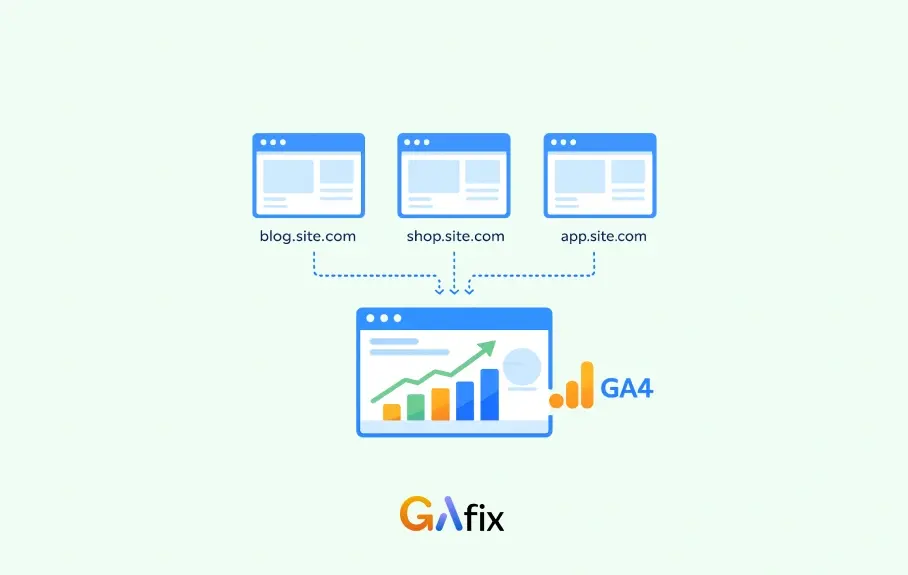



This question shows up constantly in the Google Analytics Help Community: a landing page on the main domain, the signup flow on a subdomain, and people wondering if they need separate setups to track it properly.
In most cases, the problems start when teams over-engineer it (i.e. multiple properties, custom workarounds, or trying to force attribution fixes after the fact. In Google Analytics 4 the setup is usually straightforward: the same property and measurement ID across the domain and its subdomains.
When that’s consistent, the session and attribution generally hold together. When it isn’t, you start seeing the familiar symptoms: referrals from your own domain, conversions that look “direct,” and user paths that break halfway through the funnel.
Overview: Google Analytics Subdomain Tracking
In most Google Analytics 4 audits we run at GAfix, subdomain tracking itself usually isn’t the hard part, the issues tend to come from inconsistent tagging.
When the main site and its subdomains all use the same GA4 property and measurement ID, GA4 typically keeps users in the same session as they move between them. That works because GA4 relies on first-party cookies tied to the root domain, so the visitor is recognized across places like blog, app, or support without extra configuration.
Where teams get into trouble is when subdomains end up using different properties or streams.
Once that happens, the user journey breaks apart and reports start showing self-referrals or fragmented sessions. Keeping everything under a single GA4 property and the same web data stream is what preserves session continuity and gives you a realistic view of how users move across the site.
So the real goal isn’t “setting up subdomain tracking”, it’s making sure your domains and subdomains are configured consistently inside GA4 so traffic flows into the same reporting layer. When that’s done correctly, GA4 handles most of the tracking automatically, and you don’t need cross-domain configuration.
Now that the basics are clear, it helps to understand where people often confuse subdomain tracking with cross-domain tracking, and when the latter actually becomes necessary.
Cross Domain vs. Subdomain Tracking Setup: When You Need It
- Cross-domain tracking is required when users move between different registered domains, not between subdomains of the same root domain.
- Subdomain scenarios (e.g., blog.example.com → shop.example.com) typically do not need cross-domain configuration as long as the main domain is shared.
- Cross-domain tracking setup becomes necessary when linking unrelated domains or third-party payment flows, or when tracking across a different domain.
- When configuring cross-domain tracking, you must specify the main domain and any different domains involved.
Implementation: GA4 Tracking Essentials
1. Install GA4 Tracking Code
- Install the GA4 tracking code with the same Measurement ID on every subdomain you want tracked together.
- Proper tag settings are essential for unified session and user tracking across all subdomains.
- If cookies are not available for a particular subdomain, new GA cookies will be created, which can disrupt tracking and result in fragmented user journeys.
2. Configure Cookie Domain
- Rely on GA4’s default cookie_domain:auto to set cookies at the highest shared domain (e.g., .example.com).
- Ensure cookies are set at the root domain to maintain user and session continuity across subdomains.
3. Prevent Self-Referrals
- Configure tag settings in GA4 to add your main domain to the list of unwanted referrals.
- This prevents self-referrals and ensures accurate traffic source attribution.
4. Tag Manager Best Practices
Using a tag manager, such as Google Tag Manager (GTM), can help ensure consistent deployment of the tracking code and tag settings across all subdomains and the main site.
Using a single GTM container across subdomains and the main site is optional; the essential requirement is that all tags, regardless of whether you use one or multiple containers, send data to the same GA property and measurement ID for accurate cross-subdomain tracking and consistent data flow between the main site and subdomains.
Cookie configuration in tag managers should preserve cookie_domain as auto or be explicitly set to the root domain.
Version control and environment names in GTM help prevent accidental measurement ID changes across deployment environments.
5. Client ID and Cookies
- GA4 stores a persistent _ga cookie containing the client id that identifies returning users across subdomains.
- The _ga<measurement_id> cookie contains the session id, which helps maintain the same session across subdomains by storing session-specific data.
- If cookies are scoped to a single subdomain, cross-subdomain client id and session id continuity is lost and sessions will be split.
Testing and Validation Using Developer Tools
Step-by-Step Validation Guide
Follow these steps to ensure your GA4 setup correctly attributes events from different subdomains to one user:
- Inspect Cookies
- Use Chrome Developer Tools → Application → Cookies to confirm _ga and _ga<measurement_id> exist and their domain starts with a dot (e.g., .example.com).
- Compare Cookie Values
- Visit multiple subdomains and compare the _ga client id across hosts to ensure they are identical.
- Check DebugView and Tag Assistant
- Confirm in GA4 DebugView and Tag Assistant that events from different subdomains are attributed to one user. This ensures that subdomain transitions do not create new user events.
Verify Google Ads Attribution Across Subdomains
- Ensure Google Ads auto-tagging (gclid) is retained across subdomains so clicks preserve source/medium attribution.
- If self-referrals appear after ad clicks, add your root domain to GA4’s unwanted referrals list to preserve original Google Ads attribution.
- Test Google Ads conversions end-to-end across subdomains to confirm revenue and conversion metrics are attributed correctly.
Viewing Subdomain Data in GA4
Using Dimensions for Subdomain Analysis
- By default, GA4 reports show the request URI, which only includes the path after the domain name—making it challenging to distinguish between different subdomains if they share similar page structures.
- To gain a complete view of user interactions across multiple subdomains, leverage the ‘Page Location’ dimension in GA4’s Exploration reports. This dimension displays the full URL, including the subdomain.
- For more granular analysis, add the hostname as a secondary dimension in your standard or custom reports.
- This approach is particularly useful when you have identical page paths on different subdomains, such as /landing-page on both blog.example.com and shop.example.com.
- By combining these dimensions, you can easily segment and compare user behavior across different subdomains, identify high-performing areas, and uncover opportunities for optimization.
Using Google Analytics for Subdomain Insights
Google Analytics 4 empowers organizations to gain deep insights into user activity across multiple subdomains by leveraging unified subdomain tracking. When you configure all your subdomains to use the same GA4 property and measurement ID, Google Analytics seamlessly tracks users as they navigate between different subdomains within a single session. This approach ensures that subdomain data is consolidated, allowing you to analyze the complete user journey across your digital ecosystem.
The key to effective subdomain tracking lies in the ``` cookie_domain parameter, which is set to ‘auto’ by default in GA4. This setting enables cookies to be shared across all subdomains under the same root domain, ensuring consistent visitor recognition and accurate session stitching. As a result, you can monitor user behavior, identify engagement patterns, and uncover opportunities for optimization across your entire web presence.
By analyzing subdomain data within your GA4 property, you can pinpoint which subdomains drive the most valuable user interactions, track conversion paths, and make informed decisions to enhance your website’s performance. Whether you manage a blog, shop, or support portal under different subdomains, unified subdomain tracking in Google Analytics 4 provides the actionable insights needed to optimize your online strategy and deliver a seamless user experience.
Troubleshooting Common Issues and Preventing Data Loss
Common Issues
- Self-referrals often indicate cookie or measurement ID inconsistencies; check tags and cookie_domain settings first.
- Multiple data streams or mismatched measurement IDs can cause session splits and apparent traffic inflation.
- Data loss can occur from blocked cookies or cross-origin resource restrictions.
Prevention and Monitoring
- Add your main domain to the list of unwanted referrals in Google Analytics to prevent self-referrals.
- Monitor real-time and DebugView during deployments to catch misconfigurations before historical data loss accrues.
- Consider server-side tagging as a mitigation for blocked cookies or cross-origin issues.
- Implementing unified subdomain tracking is essential for maintaining accurate conversion attribution and understanding user behaviour across subdomains.
Enterprise Considerations and GAfix AI’s Best Practices
Governance and Auditing
- Maintain a tracking governance plan that documents measurement IDs, data streams, and staging/production environments.
- Use automated GA4 audits (for example, GAfix.ai) to detect inconsistent measurement IDs, missing cookies, or data loss risks.
Event Naming and Analytics Integration
- Centralize event naming conventions and schema to simplify downstream BI and analytics integration across subdomains.
- For organizations managing various subdomains, analyze subdomain traffic in GA4 using the 'Page Location' dimension in exploration reports to view and distinguish traffic from different subdomains.
Advanced Tagging and Modernization
- Consider server-side tagging and cloud modernization to improve data reliability and reduce client-side cookie dependency.
SEO Considerations for Subdomain Tracking
Unified Tracking and SEO Reporting
- Use the same web data stream and measurement ID across all subdomains for accurate tracking of user journeys.
- Consistent user recognition is crucial for understanding user behavior and optimizing your SEO strategies across the entire site ecosystem.
Referral Exclusion and Data Integrity
- Configure your referral exclusion list in GA4 by adding your root domain to prevent self-referrals.
- This step preserves the integrity of your traffic source data, ensuring that your SEO reports accurately reflect the true origin of your visitors.
- Properly configuring your domains and referral exclusions in your GA4 property supports precise subdomain tracking and safeguards the quality of your SEO analytics.
Quick Checklist: Cross Domain Tracking Setup & Subdomain Tests
- Confirm same GA4 measurement ID deployed on every tracked subdomain.
- Verify _ga cookie domain is the root domain (leading dot) using developer tools.
- Check GA4 DebugView shows a single client id across subdomains for the same user session.
- Add root domain to unwanted referrals if you observe internal self-referrals affecting attribution.
Appendix: Tools, References, and Developer Tools Tips
- Chrome DevTools Application panel for cookie inspection and Network panel for gtag.js/gtm requests.
- Google Tag Assistant and GA4 DebugView for real-time event and client id validation.
- Audit tools (GAfix.ai) can help scale governance, prevent data loss, and optimize cross-domain strategy.
Additional Resources for Subdomain Tracking
To further enhance your understanding and implementation of subdomain tracking, take advantage of the wealth of resources available from Google Analytics and Google Tag Manager. The official Google Analytics documentation offers step-by-step guides on configuring your web data stream, deploying the correct tracking code, and ensuring the same measurement is used across all relevant subdomains. For those new to GA4 or looking to deepen their expertise, the Google Analytics Academy provides comprehensive courses covering subdomain tracking, cross domain tracking setup, and best practices for managing multiple data streams.
Google Tag Manager (GTM) is another essential tool for streamlined subdomain tracking. The GTM documentation includes detailed information on setting up tags, triggers, and variables to ensure your tracking code is correctly implemented across all subdomains. When configuring your setup, pay close attention to the use of the same web data stream and measurement ID, as well as the referral exclusion list to prevent unwanted self-referrals.
By leveraging these resources and following best practices for subdomain tracking, you can ensure accurate data collection, gain detailed information on user behavior, and optimize your cross domain tracking strategy. Staying informed and utilizing the latest guidance from Google Analytics and Tag Manager will help you maintain a robust analytics foundation as your website and business evolve.
Conclusion and Next Steps
Setting up subdomain tracking in Google Analytics 4 is a critical step for organizations seeking a unified view of user activity across their digital properties. By deploying the same measurement ID on all relevant subdomains, ensuring your cookie domain is set correctly, and configuring unwanted referrals, you lay the foundation for accurate and comprehensive subdomain data collection. This approach enables you to track user journeys seamlessly, understand cross-subdomain behavior, and optimize your website’s performance.
To maximize the value of your subdomain tracking, thoroughly test your setup using GA4’s DebugView and browser developer tools. These tools help you verify that session data, user identification, and traffic source attribution are functioning as intended. Regularly review your subdomain data in Google Analytics 4 to identify trends, spot anomalies, and refine your tracking configuration as your website evolves. By staying proactive and attentive to your analytics setup, you can ensure data accuracy, support your SEO efforts, and drive continuous improvement in user experience and conversion rates.

Frequently Asked Questions
Do I need cross-domain tracking for subdomains in GA4?

In most cases, no. If your main site and subdomains share the same root domain (for example www.example.com and app.example.com) and use the same GA4 property and measurement ID, GA4 will usually track users across them in the same session automatically. Problems typically appear only when different properties or measurement IDs are used across subdomains, which breaks session continuity and creates self-referrals.
Why am I seeing self-referrals from my own domain in GA4?
Self-referrals usually point to a tagging inconsistency. The most common causes are different measurement IDs on subdomains, cookies scoped to a single subdomain instead of the root domain, or missing referral exclusions. In practice, the first thing I check during a GA4 audit is whether every subdomain is sending data to the same property and web data stream and whether the cookie domain is set correctly.
How can I verify that GA4 is tracking users across subdomains correctly?
The easiest way is to check the _ga cookie and DebugView. In your browser’s developer tools, confirm that the _ga cookie is set on the root domain (for example .example.com). Then move between subdomains and check that the client ID stays the same. If the ID changes when switching subdomains, GA4 is treating those visits as separate users or sessions, which means the tracking setup needs fixing.
Confident Decisions Start with Accurate Tracking
Ensure your GA4 and GTM are correctly configured, reliable, and ready for scale.
%20.webp)




Subscribe To Our Newsletter


