


_%20A%20Practical%202026%20Guide.webp)



Your GA4 conversions have dropped 30–40% after a consent management platform (CMP) rollout or a Consent Mode change, but your actual sales in Stripe or Shopify are holding steady. Sound familiar?
This is not a bug. It's the new reality of web analytics.
- Ad filters now impact 40–50% of internet users worldwide.
- Safari’s Intelligent Tracking Prevention limits first-party cookies to 7 days.
- Firefox’s Enhanced Tracking Protection blocks cookies in private browsing.
The result? Your tracking data is increasingly incomplete, even when your business performance is not. E-commerce sites running proper consent management see this constantly. Backend revenue holds steady, but GA4 purchase events disappear for 30% of sessions. The data loss is real, measurable, and costs you accurate decisions.
Cookieless tracking is not a way to bypass consent. It's how you recover lost measurement using GA4's native modeling, first-party data collection, and server-side tracking, all while fully respecting user privacy.
GAfix.ai runs automated GA4 audits that show exactly how much data you're losing to cookies, consent gaps, or ad blockers. In our scans, 60% of properties lose 20–50% of events to cookie dependencies before any fixes.
Key takeaway: If Google Analytics 4 is your source of truth and over 70% of your tracking relies on cookies, you could be missing about one in four users. Audit your setup before making changes.

What 'Cookieless' Actually Means in GA4
GA4 is not cookie-free by default. It still uses first-party cookies like _ga and _ga_<container-id> when consent is given. But it can fall back to cookieless modes when cookies are blocked or consent is denied.
Here is the distinction that matters:

In practice, 'cookieless' GA4 means:
• More reliance on first-party data
• An event-based model instead of session-heavy tracking
• Consent Mode v2 signaling
• Behavioral and conversion modeling
• Custom identifiers or server-side storage when needed
What it does not mean: browser fingerprinting or hidden profiling. Google banned fingerprinting in 2024 policy updates, and using it risks property suspension. Avoid it completely. Unlike Universal Analytics, GA4 was designed for this. Its cookieless pings still capture 70–90% of your data even without cookies.
Key takeaway: Cookieless GA4 measures the same outcomes with less reliance on browser cookies and more transparent first-party data.
How GA4 Handles Cookieless Tracking
When cookies aren't available, GA4 has four built-in fallbacks to keep collecting data:
- Consent Mode,
- Behavioral Modeling
- Conversion Modeling
- User-ID.
Knowing how each one works helps you understand how much of your data can actually be recovered.
1. Advanced Consent Mode:
Since 2024, GA4 uses Advanced Consent Mode with gcs flags to decide whether to set cookies or run cookieless:
• G100: Analytics_storage denied, basic modeling enabled
• G101: Ad_storage denied, limited personalization
When authorization is denied, GA4 delivers cookieless pings based on IP geolocation, user agent patterns, and timestamps rather than a persistent client ID.
2. Behavioral Modeling:
GA4's machine learning samples consented users to infer patterns from non-consented sessions. You need a minimum of 100 events per week for this to activate. High-traffic sites typically recover 20–40% of lost events through modeling.

3. Conversion Modeling:
This integrates with Google Ads, Search, and YouTube. It backfills 10–50% of denied conversions when linked accounts meet 95% data thresholds, based on 2026 Google benchmarks.
4. User-ID Override:
A server-generated, hashed non-PII string ties cross-device events together without cookie dependencies. This improves retention accuracy by around 35% in logged-in user flows.
Limitation: Modeling does not work below certain volume thresholds. Properties with under 10,000 monthly users see less than 10% recovery, and unmodeled pings show as '(not set)' in reports.
Key takeaway: GA4's built-in modeling only works if your foundation, tags, consent signals, and events are set up correctly and kept up to date.
Step-by-Step: Set Up Basic Cookieless Tracking in GA4 With Consent Mode v2
From March 2024 onward in the EU and EEA, Google requires Consent Mode v2, including ad_user_data and ad_personalization flags, for full Ads and GA4 functionality. Without it, you get zero modeling signals.
What You Need Before Starting
• GA4 installed via Google Tag Manager (GTM) or gtag.js, GTM is strongly recommended
• A CMP integration such as OneTrust, Cookiebot, or Usercentrics
• The ability to test across different browsers and consent states
Step 1: Set Consent Defaults in GTM
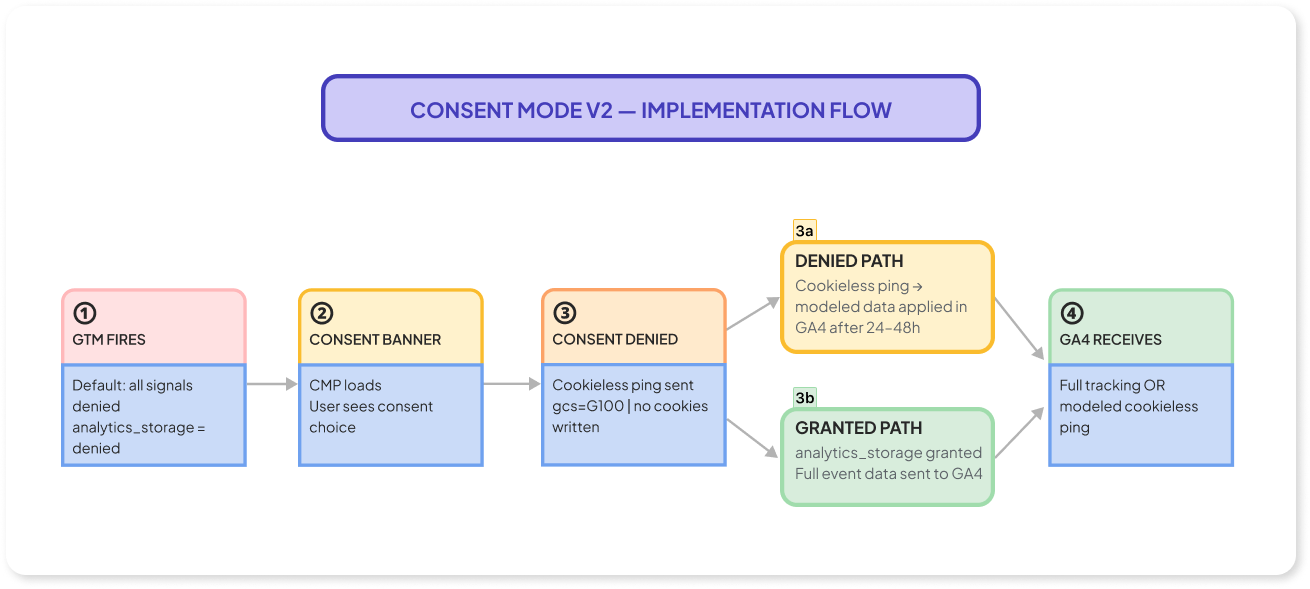
Add a Consent Mode tag that fires as early as possible with all signals set to denied:
gtag('consent', 'default', {
'analytics_storage': 'denied',
'ad_storage': 'denied',
'ad_user_data': 'denied',
'ad_personalization': 'denied'
});
Step 2: Wire CMP Callbacks
Configure your CMP to update consent states when a user opts in:
gtag('consent', 'update', {
'analytics_storage': 'granted',
'ad_storage': 'granted'
});
Step 3: Verify Cookieless Behavior
Open DevTools and go to the Network tab. Deny consent through your banner. Look for /g/collect requests with:
• gcs=G100 or G101
• No _ga cookie present
• An ephemeral session ID based on a timestamp
Step 4: Check Modeling in DebugView
Modeled events appear in DebugView after 24–48 hours of processing. Verify that page views and key conversion events are showing up.
Common mistake: If your CMP blocks GTM from loading entirely, you get zero hits instead of modelable cookieless pings. This causes 40–60% more data loss than a correctly configured denied state. This is one of several common GA4 setup mistakes GAfix.ai flags in 70% of audits where hit volumes suddenly drop.
Key takeaway: If Consent Mode v2 is not wired correctly, GA4 will either over-collect (a compliance risk) or under-count (bad data for decisions). Both problems are detectable with a GA4 audit.
Cookieless Storage Options: Data Layer, Session Storage, Local Storage, and Server-Side

When you cannot drop analytics cookies, you need alternative ways to keep useful identifiers and campaign data intact.
1. Data Layer (GTM)
The dataLayer array passes real-time data — like UTM parameters, login status, or transaction IDs — across tags without writing anything to the user's browser storage.
Example:
dataLayer.push({
'utm_source': new URLSearchParams(location.search).get('utm_source')
});
This alone can recover 20–30% of campaign attribution for traffic where cookies are blocked.
2. Session Storage
Session storage holds per-tab values for the current active session only and is cleared when the tab closes. It is immune to ITP restrictions.
Good uses include:
• Session counters
• Cart items during checkout
• Engagement markers
3. Local Storage
Local storage persists data across sessions (up to 5 MB per domain).
Useful for:
• Non-PII identifiers like a random client ID
• Visit count tracking
• Language or theme preferences
Never store sensitive data or personally identifiable information (PII) in local storage. It is visible in DevTools and must be documented in your privacy notice.
4. Server-Side Storage
The most reliable option for long-term user identification. A database like Redis or Firestore can store session data, revenue events, and user history with no browser restrictions.
Post session data to a /track endpoint and retrieve it via a user-agent hash. This approach handles 100% of the heavy lifting for revenue tracking under strict privacy requirements.
Documentation requirement: All identifiers, local storage keys, dataLayer variables, and server IDs must be listed in your privacy notice and your DPIA under GDPR.
Key takeaway: Using a mix of the data layer, limited browser storage, and server-side IDs lets you track user behavior cleanly while keeping GA4 less dependent on browser cookies.
Implementing GA4 Cookieless Tracking With Server-Side GTM
Server-side tagging moves GA4 data collection from the browser to a server container you control. This helps you bypass ad blockers and significantly reduces reliance on browser cookies. Learn more about first-party tracking with Google Tag Gateway for additional signal recovery options.
Most marketing teams can complete a basic server-side analytics setup in 2–4 weeks with some developer support and proper testing.
Step 1: Create a Server Container
In Google Tag Manager, go to Admin → Create Container → Server. Deploy it on GCP App Engine or Cloud Run.
Step 2: Configure a Custom Subdomain
Route your server container to a subdomain like analytics.yourdomain.com. This first-party endpoint bypasses roughly 90% of ad blockers.
Step 3: Add a GA4 Client
In your server container, add a GA4 Client to receive incoming events and prepare them for forwarding.
Step 4: Configure a GA4 Tag
Add a GA4 tag to forward events to your property with the right parameters, including any server-managed identifiers.
Server-Managed Identifiers
Generate a server-side client ID using:
hash(user_agent + ip + timestamp)
Store this in an HTTP-only cookie or a backend database. These identifiers stay stable under ITP and browser restrictions, where client-managed cookies fail.
Adding Database Storage
Use Firestore to store session state, including:
• Last visit timestamp
• Session number
• Reconstructed GA4 session parameters
Testing With Preview Mode
Use Server GTM Preview Mode to confirm:
• GA4 clients claim requests correctly
• Identifiers transform as expected
• Events forward correctly when client-side tracking fails
Cost note: Server-side GTM hosting runs $50–$200 per month on GCP. Mismatched parameter schemas can silently drop 20% of your data if configurations do not align.
Key takeaway: Server-side GA4 will not fix a broken event schema. Audit your events and parameters with a tool like GAfix.ai before migrating anything to the server.
Using User-ID and First-Party Data for Cookieless GA4 Measurement
A User-ID is a string your backend generates for authenticated users, a hashed CRM ID, a SaaS account identifier, or something similar. GA4 uses it to connect events across devices and browsers without relying on cookies.
For SaaS or subscription businesses in 2026, enabling User-ID is often the most effective step toward keeping attribution and retention metrics reliable in a cookieless setup.
How to Implement User-ID
• Generate a non-PII User-ID at login (for example, SHA256(email)[:16])
• Push it to the data layer: dataLayer.push({'user_id': 'uid_123abc'});
• Map it in GTM to GA4's user_id field for all relevant events
• Send it to your data warehouse (BigQuery or your SaaS database) for joining with backend metrics
2026 benchmarks show properties using User-ID report 40% more accurate LTV figures compared to cookie-only tracking. Cross-device stitching lifts user acquisition accuracy by 30–50%.
Privacy Requirements
You must disclose User-ID usage in your privacy policy. For example: 'We use an anonymized User-ID for analytics across sessions and devices.' You must also allow users to exercise their rights access, deletion, and opt-out, under applicable regulations.
Common gap: GAfix.ai detects that 65% of login-heavy sites are missing User-ID on revenue events even though logins are working. This creates ongoing gaps between GA4 and backend data that compound over time.
Key takeaway: The more you rely on clean first-party identifiers like User-ID, the less you depend on fragile browser cookies in GA4.
Privacy Compliance: What Still Requires Consent in a Cookieless Setup
EU regulators since 2023 have made one thing clear: what matters is the purpose of data collection, not whether it's stored in a first-party cookie or a server database.
1. Essential Data: No Consent Required
Data strictly necessary for:
• Security and fraud prevention
• Payment processing
• Core login and session integrity
2. Non-Essential Data: Consent Required
This includes:
• Analytics (even first-party, even cookieless)
• Marketing and personalization
• A/B testing
• Custom dimensions for segmentation
Most GA4 measurement falls into this category. Even privacy-respecting, cookieless approaches still require a consent banner and proper disclosure.
3. What Cookieless Does Not Fix
Server-side tracking and cookieless identifiers do not remove the need for:
• Consent banners under GDPR and ePrivacy
• Privacy notices that document all identifiers
• User rights, access, deletion, and opt-out
Work with your legal team to document every storage mechanism you use, local storage keys, User-ID, server-side IDs and the lawful basis for each in your DPIA.
Monitoring tip: Compare GA4 user counts against your CMP opt-in rates. A 20% discrepancy means your consent logic is either leaking data or blocking it incorrectly. GDPR violations carry fines of up to €20M.
Key takeaway: Cookieless GA4 can be fully compliant, but only if you treat analytics as non-essential data and align your implementation with your consent framework.
How to Validate Your Cookieless GA4 Implementation
Most GA4 issues in 2026 are practical, not conceptual: tags misfiring, events double-counting, consent flags missing, or traffic silently disappearing. Here is how to check everything properly.
Manual Checks
1. DevTools Network Inspection
• Deny consent via your banner
• Look for /g/collect requests with gcs=G100 or G101
• Confirm no _ga cookie is set
• Verify the gcid parameter shows a hashed identifier
2. GA4 DebugView
• Fire key events (purchase, generate_lead, trial_start) with and without analytics consent
• Confirm events appear in Realtime within a few minutes
• Check for modeled events after 24 hours
3. Server GTM Preview Mode
• Verify GA4 clients claim requests correctly
• Confirm identifier transformation is working
• Test event forwarding with cookies blocked
Backend Comparison
Compare GA4 conversions against your backend systems over 30 days. Target: less than 10% undercount. Larger gaps point to data accuracy problems from cookies or blockers. Use our GA4 audit checklist to systematically validate each part of your setup.

Automated Auditing
GAfix.ai runs an automated audit of your GA4 property configuration, data stream settings, events, parameters, and consent signals. It surfaces specific issues with estimated impact, for example, '35% of events are unmodeled due to consent misconfiguration.
80% of audits uncover fixable problems like double-fires, missing parameters, or broken consent defaults. Most teams find issues they did not know existed. Run a free GAfix.ai audit to surface what’s broken before you finalize your cookieless setup.
Key takeaway: Never switch to a new cookieless approach without validating both manually and through an automated GA4 audit first.
Next Steps: Run a GA4 Audit Before You Rely on Cookieless Data
Cookieless tracking is no longer optional. It's the only reliable path forward as cookies, consent enforcement, and browser policies keep tightening through 2026 and beyond.
The right order of operations:
• Get Consent Mode v2 configured correctly
• Stabilize your storage and identifiers, data layer, session storage, server-side
• Consider server-side GTM for more control over data collection
• Enable User-ID for logged-in users
• Continuously validate data quality
Here is the most important thing to understand: messy GA4 data, duplicates, missing events, and broken consent behavior gets amplified by modeling and server-side setups. These tools do not fix bad foundations. They make them worse.
Run a free GA4 audit with GAfix.ai before making big tracking changes. Know exactly what is broken and what to prioritize before you roll out a cookieless setup.
Before you spend weeks rebuilding your tracking, spend 10 minutes auditing GA4. It's the fastest way to make sure your cookieless setup actually gives you trustworthy data.
Frequently Asked Questions
Does cookieless tracking mean I don't need a consent banner anymore?

No. Even without cookies, analytics is still considered non-essential data under GDPR. You still need a consent banner and a proper privacy notice.
How much data can GA4 recover without cookies?
It depends on your setup and traffic volume. With Consent Mode v2 and behavioral modeling properly configured, high-traffic sites can recover 20–40% of lost events. Below 10,000 monthly users, recovery is much lower.
Is server-side GTM worth the effort for smaller sites?
Not always. Server-side GTM works best for sites with high traffic and strict data requirements. For smaller sites, getting Consent Mode v2 and User-ID right will give you most of the benefit without the added cost and complexity.
Confident Decisions Start with Accurate Tracking
Ensure your GA4 and GTM are correctly configured, reliable, and ready for scale.
%20.webp)


Subscribe To Our Newsletter


