

How Controlla Voice Found Half Its Revenue Missing From GA4
 Ayushi Saini
Overview
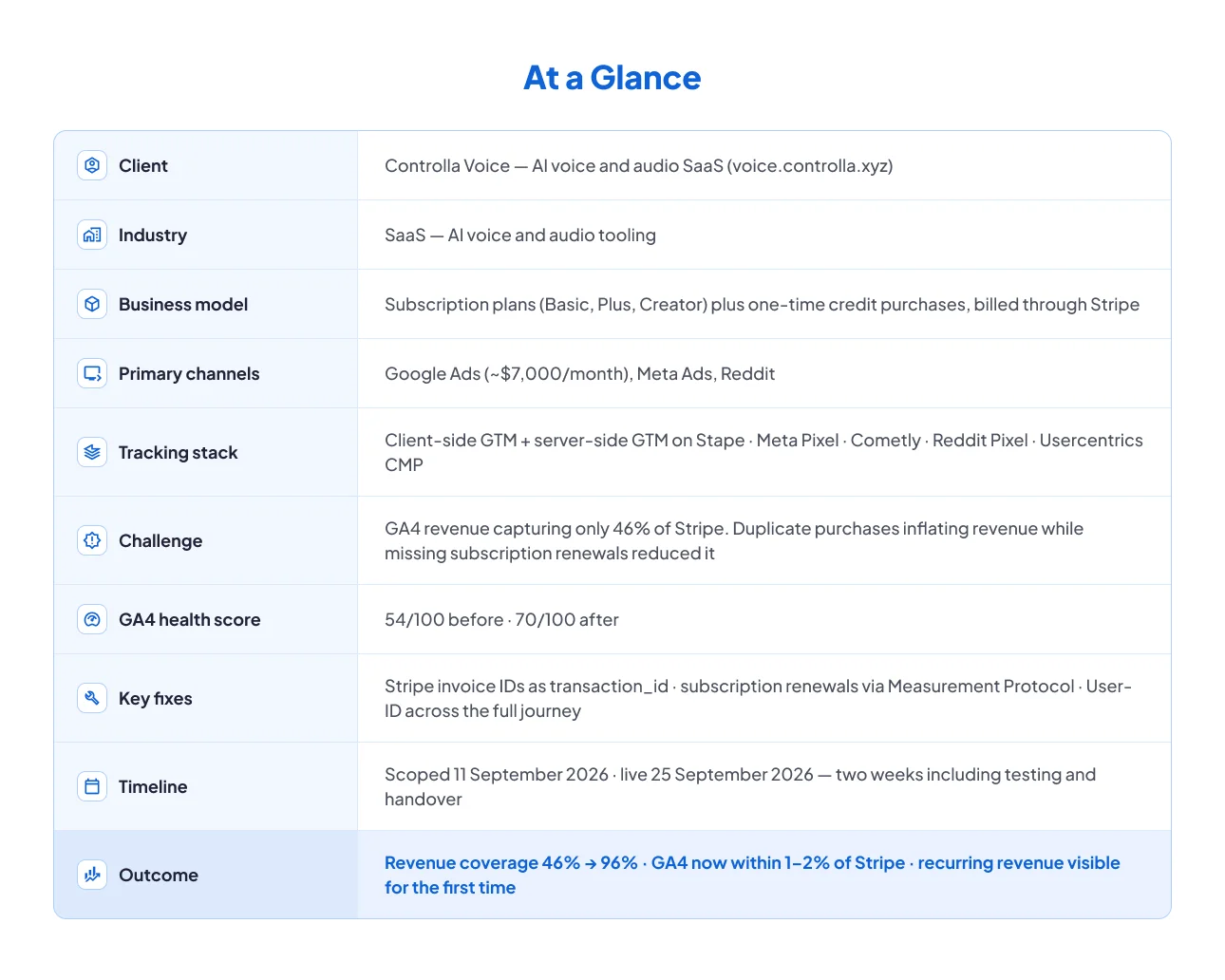
Controlla Voice is an AI-powered voice and audio SaaS platform selling subscription plans and one-time credit packs. Customers pick Basic, Plus or Creator, billed monthly or annually, with every payment processed through Stripe.
Founder Frederik Bonneau ran marketing and analytics in-house, bringing in freelancers as needed. GA4 had been implemented internally using client-side Google Tag Manager alongside a server-side container hosted on Stape, with Meta Pixel, Cometly, Reddit Pixel and Usercentrics all in the mix.
The team knew GA4 revenue did not match Stripe. Several freelancers had tried to fix it. None of them found the cause, because the setup contained two separate errors that were quietly cancelling each other out.
At a Glance
The Challenge: Two Errors That Were Hiding Each Other
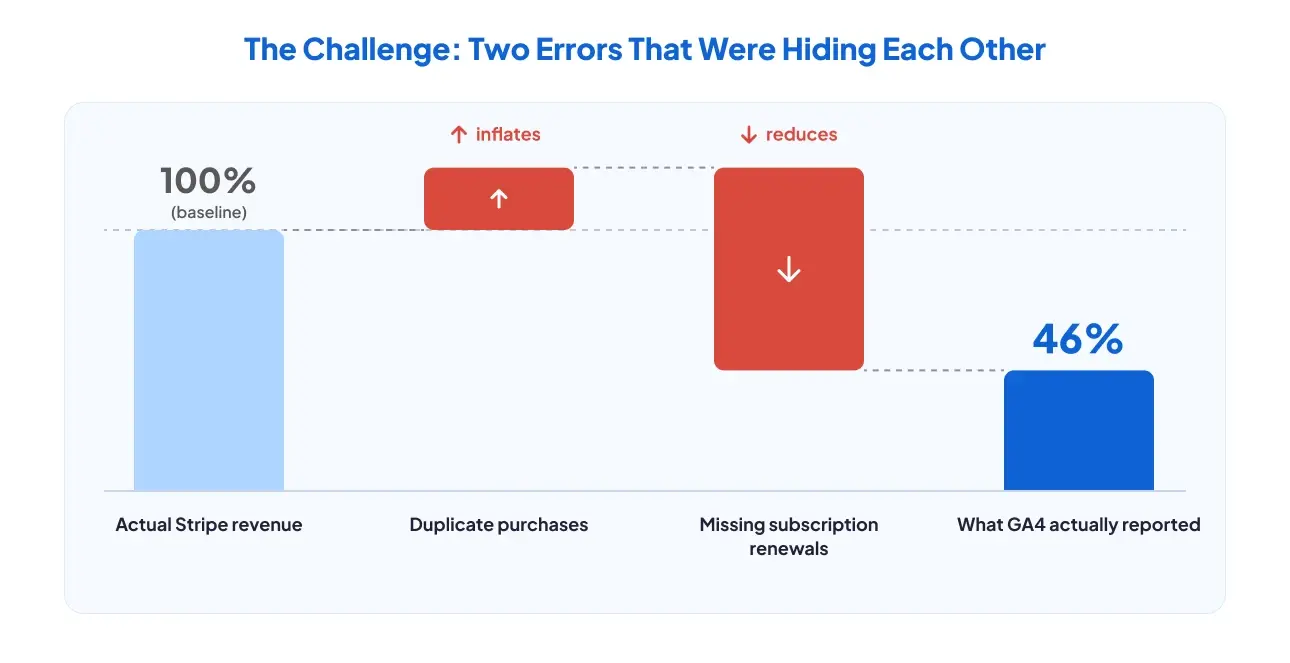
The client's confidence in GA4 was low and they knew why in broad terms — the revenue number was wrong. What nobody could work out was the cause, and the reason it had survived several attempts is the most instructive part of this story.
GA4 was over-reporting revenue through duplicate purchases. It was simultaneously under-reporting revenue by missing every subscription renewal. The two errors partly offset each other, so the headline mismatch looked like a single moderate discrepancy rather than two large opposing ones. Every previous investigation chased one number and found it roughly plausible.
The GAfix audit surfaced nine issues. These were the four that mattered most.
PROBLEM 1: Every purchase was counted roughly twice
The transaction ID was generated on the frontend, and it changed whenever the page re-rendered. GA4 saw each new ID as a new transaction, so a single payment could land as two. Google Ads conversions compounded it — they were being sent from both the client-side and the server-side container.
PROBLEM 2: Subscription renewals never reached GA4 at all
Stripe processes a subscription renewal without any browser interaction. No page loads, no tag fires, nothing reaches GA4. For a business whose model is recurring revenue, an entire revenue stream was invisible — and invisible in a way that no amount of checking the website could reveal.
PROBLEM 3: Two measurement IDs, and server-side only forwarded purchases
Tracking was split across two GA4 measurement IDs. The server-side container forwarded purchase events and dropped checkout and lead events entirely, which is why begin_checkout never appeared in GA4 despite being one of the three events the team relied on.
PROBLEM 4: sign_up fired on every page refresh
The sign_up event fired whenever anyone visited or refreshed /app/welcome, so registrations were inflated by repeat views. Logins were not tracked at all, and no User-ID was being set, which meant customers could not be connected across devices or matched to their Stripe payment records.
Four more issues sat underneath these: add_to_cart firing multiple times from three legacy triggers, Cometly tracking running on localhost, sandbox and admin pages, and server-side Meta events missing browser information and event source URL.
What the Bad Data Was Paying For
Google Ads was spending roughly $7,000 a month on Target ROAS and Maximize Conversion Value bidding. Both strategies optimise against the conversion value GA4 reports.
Duplicate purchases inflated that value. Missing renewals removed it. Smart Bidding was therefore allocating real budget against a number that was wrong in two directions at once — and channels that attracted long-term subscribers were systematically undervalued, because the renewal payments those customers went on to make were never measured.
The GAfix Audit: 2 Minutes to Find What Months of Freelancing Missed
The automated audit ran in about two minutes. Performing the same checks by hand was estimated at one to two days of analyst time.
It returned a GA4 health score of 54/100 — data collection was active, but revenue reporting could not be trusted. Because the fixes spanned website code, Stripe, the client-side container and the server-side container, the client chose a managed engagement rather than taking the findings away to implement alone. GAfix documented the required developer changes, implemented the GTM work, and ran end-to-end testing before handover.
The Fixes: Three Changes That Made the Numbers Match
Fix 1: Stripe invoice IDs became the transaction ID
The developer now passes the unique Stripe invoice ID into the purchase dataLayer, and GTM maps it to GA4's transaction_id and to Google Ads' orderId. Because the invoice ID is generated by Stripe rather than the browser, it does not change on re-render.
Google Ads conversion tracking was consolidated into the server-side container at the same time, so the same conversion can no longer be counted by both a browser tag and a server tag.
Result: Duplicate purchase reporting resolved, and Google Ads started receiving conversion values it could bid on.
Fix 2: Subscription renewals now flow into GA4 via webhook
A Stripe invoice.payment_succeeded webhook sends payment data to the server-side container, where a custom GAfix tag template forwards it to GA4 using the Measurement Protocol.
The implementation checks billing_reason = subscription_cycle to isolate genuine renewals, carries the Stripe invoice ID and the User-ID, reports in USD, and deliberately excludes the initial subscription payment because the website already tracks it.
Result: Recurring revenue became visible in GA4 for the first time, without double-counting the first payment.
Fix 3: User-ID now follows the customer across the journey
Signup and login dataLayer events were added with the internal user ID, covering email, Google and Apple sign-in. GTM carries that ID across client-side and server-side events and clears it on logout. The same identifier is written into Stripe metadata as controlla_user_id.
Result: Customer activity can now be connected across devices, sessions and Stripe payments, including renewals.
Alongside those three
- Tracking consolidated into a single GA4 property
- UTM and click-ID persistence improved
- Cometly blocked on internal and test environments
- User-agent and event source URL added to Meta events
- customer_type specification defined for new versus returning customers in Google Ads
- Stape features enabled: Custom Loader, Cookie Keeper, Preview Header, GEO Headers, Bot Detection, Ad Blocker Info
The Results: GA4 Within 1–2% of Stripe
Revenue coverage went from 46% to 96%
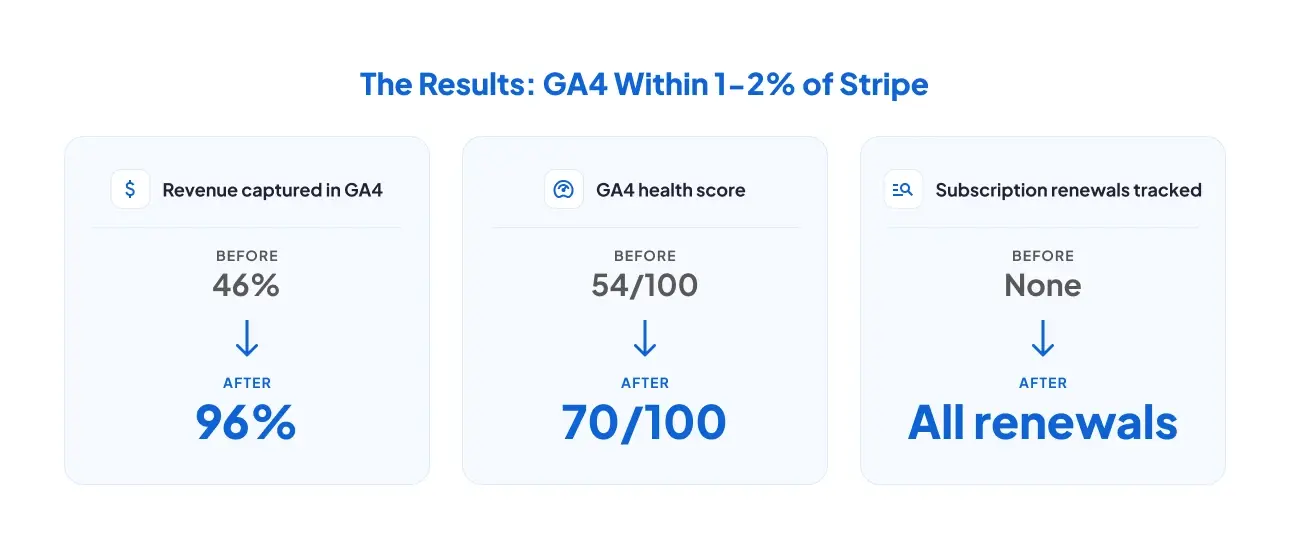
A single-day comparison shows the shift clearly.
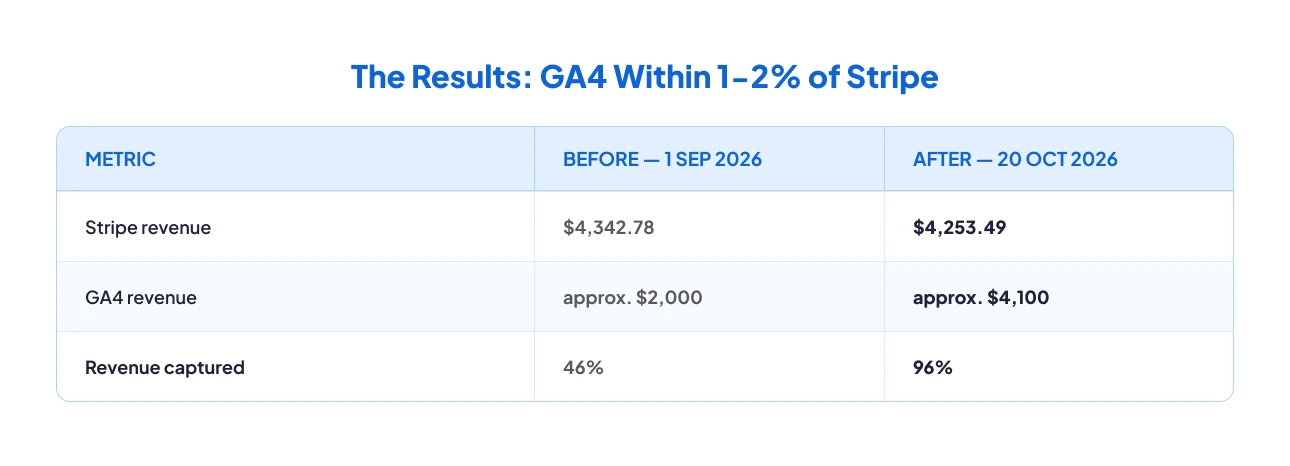
Across the full reporting period, GA4 now matches Stripe within roughly 1–2%, covering both website purchases and recurring payments.
Recurring revenue is measurable for the first time
Subscription renewals — previously absent from GA4 entirely — now appear against the customers who generated them. For a subscription business, this is the difference between measuring acquisition and measuring the business.
Health score improved from 54 to 70
Re-running the audit after implementation returned 70/100, a 16-point improvement.
What the Client Said
Key Takeaways
1. Two tracking errors can hide each other
Over-reporting and under-reporting in the same property produce a mismatch that looks moderate and single-cause. That is why this survived several freelancers: each one checked the total, found it roughly believable, and stopped.
2. Subscription renewals never touch a browser
Any revenue event that happens on your payment provider's servers rather than in a user's browser is invisible to client-side tracking by definition. For subscription businesses this is not an edge case, it is most of the revenue.
3. A transaction ID generated in the browser is not an ID
If it changes on re-render, it cannot deduplicate anything. The identifier has to come from the system that owns the transaction.
4. A falling ROAS can be the strongest evidence the fix landed
When reported performance drops after a tracking fix, check whether the previous number was real before treating it as a regression. In this case the 2.49x never existed.
Run Your GA4 and GTM Audit
The audit that found these nine issues takes about two minutes, runs read-only, and changes nothing in your property. If your revenue numbers do not match your payment processor, it will tell you where to look.
Frequently Asked Questions
The two most common causes work in opposite directions. Duplicate purchase events inflate GA4 revenue, usually because the transaction ID is unstable. Missing subscription renewals reduce it, because those payments happen on Stripe's servers with no browser involved. When both are present the mismatch looks smaller than either problem actually is.
A Stripe webhook sends invoice.payment_succeeded to a server-side GTM container, which forwards the event to GA4 using the Measurement Protocol. Filter on billing_reason = subscription_cycle so only genuine renewals are sent, and exclude the first payment if your website already tracks it.
Because the earlier figure included conversions that were counted more than once. Removing duplicates lowers reported conversion value, which lowers reported ROAS. The campaigns did not change; the measurement did. The new figure is the one your bidding should have been using all along.
Confident Decisions Start with Accurate Tracking
Ensure your GA4 and GTM are correctly configured, reliable, and ready for scale.
Related Posts
How Controlla Voice Found Half Its Revenue Missing From GA4
Controlla Voice's GA4 reported 46% of Stripe revenue. Duplicate purchases and missing renewals were hiding each other. GAfix found both in 2 minutes.
Ayushi Saini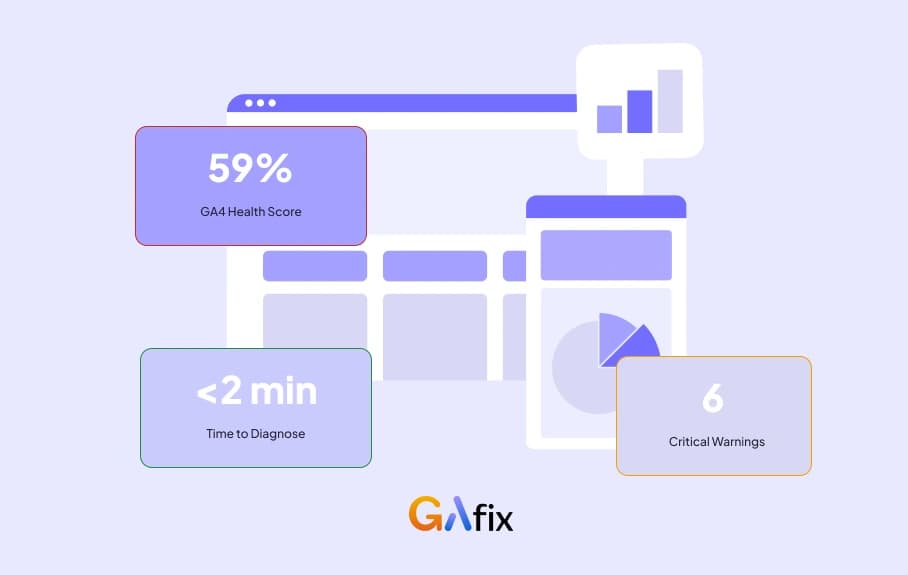
How a Florida Water Sports Company Stopped Paying for Phantom Bookings
Every booking counted 4-5 times, three domains with zero cross-domain tracking, and a booking platform invisible to GA4. Here's how one audit found it all in 2 minutes.
 Rakshita Jain5 Min
Fixing GA4 Subscription Tracking for a Wellness Brand
Learn how a growing wellness brand resolved GA4 subscription tracking issues, stabilized attribution, and restored trust in GA4 data within 30 days.
 Geetanjali Khatri4 Mins Read