





One misconfigured trigger in GA4 can silently skew every campaign report you run, and you'd never know just by looking at the dashboard. When I audited a SaaS company's GA4 setup recently, that's exactly what I found: attribution was broken, conversions were miscounted, and marketing decisions were being made off data that didn't reflect reality.
According to the Google Tag Manager Help Center, even small errors in trigger configuration or tag deployment can directly affect the accuracy of analytics and marketing measurement. For that reason, correct measurement can help solve the problem if campaign performance is a priority.
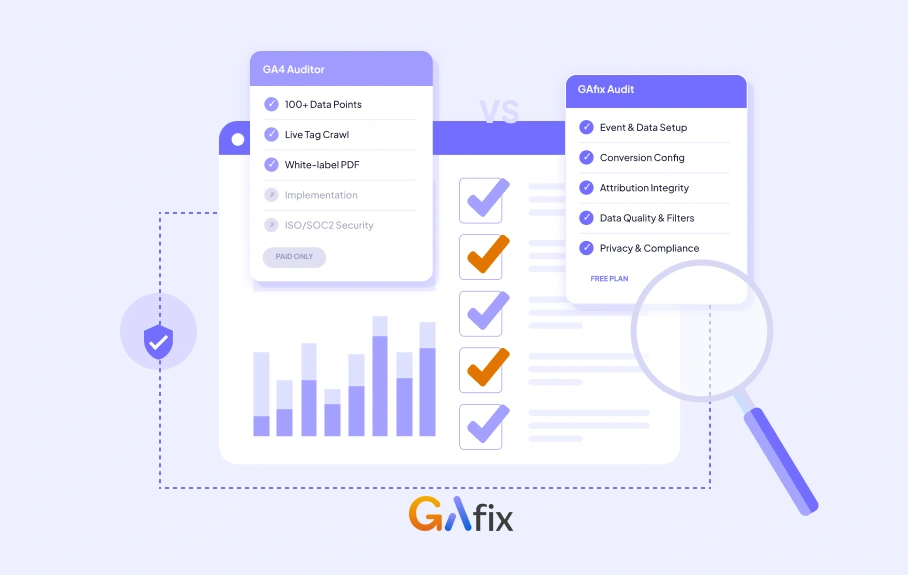
If you're here comparing GAfix vs GA4 Auditor, you're already ahead of the curve, and that is why you know you need a GA4 audit tool. The real question is which one will actually surface what's broken in your setup and whether it'll help you fix it.
GAfix is the better fit for teams that need a free starting point, enterprise-grade security certifications, and hands-on implementation support beyond the report. GA4 Auditor is the stronger pick for agencies that deliver white-labeled, multi-format reports directly to clients.
What Is GAfix?
GAfix is a conversion-focused GA4 audit tool built for teams that treat data accuracy as a prerequisite for marketing decisions. Indeed, this is not something to validate after reporting starts drifting. It runs an 18-checkpoint audit framework across a Google Analytics 4 property in under two minutes, reviewing areas that commonly break over time: event configuration or implementation, conversion mapping, attribution settings, and broader data quality issues that often pass basic QA unnoticed.
What makes GAfix genuinely different from a generic checklist tool is what sits behind the checkpoints: every audit criterion has been defined and validated by GA4 analytics practitioners, not generated by a rule engine. That expertise shapes what gets flagged, why it matters, and what you should do about it.
The Nine Core Audit Areas
GAfix organizes its audit into nine structured pillars, each covering specific checkpoints that analytics experts have identified as the most common sources of tracking failures.
- Foundation & Configuration. Everything in GA4 sits on configuration. If the foundation is flawed, every metric downstream becomes unreliable. This pillar validates your GA4 property structure, general settings, time zone and currency alignment, data stream setup, enhanced measurement configuration, custom dimensions and metrics, cross-domain tracking, referral exclusion logic, cross-platform tracking, and User-ID setup. It protects data integrity at the architectural level before anything else is measured.
- Event & E-commerce Tracking. GA4's event-based model means event accuracy determines everything. This pillar audits event naming conventions, parameter consistency, duplicate tracking risks, key event definitions, and enhanced e-commerce tracking, including the full sequence from view_item through purchase. For e-commerce businesses, this is mission-critical: a broken event setup doesn't fail loudly; it just shows you wrong numbers.
- Traffic & Campaign Tracking. Attribution errors almost always begin with traffic misclassification. This pillar reviews UTM governance, landing page consistency, default channel grouping alignment, Google Ads linking, and whether GA4 correctly classifies paid versus organic traffic. If you run paid campaigns, broken traffic classification is the most common reason performance reports and actual revenue data don't match.
- Attribution & Insights. Attribution settings directly control how conversion credit is assigned. This pillar audits attribution models and lookback windows, reporting identity configuration, Google Signals, cross-device stitching, and anomaly detection. It identifies abnormal behavior patterns: unexpected conversion spikes and inconsistent metric behavior that manual reviews routinely miss.
- Reporting & Data Governance. Data accuracy isn't just about collection, it's about governance. This pillar covers internal and developer traffic filters, Not Set and Unassigned anomalies, data retention configuration, Looker Studio and Google Sheets export integrity, and analytics documentation. A well-governed reporting layer ensures that clean GA4 data stays clean as your setup evolves.
- Privacy & Compliance. Privacy misconfiguration distorts reporting and creates regulatory risk. This pillar audits your consent setup, cookie mode configuration, regional compliance alignment, and whether GA4 uses Google Signals correctly under active consent frameworks. Your analytics configuration must balance marketing measurement with legal compliance — and most setups don't.
- Integrations & Data Flow. Modern analytics environments are interconnected. This pillar verifies Google Search Console linkage, Firebase integration, CRM, and third-party system alignment and whether GA4 data flows correctly into your broader marketing stack. Broken integrations create reporting blind spots that are invisible until you look for them.
- Audience & Segmentation. Audience configuration impacts remarketing, personalization, and reporting depth. This pillar audits audience definitions, inclusion and exclusion logic, membership duration, and alignment with Google Ads audience targeting. Poor audience setup limits optimization potential, and most teams don't discover the gaps until campaigns underperform.
- Performance & UX Optimization. GA4 is not just a measurement tool, it's an optimization asset. This pillar reviews landing page performance signals, page view integrity, funnel continuity, drop-off behavior, and engagement metric reliability. It translates your analytics data into concrete optimization opportunities, because an audit should help you improve not just diagnose.
The GA4 Health Score System
When GAfix completes an audit, it produces a GA4 Health Score, showing a 0 to 100 benchmark across your full property. But what makes this meaningful is the classification system underneath it. Each checkpoint receives one of five statuses, defined by analytics experts based on real-world impact on data quality:
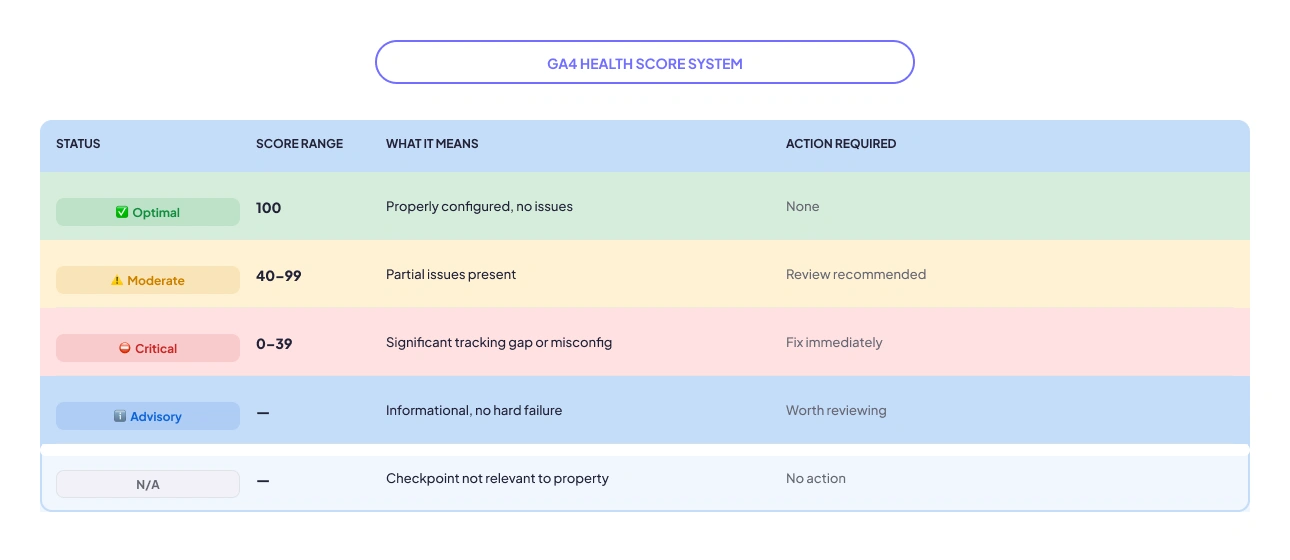
This structured scoring means you don’t just get a list of things to look at. You get a prioritized action plan. Critical issues rise to the top. Advisory items inform without cluttering. Your team can see at a glance whether your GA4 property is fundamentally healthy or structurally broken.
What Is GA4 Auditor?
GA4 Auditor is a report-generation powerhouse built with agencies in mind. It covers 100+ data points spread across 40+ pages and crawls your live website to verify that tags are actually firing, not just configured. That live tag health check is a genuinely useful differentiator for diagnosing real-world tracking gaps.
The tool supports full white-label branding, with export options including PDF, PowerPoint, and Google Slides. GA4 Auditor has gained adoption among larger agency networks like GroupM and Dentsu, which gives it some credibility in environments where multiple client properties need to be reviewed at scale. Its most commonly used pricing tier includes three audits for $99 and covers areas like GA4 configuration checks, GA4 data audits, GTM and BigQuery auditing, along with a web-based report and optional PowerPoint or Word exports.
GAfix vs GA4 Auditor: Feature-by-Feature
Here is a GA4 audit tool comparison for both tools, explaining the features and capabilities of each tool:
Audit Depth, Checkpoints, and Methodology
This is where the two tools are most meaningfully different, not just in the number of checkpoints, but in how those checkpoints are structured and what they’re actually checking.
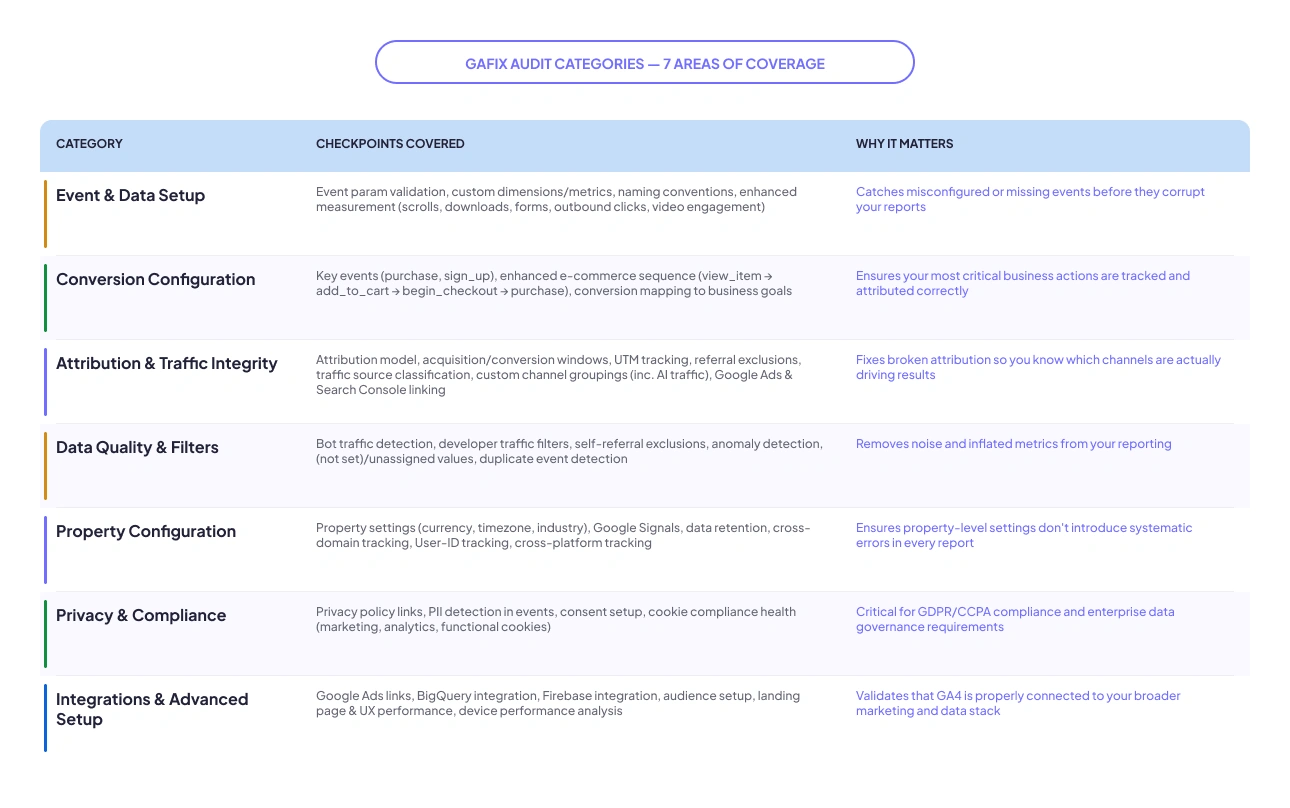
GAfix runs 18 Pro checkpoints organized across seven audit categories: Event & Data Setup, Conversion Configuration, Attribution & Traffic Integrity, Data Quality & Filters, Property Configuration, Privacy & Compliance, and Integrations & Advanced Setup. Each checkpoint was defined by GA4 analytics practitioners based on patterns they’ve seen break real-world setups, not derived from a generic checklist. Here’s what the full checkpoint coverage looks like:
.webp)
GA4 Auditor covers 100+ data points across 40+ report pages and adds a live website crawl to verify that tracking tags are actually firing in the browser. This follows a different methodology wherein it catches deployment-level issues rather than just configuration gaps.
The right choice depends on where your problem lives. If your GA4 is misconfigured with wrong event parameters, broken conversion logic, or misaligned attribution, then GAfix's 18-checkpoint audit is precise and actionable. If you suspect tags aren't firing correctly on specific pages, GA4 Auditor's live crawl adds a layer of verification that GAfix doesn't currently replicate.
Set up Speed & Ease of Use
Both tools are genuinely fast. GAfix connects to your GA4 property via a read-only API and completes the full 18-checkpoint audit in under 2 minutes, with no code, no GTM access, and no technical setup required. GA4 Auditor adds a brief customization step (language, theme, export format) before generating the report. It adds a minute or two but allows tailored output for specific audiences, which is valuable for agencies and optional overhead for internal teams.
Report Formats & Export
GAfix exports findings as an Excel file on paid plans. These are clean, sortable, and practical for internal teams and data stakeholders. GA4 Auditor exports as PDF, PowerPoint, and Google Slides. For teams that present reports externally, GA4 Auditor's format variety is a real, concrete advantage.
Security & Data Privacy
This is where the two tools diverge most sharply. GAfix is ISO-certified and SOC2 compliant. It connects via a read-only API, analyzes your GA4 configuration, and stores zero data at any stage. It never reads raw user-level event data and never makes changes to your account
GA4 Auditor stores audit output files in Google Cloud Storage (US). For organizations operating under strict data governance, SaaS companies with enterprise contracts, agencies handling regulated-industry clients, or teams subject to GDPR or CCPA compliance obligations, GAfix's certified security posture is a meaningful and often non-negotiable differentiator.
Agency Features & White-Labeling
GA4 Auditor leads this category clearly and honestly. Agencies can brand every report with their own logo, color scheme, and theme before delivery. For client-facing work where the report is the product, that white-label capability removes an awkward moment from every client conversation.
GAfix supports multi-property auditing and produces shareable Excel reports, but does not currently offer white-labeled, branded output. If delivering reports under your own agency brand is a hard requirement, GA4 Auditor is the right call here.
Pricing & Plans
Here’s how the pricing structures compare between the two tools.
GAfix Pricing:
- Free (standard) — 7 checkpoints, no credit card required
- $49 — Single audit, all 18 checkpoints, Excel export, 24/7 support
- $198 — 5-Audit Bundle (60% savings)
GA4 Auditor Pricing:
- $49 — One-time single audit
- $99 — 3 Audits ($33 per audit)
- $199 — 10 Audits ($19 per audit)
For agencies or consultants running audits frequently, GA4 Auditor’s multi-audit pricing becomes more cost-efficient on a per-audit basis. However, implementation support is still not included. For teams that want to test a tool before committing, GAfix offers a stronger entry point with a free audit and no credit card requirement.
See full GAfix pricing details →
Beyond the Audit: Implementation Support
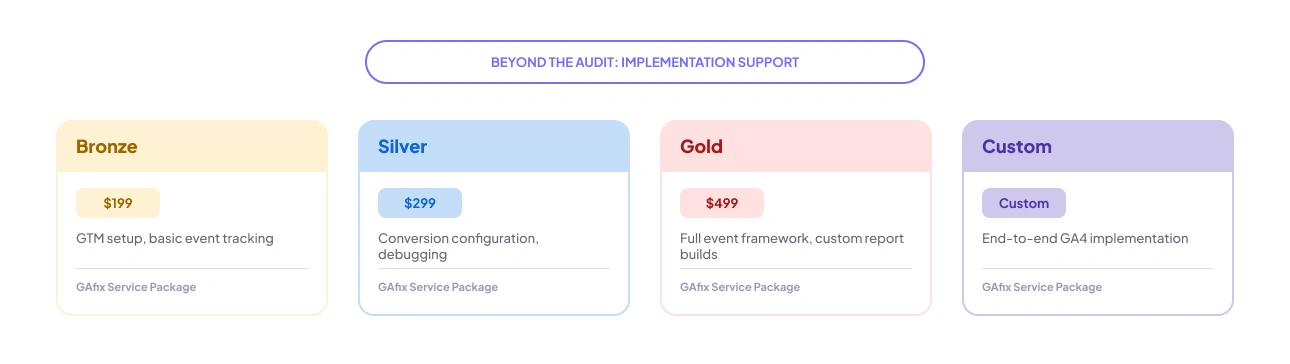
This is the clearest point of differentiation between the two tools. GAfix service packages bridge the gap between 'here's what's broken' and 'it's fixed':
Explore GAfix service packages →
GA4 Auditor provides the audit report only. No implementation, no handoff support, no follow-through. If your team has the technical capacity to action audit findings independently, that's fine. If you'd rather hand off the fixes to specialists, GAfix's service packages fill that gap end-to-end.
Pricing Comparison: GAfix vs GA4 Auditor
Side-by-side breakdown of every plan across both tools:
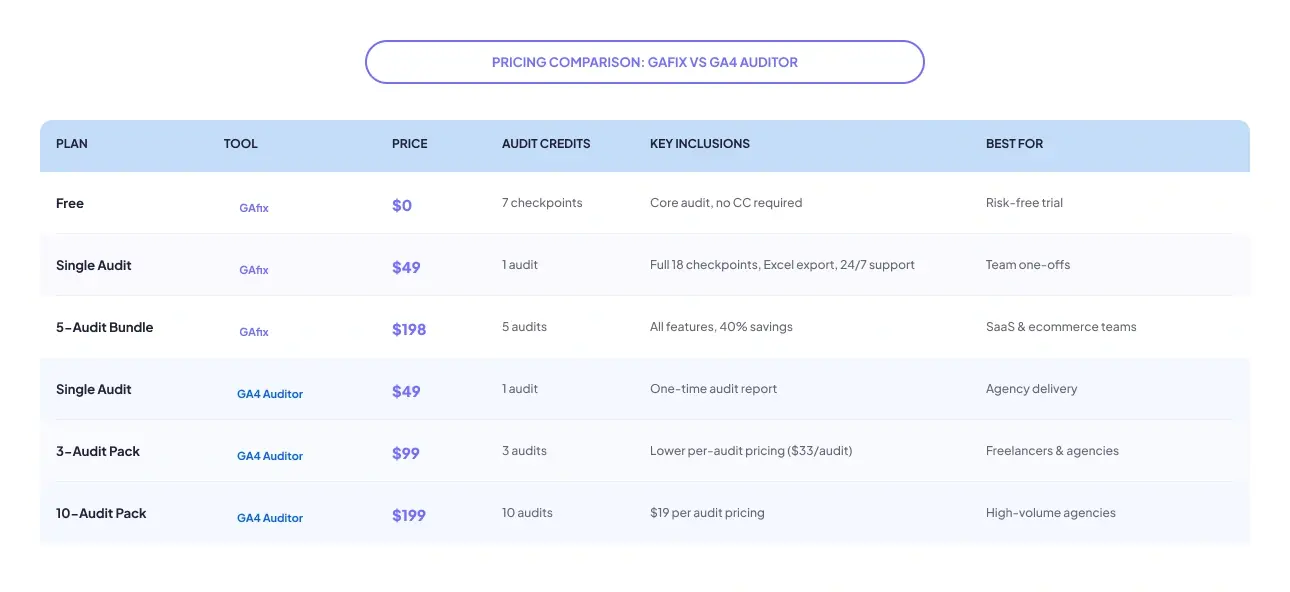
For teams running 1–5 audits per year, GAfix's bundle is competitive on cost and includes security compliance.
For a broader view of what different audit options actually cost — including freelancers, agencies, and the full automated tool spectrum — see the complete GA4 audit cost breakdown.
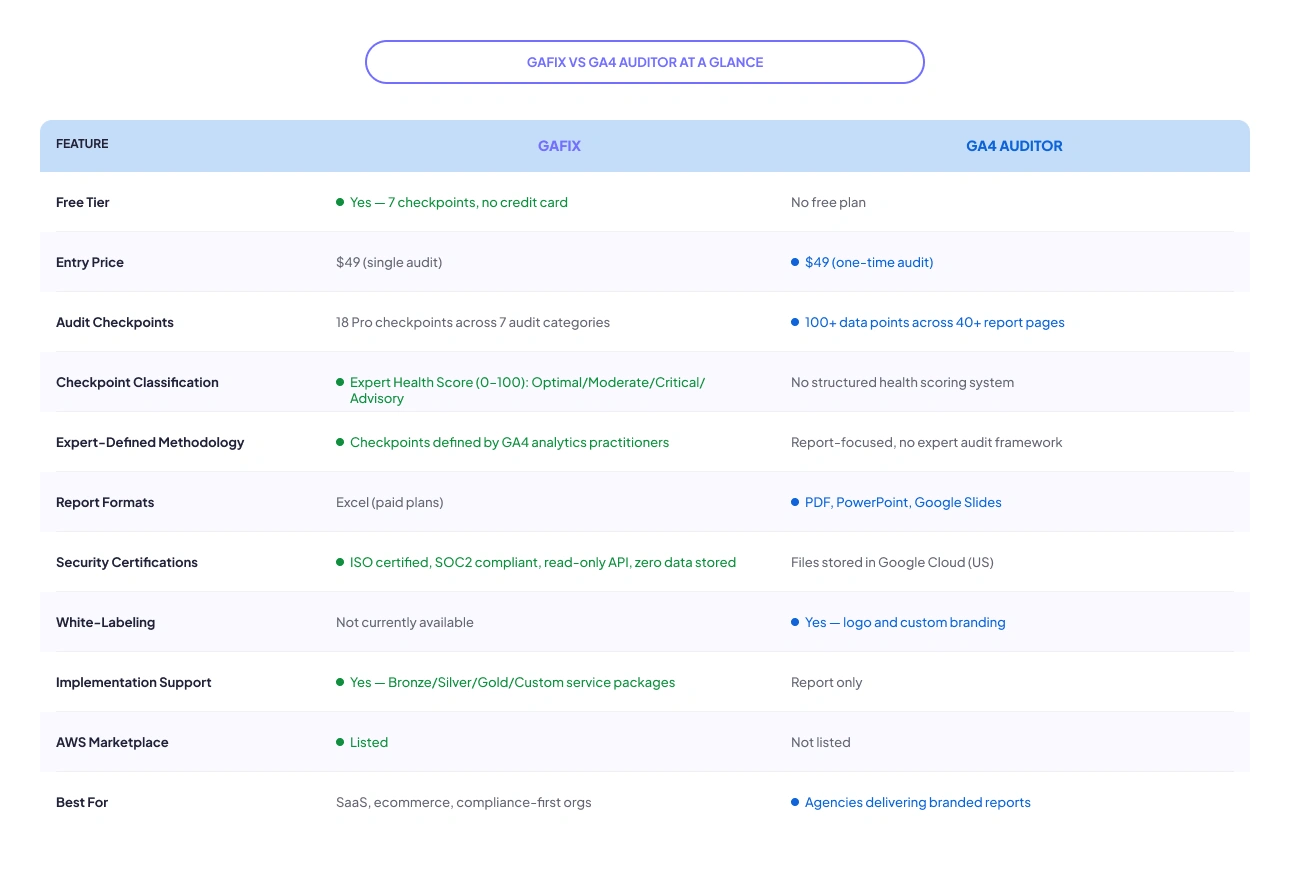
GAfix vs GA4 Auditor At a Glance
Before we go deep, here's a quick snapshot of the comparison:
When to Choose GAfix
Choose GAfix if any of these scenarios describe your situation:
- You want a risk-free start: The free 7-checkpoint audit requires no payment and no credit card. Run it right now →
- Your organization requires ISO and/or SOC2 compliance before connecting any external tool to client or internal analytics data. GAfix is the only tool in this comparison with certified credentials.
- You want an expert-validated audit, not just an automated checklist. GAfix checkpoints are defined and maintained by GA4 analytics practitioners who have seen how real setups fail, which means the tool surfaces issues that rule-based checkers routinely miss.
- You need more than a report: GAfix service packages let your team hand off the actual fixes, not just read about them. From GTM setup to full conversion configuration, it's covered.
- You're a SaaS or eCommerce team where conversion tracking accuracy is the primary concern, not slide deck formatting.
- You procure software through AWS Marketplace: GAfix is listed there. GA4 Auditor is not.
When to Choose GA4 Auditor
To be fair to GA4 Auditor, there are real scenarios where it's the better choice.
- You’re an agency delivering client-facing reports and need polished, presentation-ready outputs with branding customization.
- You rely heavily on white-labeled reporting for stakeholder presentations, client reviews, or monthly analytics reporting workflows.
- Your workflow depends on PowerPoint, PDF, or Google Slides exports for sharing findings with clients and leadership teams.
- You need live tag validation across websites to verify whether GA4 and GTM tags are firing correctly in real time, especially when diagnosing data tracking errors that don’t immediately appear inside reports.
- You manage multiple client properties and want a reporting-focused audit workflow optimized for agency operations.
Conclusion
If you've made it this far, the decision is clear. Choose GAfix review if you need a risk-free entry point, ISO and SOC2 security compliance, and the option to hand off implementation, not just read a report. Plus, with a dedicated GTM audit feature rolling out soon, GAfix is expanding beyond GA4 audits to help teams identify deeper Google Tag Manager configuration and tag-firing issues from a single platform. It's built for SaaS teams, e-commerce managers, and any organization where conversion tracking accuracy and data trust are non-negotiable. \
Choose GA4 Auditor if you're an agency that lives and dies by white-labeled, polished client reports in PDF or PowerPoint, and you're running enough audits to make the annual plan worthwhile.
Go with GAfix as the best GA4 auditor alternative if your priority is accurate tracking, actionable insights, enterprise-grade security, and hands-on support to actually fix what’s broken and not just identify it.

Frequently Asked Questions
Is GAfix free?

Yes. GAfix has a free plan that audits your GA4 setup across 7 key checkpoints at no cost with no credit card requirement. Upgrading to a paid plan starts at $49 and unlocks all 18 checkpoints, Excel export, and 24/7 support.
Which tool is better for agencies?
It depends on your workflow. GA4 Auditor is the better pick for agencies that need white-labeled, branded reports in PDF or PowerPoint. GAfix is better for agencies that prioritize compliance, want to offer implementation services alongside the audit, or manage GA4 properties for SaaS and e-commerce clients where data accuracy is the priority.
Can either tool fix GA4 issues automatically?
Neither tool makes automatic changes to your GA4 setup. Both identify issues and provide prioritized recommendations. GAfix additionally offers service packages where the GAfix team implements fixes on your behalf, from event tracking setup to full GTM configuration.
Confident Decisions Start with Accurate Tracking
Ensure your GA4 and GTM are correctly configured, reliable, and ready for scale.
.webp)
Subscribe To Our Newsletter


