






Your traffic reports feel off. Direct is climbing. Organic looks flat. And you know your pages are showing up in Google’s AI answers. So where is that traffic hiding? Here’s what GA4 actually shows and what you can do about it.
Quick Answer: How GA4 Handles Google AI Mode Right Now
As of early 2026, GA4 does not show Google AI Mode or AI Overviews as its own referrer or channel. There is no “google_ai” source/medium pattern, no distinct referrer label, and no official documentation suggesting one is coming.
Google has two overlapping AI features in Search: AI Overviews (summary boxes in standard results) and AI Mode (a separate conversational search tab). Neither shows as a distinct source in GA4 but they behave differently, and conflating them leads to measurement confusion.
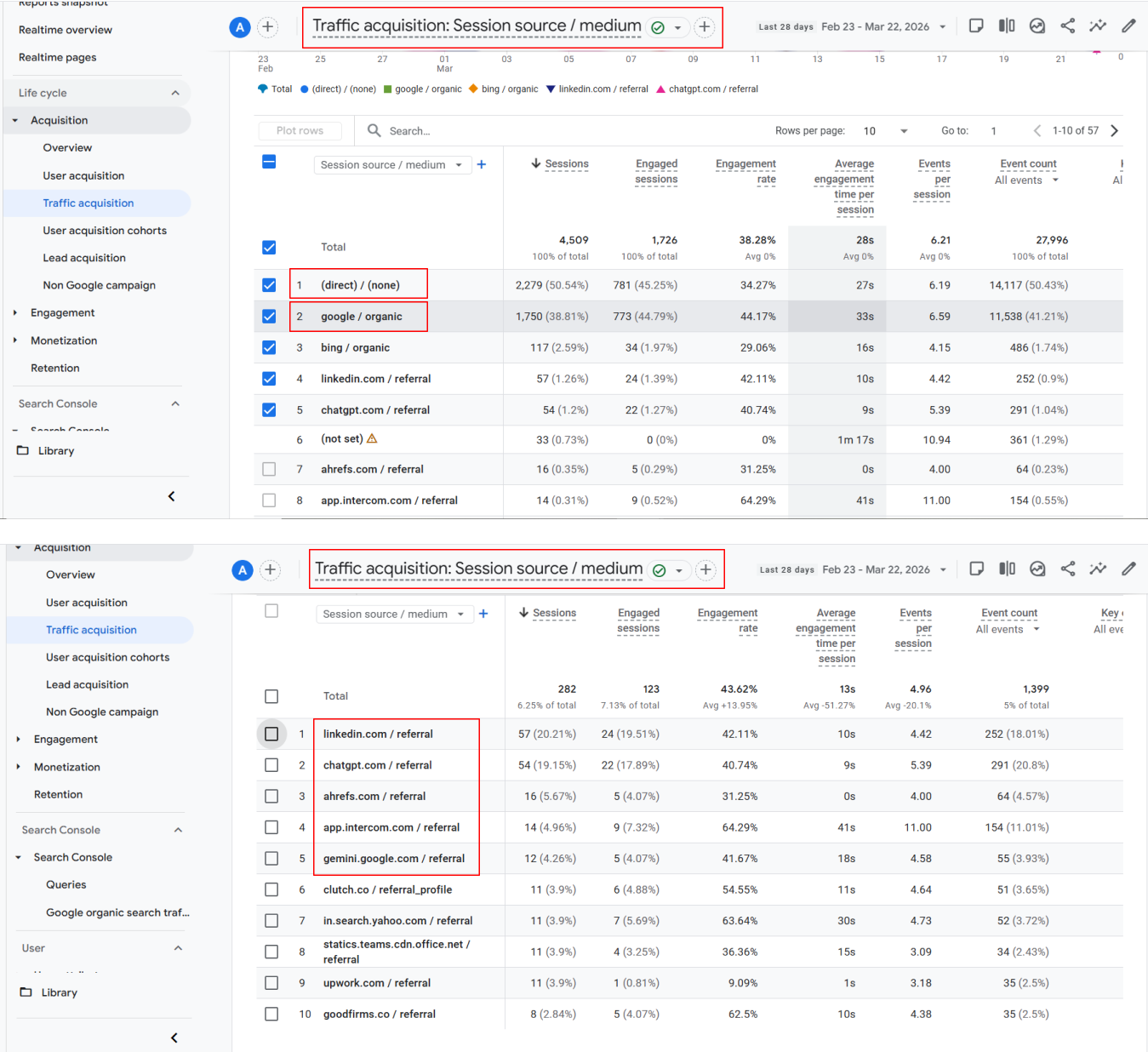
Most clicks from Google’s AI Overviews land in GA4 as google / organic, indistinguishable from standard search clicks. When the browser strips referrer data entirely, which happens often, those visits appear as direct traffic instead. This is not a configuration mistake on your end. It is how Google AI Mode currently behaves.
In GAfix.ai audits, we consistently see zero clearly labeled Google AI Mode traffic, even for sites that appear in AI summaries daily. The traffic acquisition report shows nothing unusual. But the patterns tell a different story.
If you see a sudden rise in direct and organic traffic with no clear cause, assume Google AI Mode is part of the story and your GA4 setup needs a closer audit.

Why Google AI Mode Traffic Doesn’t Show Up Clearly in GA4
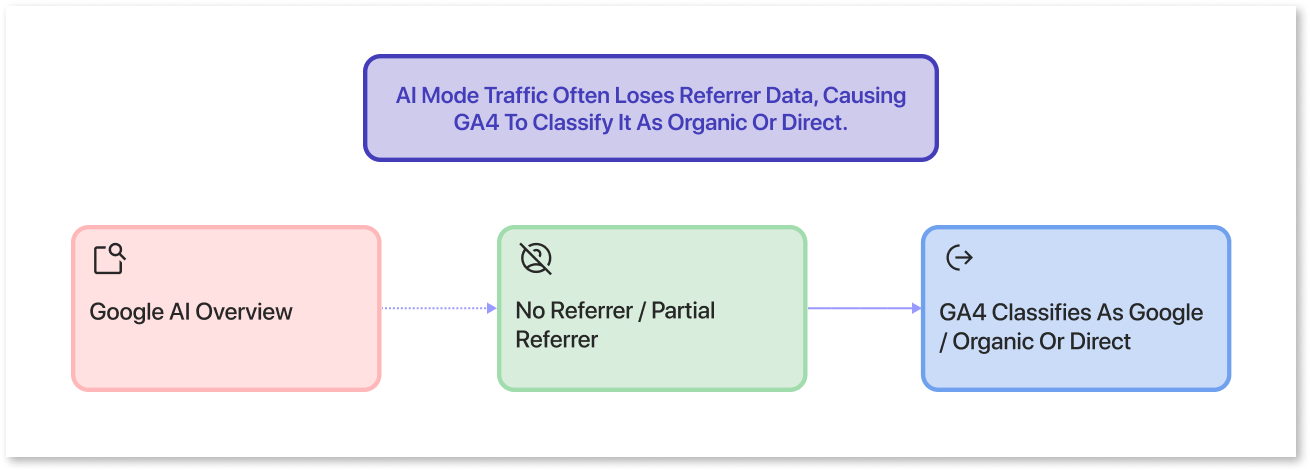
GA4 can only classify what the browser passes as a referrer. Google AI Mode often hides or downgrades that information entirely.
AI Overviews frequently embed links with “no-referrer” attributes. When a user clicks, the browser omits the originating URL. GA4 receives no signal that the visit came from an AI answer box rather than a standard blue link. Without that signal, classification defaults to google / organic or direct.
When a partial referrer is sent, it mirrors standard google.com traffic. There is no flag, no parameter, nothing to indicate “AI Overview” versus a normal search result. Many marketers assume GA4 is broken when ai mode traffic doesn’t appear. The reality is simpler: the data never arrives with an AI label.
Google has acknowledged tracking gaps around AI results but has not shipped a stable, documented AI-specific referrer pattern for GA4. Until Google standardizes AI referrers, you have to infer ai traffic from patterns and clean up everything else in GA4 so those patterns become visible.
Which AI Tools DO Show Up as Referrers in GA4
Unlike Google AI Mode, many third-party ai tools reliably pass referrer data into GA4. These platforms appear as distinct session source/medium entries under referral traffic, making them straightforward to isolate.
Common ai domains showing up in 2025-2026 traffic acquisition reports include: chatgpt.com, openai.com, perplexity.ai, gemini.google.com, copilot.microsoft.com (Microsoft Copilot), claude.ai, poe.com, writesonic.com, and you.com. These typically classify under the default channel group as referrals, as long as GA4 receives the referrer and privacy settings don’t block it.
One nuance worth noting: free or anonymous AI usage—some ChatGPT and Google Gemini flows may still strip the referrer. Those sessions route to direct traffic instead.
To confirm what’s hitting your property, go to Reports → Acquisition → Traffic acquisition. Filter the session default channel group to “Referral” and scan session source/medium for AI domains. When we audit properties with GAfix.ai, misclassified ai referrals are one of the quickest wins—clean channels instantly clarify which ai chatbots and ai platforms are sending real users.
Step-by-Step: Tracking AI Referral Traffic in GA4
You cannot force GA4 to label Google AI Mode yet. But you can systematically track ai referrals from other ai sources and carve out a dedicated view using standard GA4 features.
The approach breaks into four steps: (1) find AI referrals in your existing data, (2) add regex filters to catch them consistently, (3) build custom explorations for deeper analysis, and (4) create an AI channel group for strategic reporting.
Each step assumes your GA4 property is correctly configured—tagging works, cross-domain is set up, and filters aren’t blocking legitimate traffic. If you’re unsure, running an automated audit with GAfix.ai is the faster starting point. Fixing fundamentals first prevents wasted effort.
Your goal is not perfection on day one. Your goal is to stop letting ai referrals hide inside generic “Referral” and “Direct” buckets.
Add a Regex Filter to Catch AI Referrers
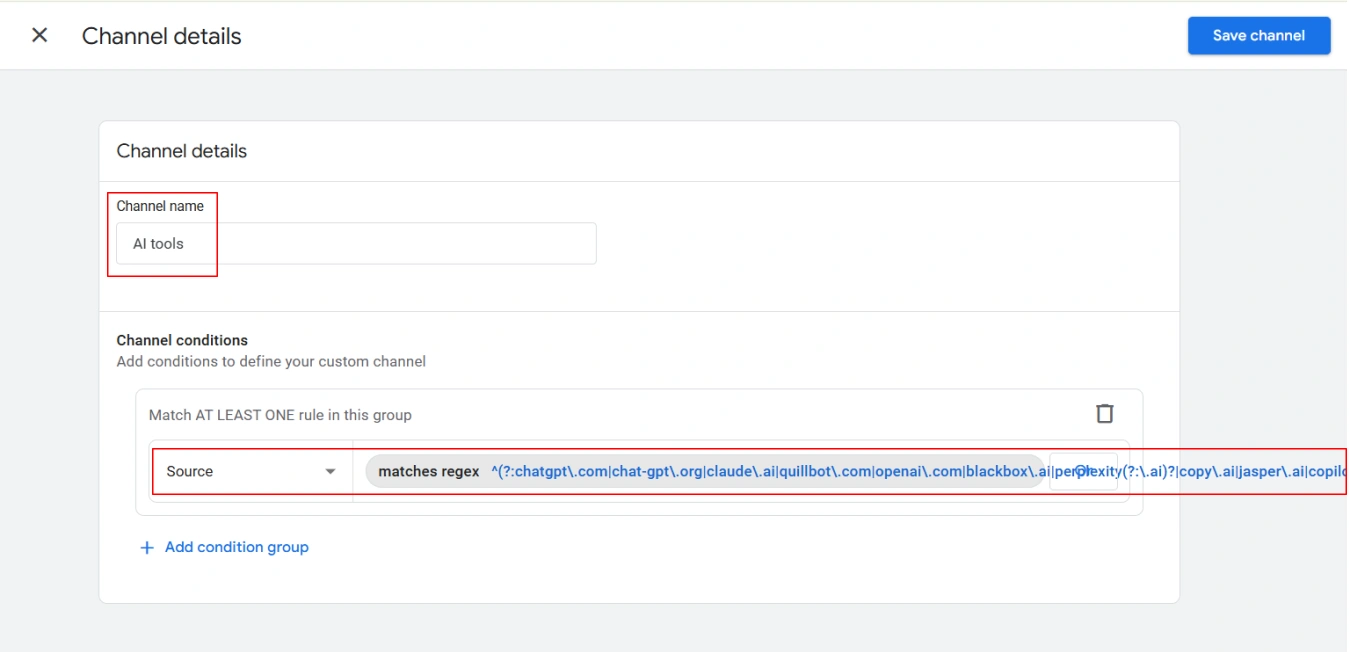
Regex filters let you group a growing list of ai domains without editing rules every week. One pattern handles multiple tools at once.
Here’s an updated regex that fits GA4’s 256-character limit and targets the most common ai sources as of 2026:
(?i).*(chatgpt\.com|openai\.com|perplexity\.ai|claude\.ai|copilot\.microsoft\.com|gemini\.google\.com|poe\.com|writesonic\.com|you\.com).*
Note: this regex captures traffic from third-party AI tools like ChatGPT and Perplexity, which pass identifiable referrer domains. It will NOT surface Google AI Mode or AI Overview clicks — those don't pass a referrer and this filter won't catch them.
Apply this in two places:
- As a filter on session source in a standard traffic acquisition report
- As an include filter in an Exploration using the Session source / medium dimension
Save this as a reusable segment or comparison so AI traffic can be toggled on/off across multiple reports. The limitation: regex only works where a domain is present. It will not surface Google AI Mode traffic if the browser sends no referrer at all.
In GAfix.ai audits, we flag missing or broken regex rules so your team isn’t blind to half of the ai tools already sending users your way.
Build a Simple GA4 Exploration for AI Traffic
Explorations offer more flexibility than default reports for early AI analysis: custom dimensions, granular filters, and side-by-side comparisons that standard reports can’t match.
Create a new Free Form exploration. Add dimensions: Session source/medium, Page referrer, Landing page + query string, Device category (including mobile devices), and Date. Apply an include filter using your AI regex on Session source. The exploration now shows only ai driven traffic sessions.
Add metrics that reveal behavior differences: Sessions, Engaged sessions, Average engagement time, and Key events. These help you see whether ai driven visits convert differently than other traffic sources.
Create a second tab showing “All traffic” with the same layout. Compare them side-by-side to highlight how AI visitors behave differently—often landing on deeper pages like documentation rather than your homepage, with higher key event rates.
Once this exploration is saved, any new AI domain you add to your regex instantly appears—giving you a living “AI Traffic” report without rebuilding your GA4.
Create an “AI Referrals” Channel in GA4
Channel groups are GA4’s way of labeling traffic at a strategic level. If AI is buried inside “Referral,” you’re underestimating a fast-growing acquisition category. Custom channel groups in GA4 apply retroactively to historical data, making this worth doing even if ai referrals started months ago.
The key idea: define a new channel named “AI Referrals” using conditions on Session source that match your AI regex. Position it above “Referral” in the channel order. GA4 evaluates channel rules top-down, so placing AI higher ensures matching sessions classify as AI, not generic referral.
To test, use the traffic acquisition report with your new custom channel group selected. Add Session source/medium as a secondary dimension to validate that ai domains flow correctly into the AI Referrals channel.
One of the fastest wins we deliver with GAfix.ai is a clean, audited channel setup where “AI Referrals” sits beside Organic, Paid, and Direct—so your dashboards finally match how people find you in 2026.
Practical Rules for Defining the AI Channel
Set Channel name = “AI Referrals.” Choose condition type = “Session source matches regex” and reuse the regex pattern from earlier.
Keep the first version tight. Focus on the top 5–8 ai domains you actually see in your data before adding long-tail tools. Review the channel’s volume after 7–14 days, then iterate the regex to include new AI tools that emerge in your GAfix.ai or GA4 audits.
This setup will not classify Google AI Mode traffic where no referrer is sent. That ai mode traffic will continue appearing as organic search or direct. But everything else becomes visible.
Document your exact regex and channel rules in your analytics playbook so future team members don’t accidentally overwrite them.
Why Tracking AI Traffic Matters More Than Ever
AI assistants and ai powered search are already reshaping how B2B buyers and consumers discover SaaS products, documentation, and support content. Ignoring this shift means misreading your own performance data.
Consider a concrete scenario: a SaaS product page starts appearing in Google’s AI Overviews and Perplexity ai summaries. GA4 shows a rise in “direct” and “google / organic” with no context. Without isolating ai driven traffic, marketers over-credit branded search or email while underestimating how ai generated answers drive late-funnel visitors.
Key metrics typically look different for AI visitors. They show higher intent—more key events per session. They land on deeper pages (documentation, pricing) rather than the homepage. Time-on-page patterns differ because queries are pre-qualified by ai responses before users click.
With a clean, audited GA4 setup, you can trust conversions by channel enough to reallocate budget and content resources toward AI-surfaced landing pages. If you keep treating ai traffic as generic organic, you will react 12–18 months late to how your buyers actually find you.
Workarounds for Estimating Google AI Mode Traffic in GA4
You cannot see a clean “google_ai / organic” source yet. But you can triangulate AI Mode impact using patterns across GA4 and Google Search Console.
The core method: compare Search Console clicks against GA4 organic search traffic sessions, especially on pages appearing frequently in AI Overviews. Look for mismatches. If search console shows 40% more clicks but GA4 organic barely moves while direct traffic climbs, you’re likely seeing shadow AI Mode traffic.
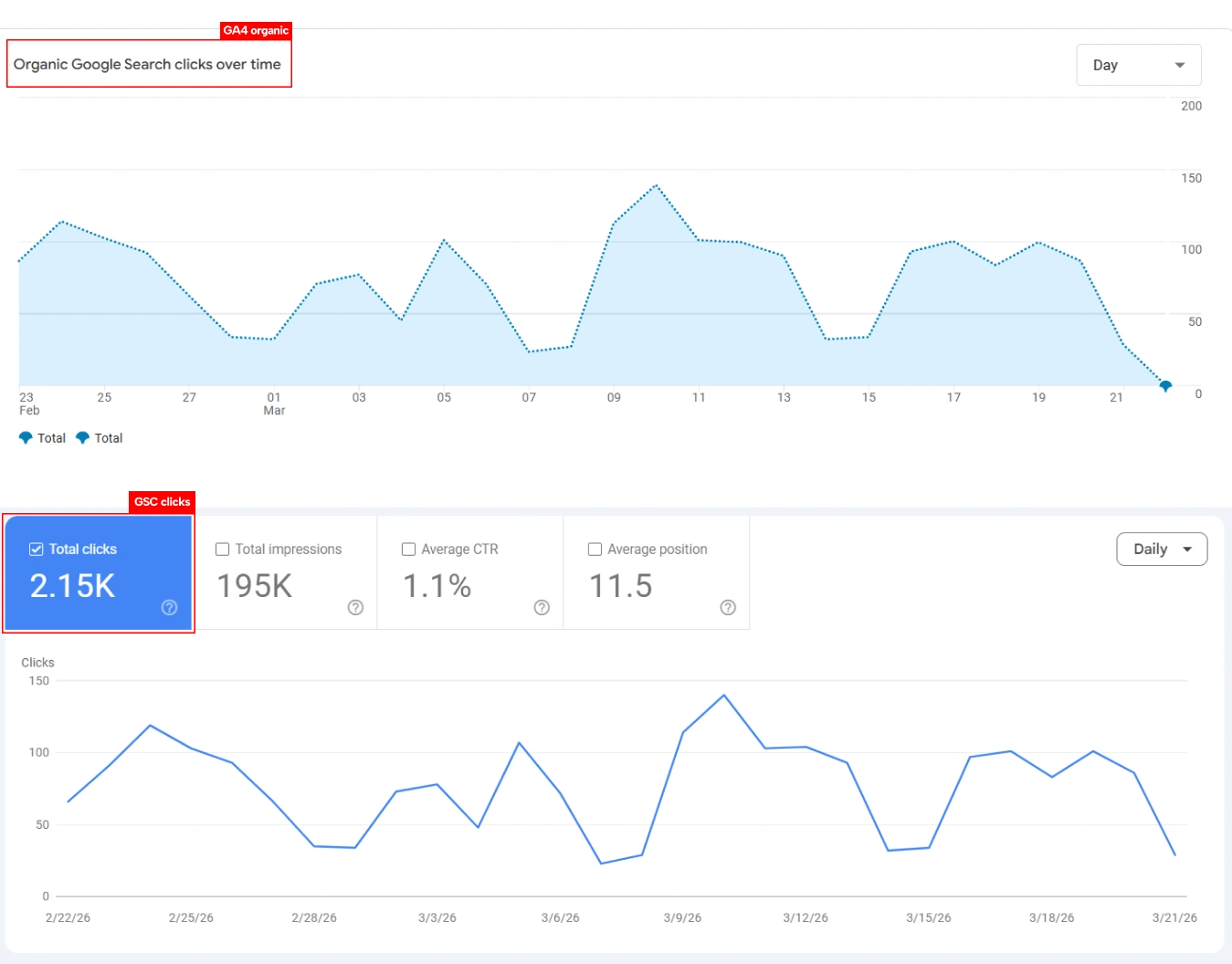
Monitor monthly spikes in Direct and Unassigned traffic that correlate with ranking improvements or new ai generated results placements. These patterns become clearer when your GA4 is properly configured.
Tag all controllable links—such as links in your own ai chatbots, help docs, and internal assistants—with utm parameters. Example:
?utm_source=gemini&utm_medium=ai_assistant&utm_campaign=onboarding_docs
This keeps known AI flows out of your mystery buckets, narrowing what remains unexplained. In our audits, we often pair GA4 data with GSC, looking for pages where impressions skyrocket, GA4 organic barely moves, and direct traffic quietly climbs—that’s your AI Mode shadow traffic.
Common Pitfalls When Estimating AI Mode Traffic
Bot traffic and scrapers can mimic ai referrals, often showing zero engagement and no key events. Always check engagement metrics before assuming traffic represents real users.
Some teams accidentally double-count AI traffic by adding custom UTMs plus regex rules that both catch the same sessions. Others use over-broad regex filters—matching “ai” in any domain—which misclassifies unrelated referral traffic and distorts channel reports.
Review AI-related segments at least quarterly. Remove dead tools. Add emerging assistants launched in late 2025–2026. Search behavior evolves fast, and your tracking should keep pace.
Sloppy AI detection is as dangerous as no AI detection—clean rules and periodic audits are non-negotiable.
How GAfix.ai Helps You Audit GA4 for AI Traffic Readiness
GAfix.ai is an automated GA4 audit tool built by NeenOpal that checks whether your property can actually surface AI traffic correctly. It scans for the configuration gaps that hide ai visibility.
The audit covers: broken or missing GA4 tags, incorrect default channel settings, absence of AI-specific custom channel groups, lack of regex rules for common ai domains, and misconfigured utm parameters. These are the fundamentals that separate usable data from noise.
A concrete scenario: a mid-sized SaaS company sees rising “direct” sessions but flat branded search. GAfix.ai audit reveals no AI channel, no regex, and conflicting UTMs. Fixing these immediately exposes ChatGPT and Perplexity as top-5 referrers—traffic that was there all along, just invisible.
Even though GA4 doesn’t label Google AI Mode yet, you can’t afford to let the rest of your AI traffic hide because of basic configuration errors. If you suspect AI is driving traffic but your GA4 can’t prove it, start by running a free GAfix.ai audit and fix the fundamentals before AI reporting gets even more complex.
Final Answer: Does GA4 Show Google AI Mode as a Referrer?
As of early 2026, GA4 does not show Google AI Mode or AI Overviews as a distinct referrer or channel. Those visits mostly appear as google / organic, direct traffic, or occasionally unassigned. There is no separate ai overview clicks label, no mode as a referrer pattern, and no official ga4 show google ai mode classification.
What you can do: implement regex filters and custom explorations to track ai referrals from other ai tools. Create an “AI Referrals” channel group. Use UTMs for controllable AI links. Compare GA4 with search console to infer Google AI Mode impact.
None of this works well on a broken or half-configured GA4 setup. Data quality and a clean implementation are the foundation for every insight.
Before AI search eats more of your organic traffic, make sure your GA4 can actually see what’s happening—run an audit, fix the tracking, then start measuring AI like a real channel instead of a guess.
Frequently Asked Questions
Does GA4 show traffic from Google AI Overviews or AI Mode?

GA4 does not currently show Google AI Overviews or AI Mode as a distinct traffic source. Most visits appear as google / organic, while some are categorized as direct traffic when referrer data is missing. There is no dedicated AI referrer or channel in GA4 as of 2026.
How can I track AI traffic in GA4 if Google AI Mode isn’t visible?
You can track AI traffic in GA4 by identifying referral traffic from AI tools like ChatGPT, Perplexity, and Gemini using regex filters. Creating a custom “AI Referrals” channel group and using Explorations helps isolate and analyze AI-driven traffic. However, traffic from Google AI Mode must be estimated using patterns and comparisons with Search Console.
Why is my direct traffic increasing in GA4 suddenly?
A sudden rise in direct traffic can happen when referrer data is missing or stripped, which is common with AI-driven sources like Google AI Overviews. It may also indicate tracking issues, misconfigured tags, or attribution gaps. Auditing your GA4 setup can help identify the exact cause.
Confident Decisions Start with Accurate Tracking
Ensure your GA4 and GTM are correctly configured, reliable, and ready for scale.


Subscribe To Our Newsletter


