





Key Takeaways
- AI traffic in 2024–2026 primarily arrives majorly from tools like ChatGPT, Perplexity, Copilot, Gemini, and Meta AI
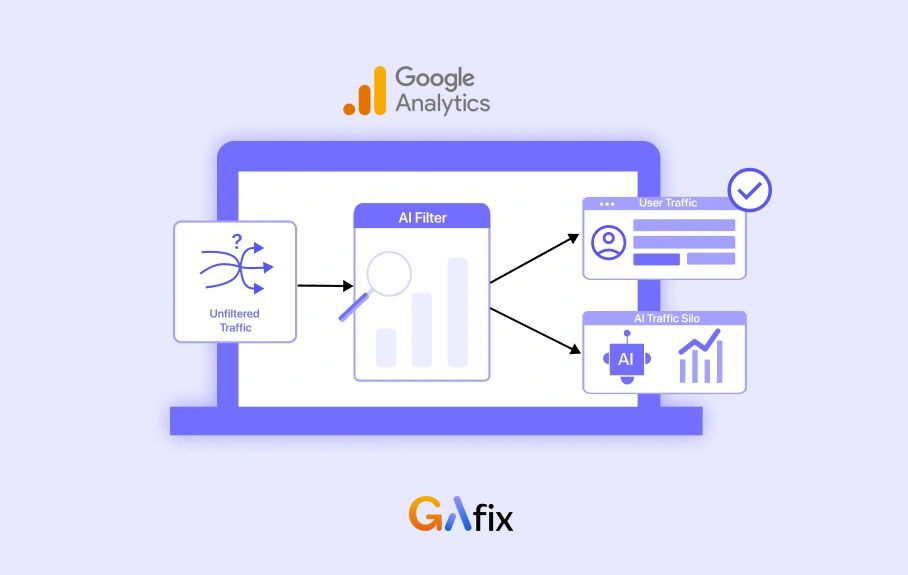
- GA4 doesn’t offer a native AI channel, so you end up relying on regex-based segments and custom channel groupings, which work.
- A fair share of AI-driven visits still land under Direct or Organic, mostly due to referrer loss in in-app browsers, so the numbers are indicative at best rather than absolute.
- I referrals often outperform generic referral traffic by 20–50%, though this can vary depending on how cleanly sessions are attributed.
- Getting AI traffic tracking into a reliable state usually means a structured setup and periodic validation, and tools like GAfix.ai tend to help surface the quiet misclassifications that slip through.
In your analytics, most of your website traffic is via AI tools. Almost 63% of websites see AI traffic, meaning at least one visitor arrived via an AI chatbot.
Now that AI traffic is huge, tracking becomes critically important. With tools like ChatGPT, Perplexity, and Gemini influencing search behavior, a growing share of website visits now comes from AI-generated recommendations rather than traditional search engines.
If you’re not actively tracking AI traffic, you’re likely underreporting performance, misjudging channels, and making flawed decisions. This blog breaks down exactly how to track AI traffic in GA4, without disrupting your existing reporting setup or creating messy data.
Why Tracking AI Traffic in GA4 Matters Now
Before diving into why this shift matters, a proper Google Analytics audit often reveals that a significant portion of emerging traffic sources.
Between late 2024 and early 2026, AI-driven discovery didn’t just evolve; it quietly reshaped how traffic shows up in GA4. Tools like ChatGPT Search, Perplexity (especially its citation-heavy Pro tier), and Google Gemini started acting as intermediaries between users and content. In practice, this is where things began to drift. Teams noticed sudden referral spikes that didn’t map to any campaign, or organic traffic dipping without a clear ranking loss. On the surface, nothing looked broken, but the source of truth had already shifted, and GA4 wasn’t always making that obvious.
AI traffic means sessions arriving via links in AI chats, summaries, or research reports from domains like chatgpt.com, perplexity.ai, copilot.microsoft.com, and gemini.google.com. These ai platforms surface content without traditional search results, so your traffic acquisition report alone no longer explains what’s happening.
When you lump AI-driven traffic into generic referrals or directs, you hide its actual performance. Channel ROI calculations become unreliable. Content decisions get made on incomplete data.
Takeaway: If you don’t isolate AI referrals in GA4 and audit them regularly, every decision you make from your website traffic reports is at least partly guesswork.
What Counts as “AI Traffic” in GA4?
AI traffic equals users clicking from AI assistants or AI-enhanced search results, where the AI tool acts as the referrer.
Concrete examples include:
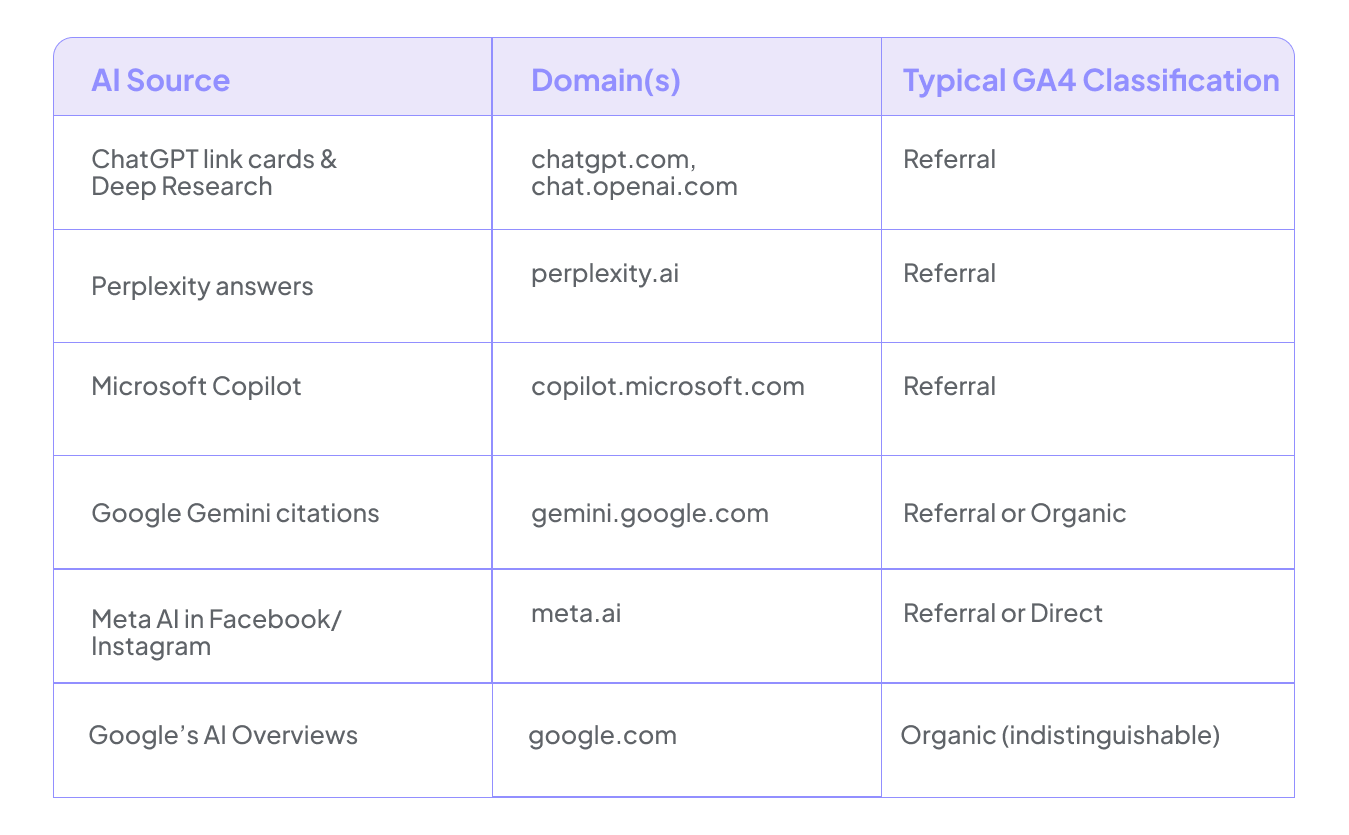
Here’s the problem: Google AI Overviews still appear as Google / organic. Many mobile apps strip referrer data entirely. Private browsing and VPNs blur the picture further.
Recent studies point to a consistent blind spot: roughly 40–60% of AI-driven visits don’t show up as referrals at all; they’re absorbed into Direct or Organic. So when you look at GA4, you’re usually seeing the cleanest, most attributable slice, not the full picture. For most B2B and SaaS properties through 2025–2026, identifiable AI referral traffic tends to sit below 1% of total sessions. That sounds negligible until you look at behavior. These sessions often come in 20–50% more engaged than baseline. Small volume, but not low impact, and easy to underestimate if you’re only scanning top-level reports.
Quick Wins: Check AI Traffic with GA4 Acquisition Reports
Want answers in the next five minutes? Use standard GA4 reports before building anything custom.
Navigate to Reports > Acquisition > Traffic acquisition. Set your primary dimension to Session source / medium. Then search or filter for obvious AI patterns:
- chatgpt
- perplexity
- copilot
- gemini
- meta.ai
- claude
- anthropic
You’ll see 2024-2026 realistic domains like chatgpt.com, perplexity.ai, copilot.microsoft.com, and gemini.google.com appear in your AI traffic sources.
This kind of quick check only surfaces explicit referrals, which is a pretty narrow slice of what’s actually happening. Data Bloo, for example, reported a client seeing around 0.5% of sessions from Perplexity in Q1 2026, but that’s just what showed up cleanly as a referrer. Anything routed through redirects, stripped parameters, or browser-level privacy settings will often fall into direct or even organic search results.
So the numbers tend to look negligible, even when influence isn’t. To get closer to what’s really going on, add a secondary dimension like a landing page + query string or page referrer. That’s usually where patterns start to emerge—AI tools don’t distribute traffic evenly, they cluster around specific content types like guides, documentation, or pricing pages.
Create an AI Traffic Segment in GA4 Explorations
Building a reusable session segment in Explorations is your first proper tracking step. It isolates AI sessions for more profound analysis.
Here’s the process:
- Click the Explore icon and select Free form (or Blank)
- Add dimensions: Session source, Session source / medium, and Page referrer
- Create a new session segment named “AI Traffic”
- Set condition: Session source matches regex with this pattern:
chatgpt|chat\.openai|perplexity\.ai|claude\.ai|copilot\.microsoft|gemini\.google|meta\.ai|anthropic|poe|huggingface
If regex isn’t something you work with often, treat it as a controlled wildcard—it lets you group multiple AI referrers into a single rule without maintaining separate filters. In practice, most teams either under-match or over-match here, so it’s worth validating the pattern using ChatGPT or testing it in tools like regex101 before trusting the output. Once set, save the segment at the property level, otherwise it tends to get recreated inconsistently across explorations.
Then build your report with landing pages as rows, months (spanning 2024–2026) as columns, and metrics like sessions, engagement rate, and key event rate. Apply the AI segment and compare it against All Users—this is usually where attribution gaps and behavioral differences start to show up.
Build an AI Traffic Channel Group in GA4
Segments work for analysis. But channel groups are how AI traffic shows up in your everyday GA4 reports and dashboards.
Here’s how to create a new channel group:
- Go to Admin > Data display > Channel groups
- Click Create new channel group (e.g., “AI Traffic Tracking”)
- Add a new channel named “AI Referral” or “AI Assistants”
- Set channel conditions: Source matches regex with the same AI pattern from your segment
- Critical: Order this ai channel above generic Referral so it takes precedence
- Click Save group
Backbone Media warns that misordering lets 30% of AI traffic slip into the referral channel instead. Order matters.
New custom channel groups are not retroactive. They only classify sessions from publication onward. Give it 2-4 weeks before relying on trends.
To view results, go to Reports > Acquisition > Traffic acquisition. Choose your custom channel group as the primary dimension. Now you can compare “AI Referral” against Organic Search, Paid Search, and other channels directly.
This structure makes downstream work easier. Looker Studio dashboards, internal reports, and performance reviews can now include AI as a first-class channel alongside organic traffic and paid.
Takeaway: A misconfigured ai traffic channel group silently mislabels traffic for months. This is exactly the kind of issue GAfix.ai is built to catch.

Monitor AI Traffic Quality and Content Performance
Now that AI traffic is segmented and grouped, the question shifts from visibility to value, whether this segment is actually doing anything meaningful. When you’re figuring out how to track AI traffic in GA4, it’s less about adding more reports and more about reading the right signals.
Engagement rate is a good starting point (AI traffic in GA4 often lands around 55–70% vs 40–50% sitewide), but it’s the combination with average engagement time that tells a fuller story—AI-driven sessions regularly run 2–4x longer, especially on cited or reference-style content. Session key event rate and conversions (demo requests, signups, and purchases) matter more here than raw session volume because this traffic tends to be selective rather than broad.
For tracking AI traffic in practice, apply your segment to the landing page and look at where these sessions concentrate. Two Octobers observed B2B sites where AI platforms consistently routed users to documentation and API pages, with conversion rates roughly 1.5x higher than organic. It’s not evenly distributed traffic, it clusters around intent-heavy pages, which is easy to miss if you’re only looking at aggregates.
Build comparison tables in Explorations:
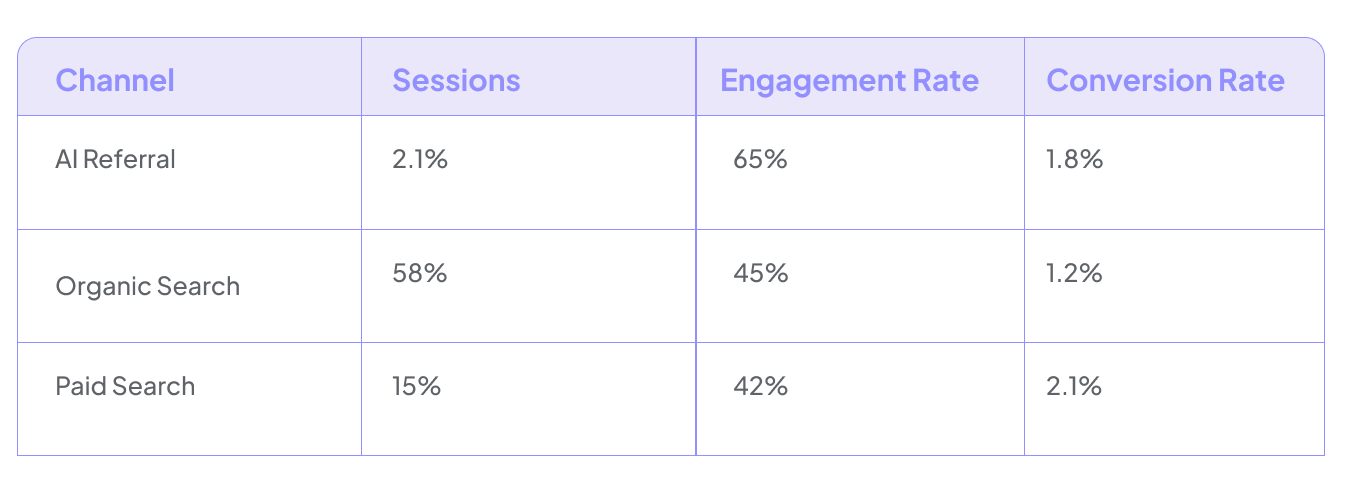
This reveals whether ai driven visits turn into pipeline—not just pageviews.
Takeaway: It’s not enough to know AI is driving traffic—you need clean GA4 analytics data showing whether those visits convert.
Visualize AI Traffic Trends in Looker Studio
Once AI is a defined channel in GA4, Looker Studio makes trends obvious for non-analytics stakeholders.
Connect GA4 to Looker Studio using the standard connector. Use your custom channel group dimension so “AI Referral” shows up as its own series, otherwise it just gets diluted into referral or direct and never gets proper visibility.
Build these charts:
- Line chart showing sessions by channel from January 2024 onward, with AI as a separate trend line
- Bar chart comparing conversions by channel including AI
- Top pages table filtered where Default channel group = AI Referral
If you’re serious about tracking AI traffic and not just observing it, blend this with CRM data where possible, attribute MQLs back to the AI channel using UTMs or event IDs, otherwise attribution will drift quickly.
Takeaway: A clean GA4 setup plus a clear AI dashboard means you spot AI-driven spikes in days instead of discovering them in quarterly reviews.
Common Pitfalls When Tracking AI Traffic (And How GAfix.ai Helps)
Most teams’ first AI tracking attempts are half-complete. A basic regex here, a half-finished ai channel group there, and zero validation.
Common mistakes we see:
- Missing domains: New ai tools and subdomains slip through regex patterns (e.g., new ChatGPT subdomains)
- Wrong channel order: AI rules placed after generic Referral end up getting overridden, which can quietly leak 30–40% of traffic into the wrong bucket,
- Case sensitivity issues: Partial matches or case-sensitive regex missing traffic
- Events not firing: Key events broken on AI landing pages due to consent mode or tag issues
- Sampling thresholds: GA4 Explorations suppress rows under 10 users, which means smaller AI sources never appear, even though they’re contributing incrementally.
GAfix.ai scans consistently show that around 25% of properties lose 10–15% of referral data due to unconfigured or misconfigured consent mode alone. That’s where things get misleading, he numbers look precise, but the structure underneath isn’t holding. A free scan surfaces mislabeled ai referral traffic, missing AI domains, and broken events in minutes.
Takeaway: Before you put AI traffic into a board deck, run an automated GA4 audit—guesswork in your channel definitions always comes back to bite you.
Next Steps: Turn AI Traffic Insight into Action
Now that AI traffic in GA4 is measurable, what should you actually do with that information?
Concrete follow-ups:
- Prioritize content types that attract high-converting ai visitors (guides, documentation, templates)
- Test on-page messaging on AI-favored landing pages
- Build UTM standards for links you control in AI tools or playgrounds
- Feed learnings back into SEO and content roadmaps, this is just the beginning
Set a monthly review cadence for AI channel performance, and keep checking acquisition reports for new referrers that need to be added to your regex patterns. Pair this with Google Search Console to compare organic signals against AI-driven discovery. This is often where gaps surface. Before scaling any AI-focused SEO efforts, run a structured audit through GAfix.ai: It works as a baseline check to make sure your AI traffic in GA4 isn’t being misrepresented before you invest further.
AI is changing how people discover you. A clean, audited GA4 is how you make sure those visits turn into measurable growth. Run your free GAfix.ai audit and stop guessing about your traffic coming from AI.
Frequently Asked Questions
Can I track Google AI Overviews as a separate traffic source?

Currently, GA4 reports most traffic from Google AI Overviews as google / organic. There’s no official way to separate these from classic search results. You can infer AI Overview impact using landing page patterns, query data from Google Search Console, and sudden changes in organic behavior—but this remains imperfect. Some practitioners use server logs or Google Tag Manager workarounds, but none provide complete visibility. This limitation makes keeping your GA4 clean even more important so organic trends aren’t muddied by other misconfigurations.
How often should I update my AI traffic regex in GA4?
Review and update AI-related domains at least quarterly, or monthly if you’re a high-traffic organization. New AI tools emerge regularly—poe.com, huggingface.co, and various regional AI assistants need adding. Monitor your traffic acquisition report for unfamiliar referrers. Check industry news about new search engines and AI platforms. GAfix.ai can highlight unclassified referrers and potential AI sources not covered by existing channel conditions.
Do I need a developer to implement AI traffic tracking in GA4?
Basic setup—segments, regex-based custom channel groups, and Looker Studio dashboards—can usually be completed by a technically comfortable marketer without engineering help. Developers may be needed for advanced attribution, tying AI traffic to backend events, or integrating with product analytics stacks. You don’t need a video tutorial or video walkthrough for this level of configuration. GAfix.ai validates your non-code configuration work (channels, events, and parameters) to catch errors even without developer involvement.
Confident Decisions Start with Accurate Tracking
Ensure your GA4 and GTM are correctly configured, reliable, and ready for scale.
.webp)
Subscribe To Our Newsletter


