






Organic social in Google Analytics is the default channel that captures unpaid traffic from social platforms, including visits from posts, profiles, and bio links on Facebook, Instagram, LinkedIn, TikTok, Pinterest, and others. GA4 assigns a session to Organic Social when its source is a known social platform and the medium isn't paid.
However, the definition of “what is Organic Social in Google Analytics” isn’t as simple in practice. Under the hood, GA4 compares your source and medium against a list Google controls, and that list changes without asking anyone. Fall outside it, and your traffic doesn't become Organic Social. It becomes somebody else's problem: Referral, Direct, or the ever-annoying Unassigned.
This piece covers which platforms make that list, how GA4 separates organic from paid and referral, and where social traffic tends to disappear.
Which Platforms Count as Organic Social?
Before fixing anything, pin down what is organic social in Google Analytics at the platform level first. The definition only really clicks once you know which domains GA4 checks against. Your session's source gets run against an internal list of recognized social domains that Google maintains and updates on its own timeline. You don't get to add a platform to it just because it feels social enough.
Here's what that looks like for the platforms most sites actually care about:
Two things most explainers on this topic just skip.
- YouTube isn't Organic Social. Once GA4 rolled out Organic Video as its own channel, Google quietly moved YouTube (and platforms like Vimeo) under Organic Video instead. Nobody sent out a memo about it. So if you've been reporting YouTube traffic under "social" this whole time, both numbers in your dashboard are wrong. (source)
- x.com isn't officially recognized yet, at least not on its own. Google's published social-source list still runs on Twitter.com and t.co. The newer x.com domain hasn't made the cut by itself. So when a share resolves with x.com as the raw source, it can slide into Referral or Unassigned instead of Organic Social. That's miscategorized traffic hiding in plain sight, and a routine UTM audit won't catch it unless someone already knows to look. Fix it with a custom channel group that explicitly maps x.com back to Social.

Organic Social vs. Paid Social vs. Referral vs. Direct
This is usually the real question behind Google Analytics organic social searches. Someone noticed a GA4 data discrepancy in the numbers and wants to know which bucket their traffic is actually supposed to land in.
Organic social vs. paid social confuses almost everyone eventually. Same Instagram post, same platform, sometimes even the same day. What flips the channel is nothing more than whether the link includes a paid UTM parameter. Forget the tag, and a paid campaign quietly gets counted as organic.
Organic social vs referral is a different kind of headache. It's less about paid versus unpaid and more about whether GA4 even recognizes the source as social to begin with. If traffic comes from a subdomain or from a platform Google hasn't added to its list yet, GA4 falls back to Referral. This is exactly what happens with x.com today.
Worth knowing: GA4 checks paid rules before organic ones when it sorts a session. A session only ends up in Organic Social once it's already failed to match Paid Social's rules first.
Where to Find Organic Social Traffic in GA4
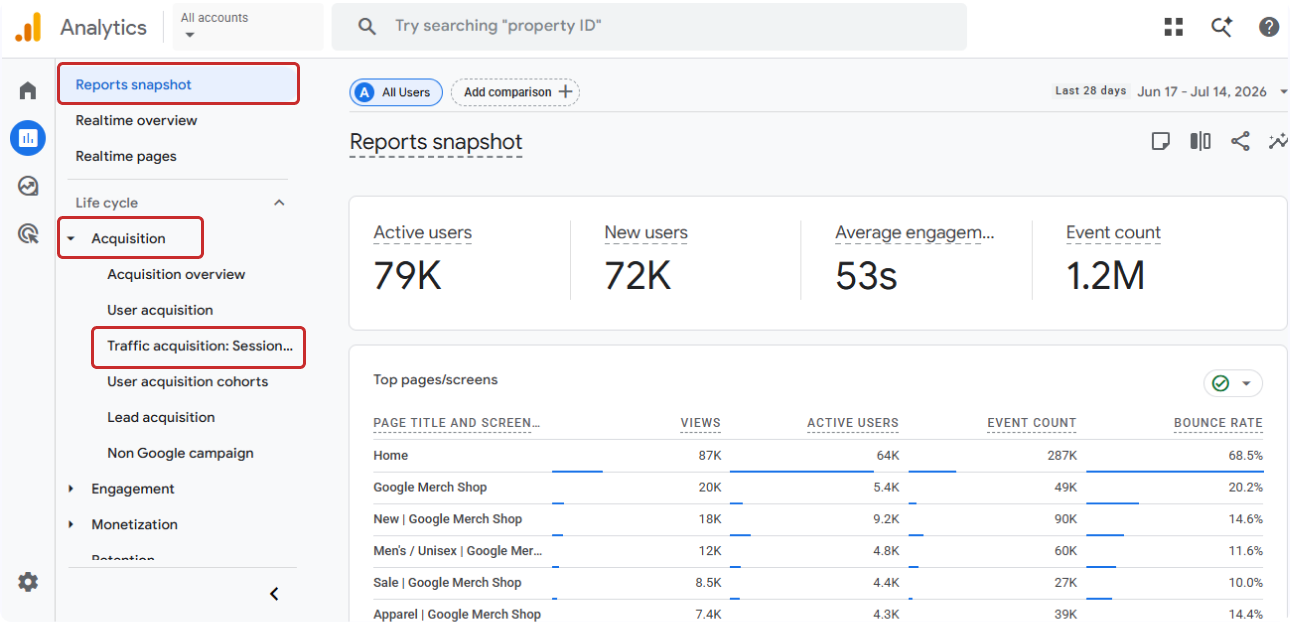
You don't need a fancy Exploration for this part. Open Reports › Acquisition › Traffic acquisition. That's the standard traffic acquisition report, and session-level channel data lives there.
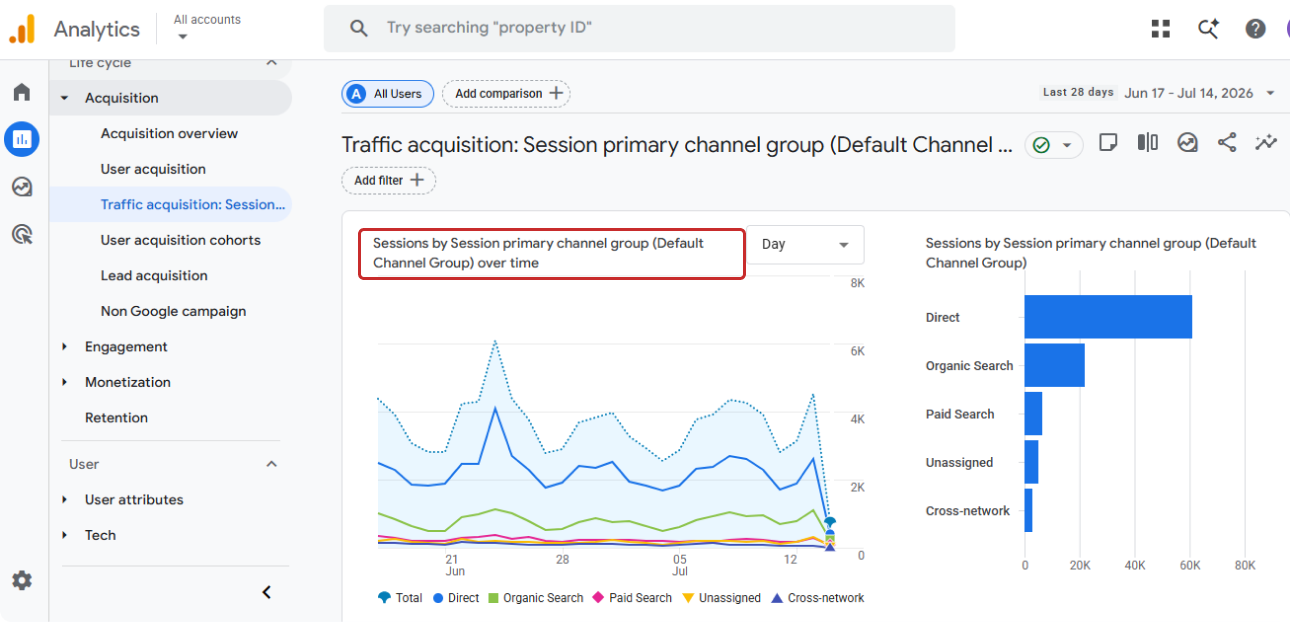
Set the primary dimension to the Session default channel group if you want Organic Social sitting as its own line item next to Paid Social, Organic Search, Referral, and the rest.
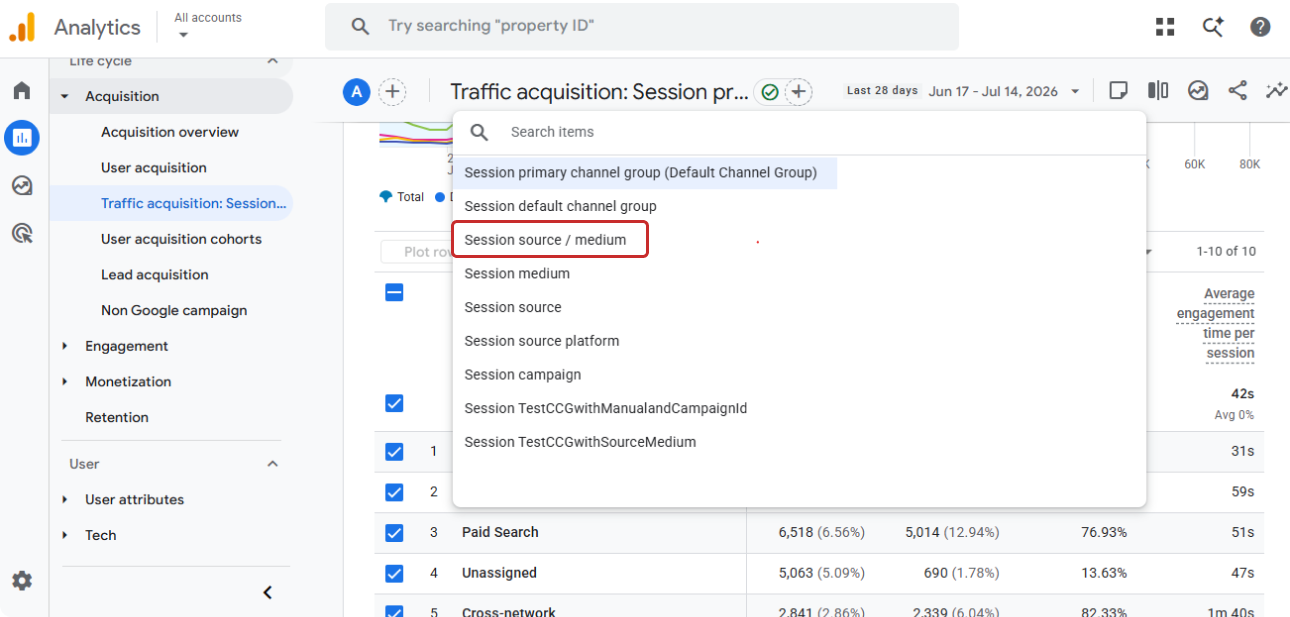
If you want more granularity, switch to Session source/medium instead, and individual entries start showing up: facebook.com / referral, instagram.com / referral, linkedin.com / referral. That's the platform-level breakdown the channel view normally hides.
In case you need something narrower, like one campaign, a date-range comparison, or a single client property, a Free-form Exploration filtered to Organic Social handles that. Same data, more room to cut it up.
If you take one thing from this section, take this: The session default channel group tells you the category. Session source/medium tells you the platform. Most real audits need both open at once.
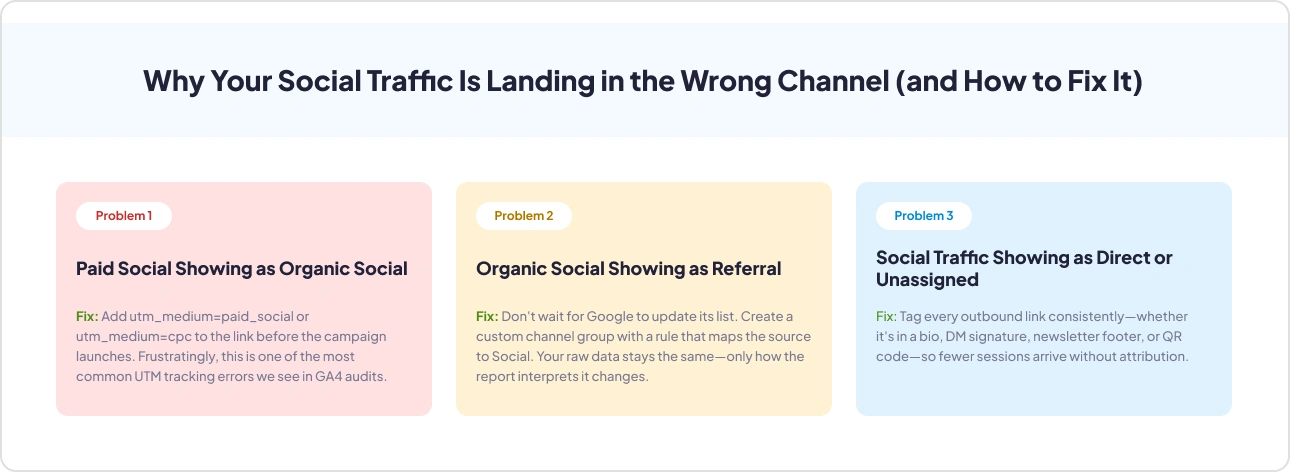
Why Your Social Traffic Is Landing in the Wrong Channel (and How to Fix It)
Three things cause almost every one of these tickets associated with organic social in Google Analytics, in our experience of auditing GA4 properties. Here's each one, and what actually fixes it.
Problem 1: Paid Social Showing as Organic Social
This is the classic "my ad spend isn't showing up anywhere" complaint. It usually shows up, just filed under Organic Social, because whoever built the campaign link forgot the paid UTM. GA4 saw a social source and no paid signal, so organic is where it landed. Simple mistake, expensive to leave unfixed.
Fix: Add utm_medium=paid_social or utm_medium=cpc to the link before the campaign launches. It's also, frustratingly, one of the top UTM parameters tracking errors in GA4 we see in almost every audit.
Problem 2: Organic Social Showing as Referral
This one isn't really your fault. Google hasn't added the source to its recognized list yet, or the traffic's coming through a subdomain, a link shortener, or a platform too new to be on the list (x.com, again).
Fix: Waiting for Google to update its list isn't a strategy. A custom channel group with an explicit rule pointing that source to Social is. Nothing about your raw data changes, only how the report reads it.
Problem 3: Social Traffic Showing as Direct or Unassigned
Nine times out of ten, it's dark social hiding behind the label. A DM, a messenger app, and an in-app browser- none of them pass along a referrer, so Direct is where GA4 dumps the session by default. Less often, it's a UTM that's half-broken, which lands specifically in Unassigned, GA4's real "couldn't match anything" bucket.
Fix: Tag every outbound link the same way, regardless of where it lives, bio, DM signature, newsletter footer, QR code, and fewer sessions arrive stripped bare.
Dark Social – the Social Traffic You Can't See
You'll sometimes see a spike in traffic right after posting something great on socials, and GA4 will have absolutely no idea where it came from. That's dark social. It's not an official GA4 term, just marketer shorthand for shares that happen off the open web: someone pastes your link into a DM, drops it in a group chat, or opens it inside whatever browser is baked into Instagram or TikTok that week.
As HubSpot explains, none of those carry a referrer. GA4 can't tag it as social because there's nothing there to tag, so it dumps the session into Direct, or Unassigned if the UTM was half-broken to begin with.
It is important to consider it because dark social eats your best content first. People don't forward links to things they don't care about.
Its total elimination isn't realistic. But tag consistently, on every bio, every post, every share button, and platforms that do pass a referrer will actually hand GA4 the UTM data it needs, instead of everything defaulting to Direct.
How to Track Organic Social Properly
Once you understand what does organic social mean in Google Analytics at the rule level, tightening up organic social in Google Analytics stops being a tooling problem. It becomes a discipline problem. Here's what that looks like in practice, not just in theory:
- Standardize UTMs before the link goes live. Every post, bio link, and shared URL needs the same UTM structure, so GA4 isn't left guessing at classification.
- Build a custom channel group if the defaults genuinely don't fit your traffic (new platforms, niche communities, link shorteners GA4 hasn't caught up to yet). A custom channel group with an explicit rule fixes how the GA4 report reads that traffic, without touching a single row of raw data.
- Bake paid-vs-organic separation into the campaign checklist, not the monthly audit. A missing utm_medium=paid_social tag is still the single most common reason ad spend quietly shows up as organic. Catching it at launch is cheap; catching it three months later means restating a quarter's worth of numbers.
- Judge each platform on engagement rate and conversions, not just sessions. An Instagram visitor and a LinkedIn visitor behave nothing alike once they land. A platform can pad your session count while contributing almost nothing to the pipeline, and sessions alone won't show you that.
- Re-check your custom channel group rules on a quarterly cadence. Google updates its recognized social-source list on its own schedule, not yours. A rule built six months ago might now be redundant, or it might be the only thing standing between a newly-added platform and a Referral bucket it doesn't belong in.
Audit Your Social Tracking Automatically
Every fix above- paid social hiding as organic, organic social landing in Referral, dark social piling up in Direct, comes down to catching a source/medium mismatch. Catching these Organic traffic gaps by hand means cross-referencing UTM links, source/medium reports, and channel rules one property at a time, which can easily take days and even weeks.
That's specifically why GAfix.ai built dedicated checkpoints for it. Traffic Source Effectiveness and Custom Channel Grouping, both under the Traffic & Campaign Tracking pillar, catch a paid campaign missing its name, a self-referral loop, a direct session landing on a paid page, or any of the source/medium mismatches walked through above.
Connect a property, and it audits both GA4 and GTM together, done in under two minutes. GTM doesn't even need a login since it's reading the public container, and GA4 stays strictly read-only. Nothing from either one gets stored once the report's generated; it's a read, check, and done.
Run Your Free GA4 Audit, or if you'd rather see what the output looks like first, check out a sample report before connecting anything.
Conclusion
Organic social in Google Analytics is a specific, rule-based channel. Nearly every "my social traffic looks wrong" complaint comes down to one of three things: paid links missing their tags, unrecognized sources landing in Referral, or dark social quietly showing up as Direct. Fix the tagging, map the exceptions, and your channel report finally starts matching reality.
Run a free GA4 audit and see where your own setup actually stands.
Frequently Asked Questions
What is an example of organic social?

Let’s say when someone taps a shared post on LinkedIn or clicks a link sitting in your Instagram bio, and no ad money is behind either one. GA4 sees the source as the platform itself, and files the whole session under Organic Social. That's really all Google Analytics organic social means.
How do I view social media traffic in GA4?
Reports › Acquisition › Traffic acquisition, then swap the primary dimension to Session default channel group (for the category view) or Session source/medium (for platform-level detail). That covers Google Analytics 4 track users from social networks for most day-to-day questions, and you don't need to build an Exploration just to get there.
Why is my social traffic showing as Direct?
Dark social, almost always. A DM, a messaging app, or an in-app browser quietly strips the referrer before GA4 ever gets a look at it, so there's nothing for GA4 to match against a social source. This is honestly the single biggest reason anyone types what does organic social mean in Google Analytics into a search bar.
Confident Decisions Start with Accurate Tracking
Ensure your GA4 and GTM are correctly configured, reliable, and ready for scale.
%20.webp)


_%20A%20Practical%202026%20Guide.webp)
Subscribe To Our Newsletter


