

What Google Analytics 4 Cannot Collect (and What You Must Never Send It)
Author
 Rakshita Jain5 Min
Reviewer
 Ayushi Saini
What cannot be collected by the default analytics tracking code?
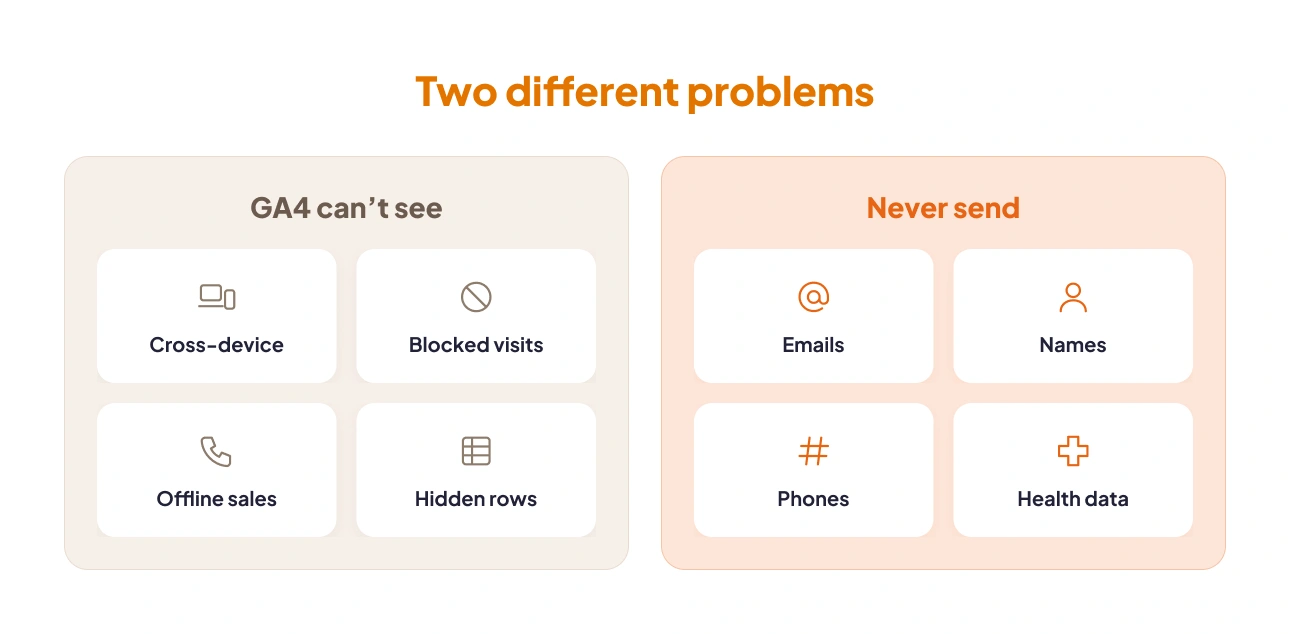
It splits into two separate lists. One list is data GA4 can’t see by itself (cross-device journeys without User-ID, visits where the tag never fires, offline sales, thresholded rows). The other is data Google won’t let you send at all. In audits, we often find teams worrying about the first list while the second quietly sits in their reports.
Why does the difference matter now? Because people on Reddit have reported receiving demand letters over their GA tracking, and “we’re probably fine” doesn’t hold up well in that conversation. So let’s pull the lists apart. After that, we’ll get into the Google Analytics privacy settings, then HIPAA, then how to inspect your own property.
Short on time? You can run a free GA4 and GTM audit instead. It takes about two minutes.
What GA4 Cannot Collect by Default?
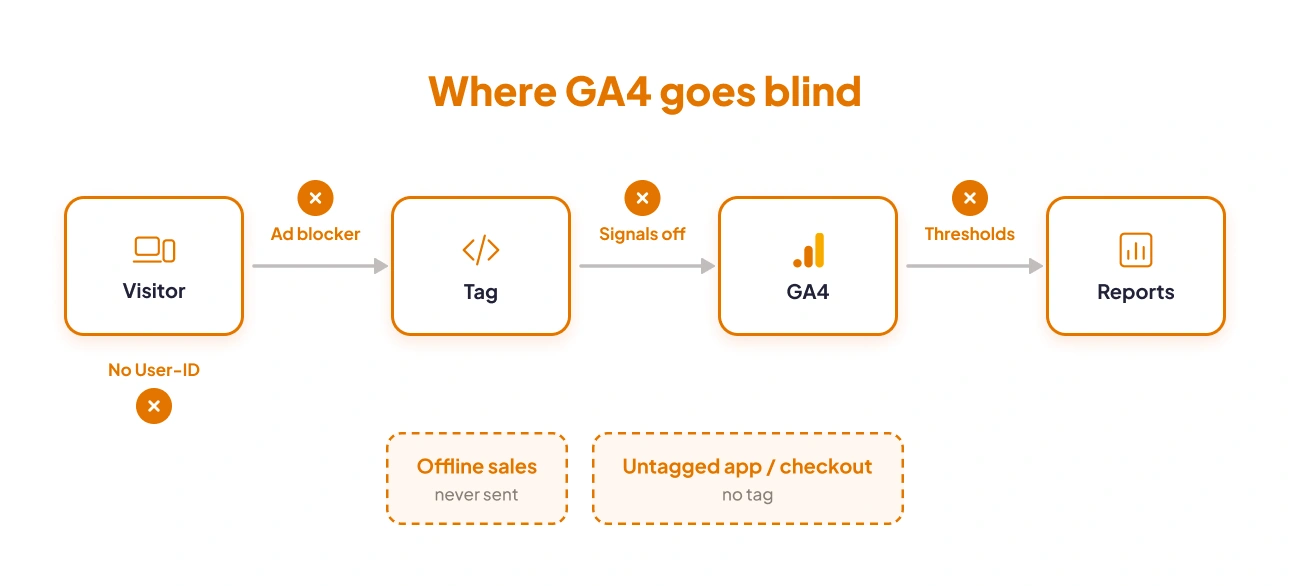
A standard GA4 tag that records activities of a browser (gtag.js or the Google tag in GTM) can not tell if the same person used two devices unless you send it a User-ID. Nor does it see sessions where it never fired, demographics with Google Signals switched off, or offline and server-side events you never pushed through Measurement Protocol. Systems that never load the tag stay dark too.
That’s the quick answer to what cannot be collected by the default analytics tracking code. Each gap, though, breaks your reports in its own way:
-
Cross-device behaviour without User-ID: GA4 counts browsers. The client ID lives in the _ga cookie. Browse on your phone at lunch, buy on your laptop at night, and you’re two users as far as GA4 knows. Pass a user_id when people log in, and GA4 can stitch the two together. Without it, it can’t.
-
Visitors GA4 never hears from: Some visits simply don’t reach GA4. An ad blocker can stop the tag from loading, a visitor can click “reject” on your cookie banner, or a broken script can stop the tag before it runs. If you use Consent Mode in Advanced mode and your property meets Google’s eligibility thresholds, GA4 models some of the visits from people who declined cookies. Those are estimates, not real visits. Visits lost to ad blockers or broken scripts aren’t modelled at all.
-
Demographic and interest data when Google Signals is off: Age, gender, and interests are borrowed from people’s signed-in Google accounts. Switch Signals off, and those reports simply go blank.
-
Data below reporting thresholds: Small rows get held back on purpose. We’ll come back to this one, because it fools a lot of people.
-
Offline and server-side events: Phone sales, CRM deals marked done, refunds pushed from your backend- none of it touches a browser. You’d have to send it in yourself.
-
Anything outside the tagged surface: A native app with no Firebase SDK. A third-party checkout on someone else’s domain. Email opens. If the tag isn’t there, the data isn’t either.
Hidden data isn’t lost data
Here’s the one we see misdiagnosed most. Google’s GA4 data thresholds documentation explains that GA4 suppresses rows in reports and explorations that include demographics or search query data when the user count is low enough that someone might be able to identify an individual. You can’t change those thresholds. Google sets them.
So the data exists. GA4 just isn’t showing it to you. There’s a data quality indicator at the top of the report that says when thresholding has been applied. Widen the date range or remove the demographic dimension, and the rows should come back. Numbers that disappear the moment you add Age or Gender? That’s thresholding. Your tag is fine.
What Google Prohibits You From Sending: PII
On PII (Personally Identifiable Information), Google is unusually strict. Its policy bars you from sending Analytics anything Google could use or recognise as personally identifiable information.
In its guide to avoiding PII, Google names email addresses, personal phone numbers, and government ID numbers, and it wants anything visitors type stripped out before Analytics ever gets it.
Most sites don’t send PII on purpose. It slips in through everyday setup: URLs, page titles, and form behaviour that nobody thought to check.
These are the routes we run into again and again in audits:
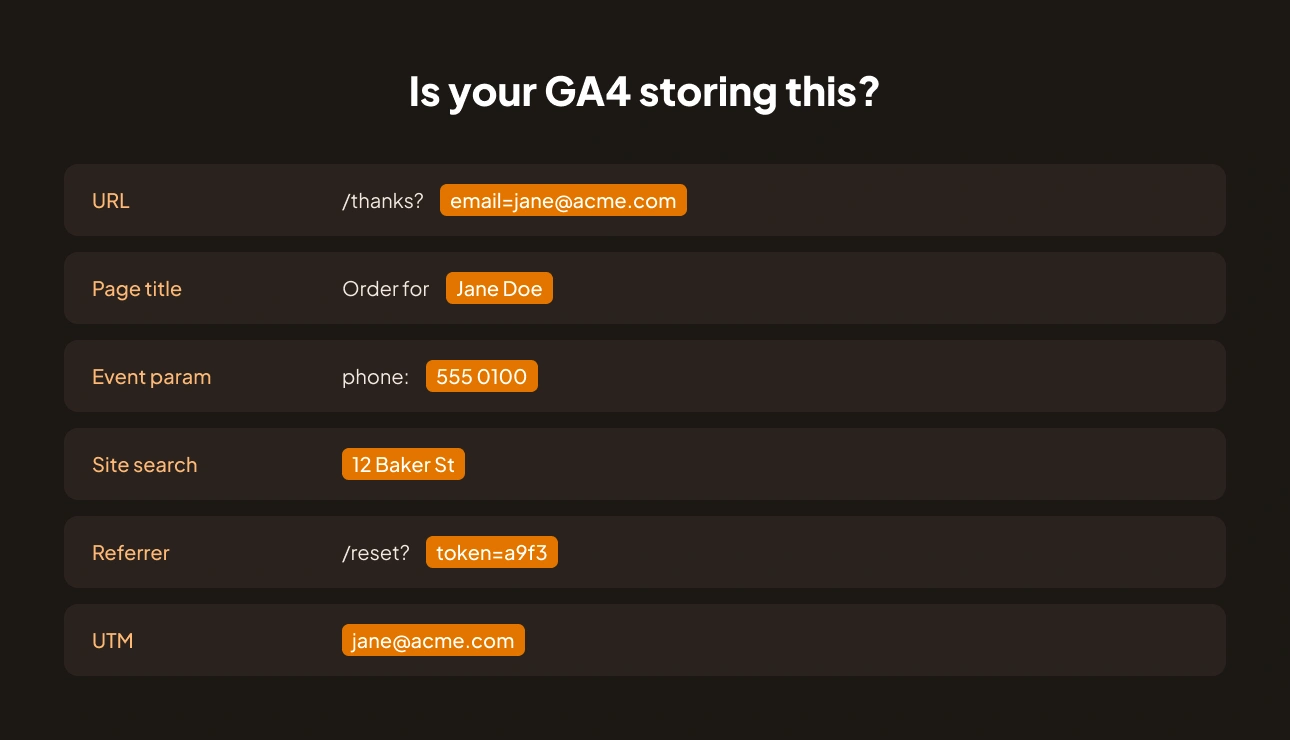
- Email addresses in page URLs: Start with your thank-you page. If the form submits using the GET method, the fields are appended to the URL, and GA4 happily stores /thanks?email=jane@acme.com as page_location.
- Names and order details in page titles: “Order #48213 for Jane Doe”. “Welcome back, Priya”. Templates like these go straight into page_title on every pageview.
- User identifiers in event parameters: This one rarely looks like a mistake at the time. Email or phone gets added to the dataLayer for the CRM. Then a GTM variable that forwards every key passes it to GA4 as a custom parameter.
- Search terms containing personal data: search_term is captured word for word. People type their order numbers into site search. Some type their home address.
- Full URLs captured in referrers: Password reset links, magic login tokens, and webmail URLs can turn up in page_referrer with the identifier still attached.
- UTM parameters: Some email tools merge the subscriber’s address into utm_content. Every click then hands that address to GA4.
What happens when PII lands in your property
Google’s terms don’t allow PII, so once it’s in, you have to remove it. But it can’t remove just the bad entries. It wipes the entire field for the dates you pick, good data included. And if PII keeps coming in, your account could be suspended.
Still, Google isn’t the party you should worry about most. PII stored in an analytics tool is exactly what shows up during GDPR and CCPA requests, and it’s often what legal complaints point to. GA4 does offer data redaction for web streams. But Google itself calls that best-effort, so don’t rely on it alone. If your real issue is consent rather than PII, our guide to setting up Consent Mode and cookieless tracking covers that.
Is GA4 HIPAA Compliant?
No. Google’s own HIPAA and Google Analytics page says it “does not offer Business Associate Agreements in connection with this service,” and tells HIPAA-regulated entities not to expose any data that could be considered PHI to Google.
So when a healthcare marketer asks if GA4 is HIPAA compliant, that missing contract is really the entire answer. Under HIPAA, a vendor handling PHI for a covered entity counts as a business associate, and a signed Business Associate Agreement (BAA) has to be in place first. Google won’t sign one for Analytics, and configuration can’t change that.
Google’s guidance is also stricter than many teams realise:
- Authenticated pages are out: Patient portals and other logged-in areas are likely HIPAA-covered. Google’s instruction is to keep GA tags off them.
- Some public pages may be covered too: Pages that don’t need a login but relate to health care services (booking an appointment, a symptom checker) are more likely to be covered as well.
- Cookie banners do not fix it: HHS says plainly that a consent banner isn’t a valid HIPAA authorisation.
What triggered the current wave
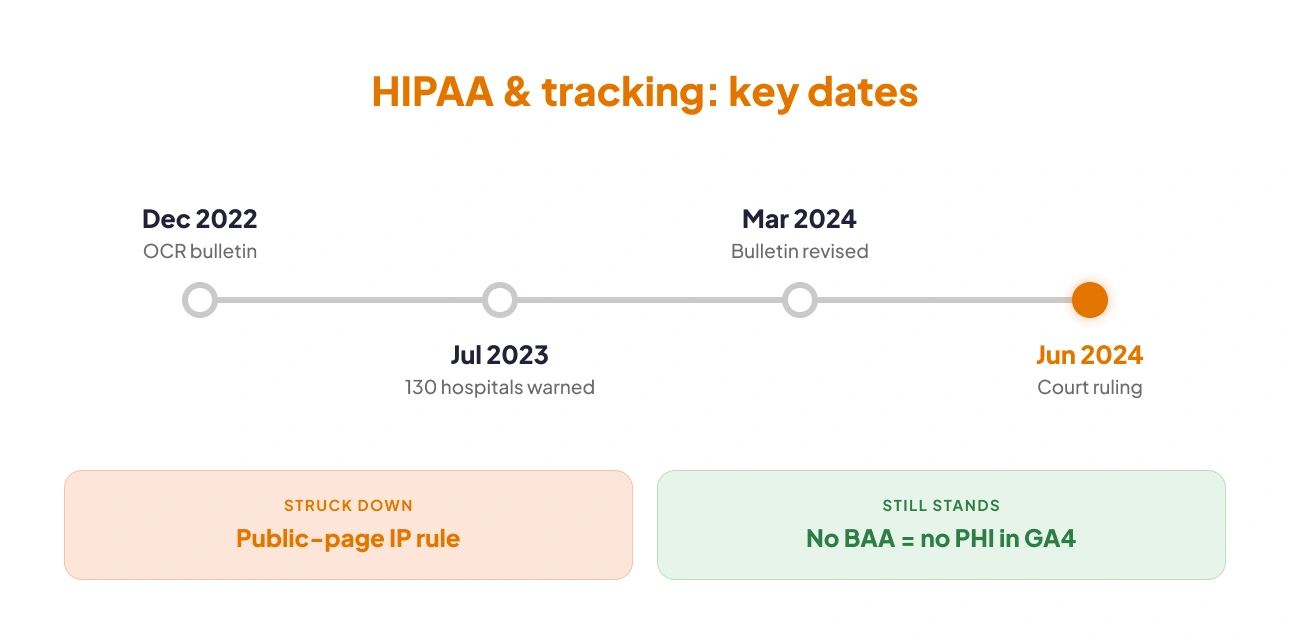
The Office for Civil Rights (part of HHS) put out its bulletin on the use of online tracking technologies by HIPAA covered entities in December 2022. A revised version followed in March 2024. Between those dates, in July 2023, OCR and the FTC sent a joint letter to approximately 130 hospital systems and telehealth providers about tracking pixels.
There’s a caveat worth knowing. A federal court ruled in June 2024, in American Hospital Association v. Becerra, and vacated the part of the bulletin that said identifying data like an IP address, combined with a visit to a public health-related page, counts as protected health information. The guidance on logged-in pages wasn’t touched, and neither was the need for a Business Associate Agreement (BAA), which Google doesn’t sign for GA. None of this is legal advice, by the way. Your counsel should confirm what applies to you.
How to Make Google Analytics HIPAA Compliant
People search how to make Google Analytics HIPAA compliant hoping for a settings checklist. We’d love to give you one, but it doesn’t exist. There’s no setting, plugin, or proxy that lets GA4 receive PHI, because the missing piece is a contract, and Google doesn’t sign it. Any vendor claiming otherwise deserves some hard questions.
That leaves you with two practical options:
- Keep PHI out of GA4 entirely. Limit GA4 to pages and events where PHI has no way in, and keep checking that stays true.
- Use a platform that signs a BAA. HHS points out that a Customer Data Platform working under a BAA can de-identify data before it reaches a vendor like Google. The other route is moving healthcare tracking to an analytics tool that will sign.
If you go with the first option, here’s what it takes:
- No identifiers in URLs: Patient IDs, appointment IDs, condition slugs, emails- none of them belong in page_location, page_title or page_referrer.
- No PHI in event parameters: Go through every custom dimension and every dataLayer push looking for health, identity or appointment details.
- Scrub before the hit is sent: Redacting in GTM or a server-side container happens before Google sees anything. Deletion requests come later. Google already has the data by then.
- Keep checking after launch: One new form or one CMS template change can bring identifiers back overnight.
To be clear, GAfix doesn’t make a website HIPAA-compliant on its own. What it does is check whether personal identifiers are appearing in your GA4 and GTM setup. That’s the kind of evidence the first option depends on.
Find out if identifiers are leaking into GA4 before someone else does. The GAfix audit reads your configuration in about two minutes, read-only, and changes nothing. Check my GA4 setup →
The GA4 Privacy Settings That Change What Gets Collected
A few settings in Admin control how much Google Analytics privacy you actually get, and none of them are free. Every toggle costs you something in reporting. Most guides list the switch and move on. We’d rather tell you what breaks:
-
Google Signals: Turned on, you get demographics (Age, Gender, Interests) and bigger Ads remarketing audiences, based on people signed in to Google. Turned off, those demographic reports empty out and your audiences shrink. Note that Signals no longer powers cross-device stitching in GA4 reports. That now comes from User-ID and device data.
-
Data retention: Out of the box, a standard property keeps 2 months, and 14 months is the max. That limit only applies to user- and event-level data in Explorations and funnels, so standard reports look fine while your year-over-year exploration comes back empty. Empty Explorations are one of the usual reasons why GA4 stops showing data.
-
IP handling: GA4 doesn’t log or store IP addresses. It uses the IP to work out location at collection time and then throws it away. If you want more privacy, you can also switch off city-level location and detailed device info (like phone model or screen size) for specific regions. Just know those details will then show up blank in your reports.
-
Data redaction: GA4 can redact likely email addresses in any event parameter, plus the page URLs query parameters you specify, before the data is sent to Google. It’s web-only; it won’t catch names, phone numbers or order details, and it doesn’t apply to Measurement Protocol hits. Google also calls it best-effort, so treat it as a safety net, not your main PII defence.
-
Data sharing settings: These account-level toggles decide whether Google may use your data for its own products, benchmarking, and modelling. Switching them off doesn’t affect what you collect. You do lose some benchmarks and modelled insights.
-
Data Processing Amendment: Accept the Data Processing Terms under Account settings, and Google becomes your processor for GDPR purposes. That’s a contractual change. The data flowing in stays the same, so it won’t help with PII or PHI that’s already there.
Consent is a separate job. Consent Mode controls how your tags behave based on what each visitor agrees to: whether they fire at all, or send limited, cookieless data instead.
How to Check Whether Your GA4 Is Collecting Something It Should Not
Plenty of pages explain the rules. Almost none show you how to look inside your own property, which is the only way to answer the question you came here with. You can start today with Viewer access and GTM Preview. Nothing else needed.
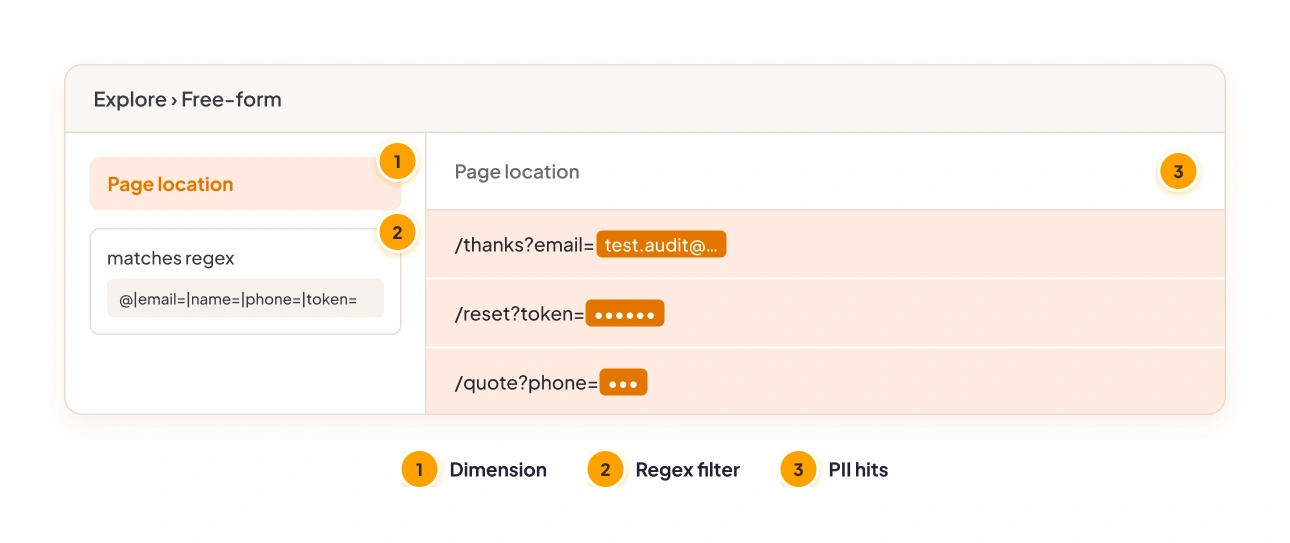
- Search page paths for “@”. Go to Explore and create a free-form exploration. Add the dimension Page location (the full URL, including everything after the “?”). Filter it with the regex @|email=|name=|phone=|token=. Any hit is worth checking. Most will be PII.
- Scan page titles for names and order numbers. Filter page titles for terms like “order”, “welcome,” and “Hi” (with a space, so you don’t match words like “this”). Also check the templates for account and order-confirmation pages.
- Submit a test form while watching Realtime. Use a throwaway address such as test.audit@yourdomain.com. Then look for it in Realtime or DebugView, and in the thank-you page URL.
- Inspect event parameters in DebugView. With GTM Preview or the GA Debugger extension running, sign up, search, and buy something, then read every parameter on every event.
- Review custom dimensions and user properties. Under Admin, Custom definitions, anything called email, phone, user_name, or similar deserves a close look.
- Check search_term and UTM values. Export the last 90 days of site search terms and campaign parameters, then search them for email patterns.
Automate the checks you cannot run every week
Manual checks tell you about today. They won’t catch next Tuesday’s template release. Nor will they spot a tag that starts firing before a visitor has made a consent choice, or one that carries on after they’ve said no.
This is the part worth automating. Run a free GA4 and GTM audit and GAfix checks your configuration against 44 checkpoints across GA4, GTM, and compliance, in roughly two minutes. It’s read-only. Nothing gets stored, nothing gets changed. If you want it watched week to week, continuous consent and privacy monitoring runs those checks on a schedule. You get an alert when tracking fires before consent, or after someone rejects it.
Find out what your GA4 is collecting right now. 44 checkpoints, about two minutes, read-only.
Run a free GA4 and GTM audit → ·
Frequently Asked Questions
On its own, the default GA4 tag can’t collect cross-device identity without a User-ID, sessions where the tag is blocked or never fires, demographics while Google Signals is off, or offline and backend events unless you send them through the Measurement Protocol or Data Import. It also misses anything in systems that don’t load the tag, and thresholding can hide rows it did collect.
No. GA4 isn’t HIPAA compliant because Google doesn’t offer a Business Associate Agreement for Google Analytics. HIPAA requires a BAA before any vendor handles PHI for a covered entity, and Google’s own documentation tells HIPAA-regulated organisations to keep PHI away from Google and keep GA tags off authenticated pages.
Google treats PII as anything that can identify, contact or precisely locate a person on its own: email addresses, full names, phone numbers, postal addresses, government ID numbers and precise location such as GPS coordinates. Identifiers like IP addresses and cookie IDs aren’t PII under Google’s policy, but privacy laws like GDPR can still treat them as personal data.”
You’ve breached the Google Analytics Terms of Service, and the usual fix is a data deletion request that wipes the affected parameter for the whole date range you choose. Repeat violations can get the account suspended. Your business carries the bigger risk, in the form of privacy requests, regulatory complaints, and demand letters.
You find out by inspecting the data itself, not by reading your settings. Search page paths and titles for “@” and identifier parameters, submit a test form while Realtime is open, and read event parameters in DebugView. Want all 44 checkpoints covered in one go? Run the free GAfix audit.
Confident Decisions Start with Accurate Tracking
Ensure your GA4 and GTM are correctly configured, reliable, and ready for scale.
Related Posts
- Data Analytics

Events vs Goals in Google Analytics: How GA4 Changed Conversion Tracking
Understand how Google Analytics 4 replaces Goals with events and conversions, and how to avoid tracking mistakes.
 Justin Gomes7 Min
- Data Analytics

What Are Website Traffic Sources and Why They Matter for Your Business
This blog explains what website traffic sources are, why they matter, and how businesses can track and optimize them to drive better growth.
 Madiha Khan6 Min Read
- Data Analytics
Is Google Analytics Free? What You Can (and Can’t) Do in GA4
This blog explores whether Google Analytics 4 (GA4) is truly free, what features you get with the standard version, what’s limited, and when upgrading to GA4 360 makes sense.
Madiha Khan7 Min Read