

How to Track Subscription Revenue in GA4 (Including the Renewals It Misses)
Author
 Geetanjali Khatri8 Min Read
Reviewer
If you run a subscription business, GA4 is probably underreporting your revenue. The reason is simple: GA4 subscription revenue tracking only captures payments that happen in a browser, and renewals never do.
Your customer pays once on your website, and GA4 records it. After that, your payment provider charges every renewal in the background, so it never reaches GA4. Add a few duplicate purchases, and your reports drift even further from what your processor shows.
This guide explains why it happens and how to fix it in three steps: deduplicate purchases, send renewals server-side, and connect them with User-ID. You will also see results from a real engagement, where GA4 went from capturing 46% of revenue to 96%.
Want to check your own GA4 subscription revenue tracking first? Run a free GA4 and GTM audit.
Why GA4 Misses Subscription Revenue by Default
A renewal is processed on your payment provider’s servers, not in your customer’s browser. On the renewal date, Stripe charges the saved card in the background. No page loads, no tag fires, and nothing reaches GA4.
That single fact is why GA4 subscription revenue tracking breaks by default. Your GA4 tag only sees what happens in a browser, and a renewal never touches one. If you have ever searched for “GA4 not tracking subscription renewals," this is the answer you were looking for.
For a subscription business, the consequence is stark. The first payment is tracked because your customer completed checkout on your site. Every payment after that is not. When your model is recurring revenue, that untracked tail is most of your revenue.
And that tail matters more each year. Zuora’s 2025 Subscription Economy Index reports that subscription companies grew revenue 16.5% in the prior year, faster than the S&P 500. The more of your business that renews, the more GA4 subscription revenue tracking falls behind reality.
Why does nobody notice? The website looks fine because the website is fine.
The Two Errors That Hide Each Other
Most teams go looking for one problem. Subscription businesses usually have two, and they pull in opposite directions.
The first error inflates revenue. GA4 duplicate purchase events appear when one payment is counted twice, usually because the thank-you page re-renders and the browser generates a fresh ID. The second error deflates revenue. Renewals never arrive at all, as you just saw.
When both are present, they partly cancel out. The mismatch between GA4 and your processor looks like one moderate problem. In reality, it is two large ones pushing against each other. That is how GA4 subscription revenue tracking can look roughly right while being wrong in both directions at once.
We saw exactly this in a SaaS subscription engagement in September 2026. Several freelancers had investigated the gap before us. Each one checked the total, found it roughly plausible, and stopped. The errors survived because they were hiding each other.
Stopping at “roughly plausible” is expensive. Gartner’s data quality research put the average annual cost of poor data quality at $15 million per organization in its 2017 survey. Every wrong number ends up in a budget decision somewhere.
So here is the first rule of GA4 subscription revenue tracking: never reconcile on the total. Reconcile transaction by transaction. Match each payment in your processor to a transaction_id in GA4, and list what is missing and what appears twice. Compare only sums, and you will chase a net figure that is wrong in two directions.
Fix the Duplicates First: Use a Transaction ID the Browser Cannot Change
GA4 deduplicates purchases that share a transaction_id. The catch is that the ID has to stay the same. Many setups generate it in the browser, from a timestamp or a random string, so it changes every time the confirmation page re-renders. GA4 reads one payment as two, and your revenue inflates.
The fix for this half of GA4 subscription revenue tracking is to stop inventing IDs. Use the one your payment provider already created. For Stripe, that is the invoice ID (in_…). It is unique per payment, it never changes, and it is the same ID your finance team sees.
Ask your developer to push it into the purchase data layer like this (values are examples):
window.dataLayer = window.dataLayer || [];
window.dataLayer.push({ ecommerce: null });
window.dataLayer.push({
event: 'purchase',
user_id: 'usr_8841',
ecommerce: {
transaction_id: 'in_1Q8xYz2eZvKYlo2C', // Stripe invoice ID
value: 49.00,
currency: 'USD',
items: [{
item_id: 'pro_monthly',
item_name: 'Pro plan (monthly)',
price: 49.00,
quantity: 1
}]
}
});
Then map it in Google Tag Manager:

Now the half most guides skip. If you run a server container, check where your Google Ads conversion fires. Many accounts fire it from a browser tag and a server tag. Same payment, two conversions. Consolidate Google Ads conversion tracking into the server container and remove the browser copy. This is what advanced conversion tracking GA4 setups get right: one payment, one ID, one tag that sends it.
Order matters here. Deduplicate before you add renewals. If you add correct renewal data on top of inflated data, you cannot tell which change moved which number, and your GA4 subscription revenue tracking stays untrustworthy. Duplicates are one of several other GA4 event tracking errors worth ruling out at the same time.
Send Renewals to GA4 With the Measurement Protocol
With duplicates gone, your GA4 subscription revenue tracking is ready for the revenue GA4 never saw. Since renewals happen on a server, you send them from a server. The chain looks like this:
Payment provider webhook → server-side GTM → GA4 via the Measurement Protocol
Stripe tells your server-side GTM container that a payment happened. The container checks it, shapes it into a GA4 purchase event, and sends it through the GA4 Measurement Protocol. No browser is involved at any step, which is exactly why this works for GA4 subscription revenue tracking.
Which webhook to listen for
Subscribe to Stripe’s invoice-paid event. Every subscription charge produces an invoice, so this one event covers every renewal. Four fields must travel from the payload into GA4:
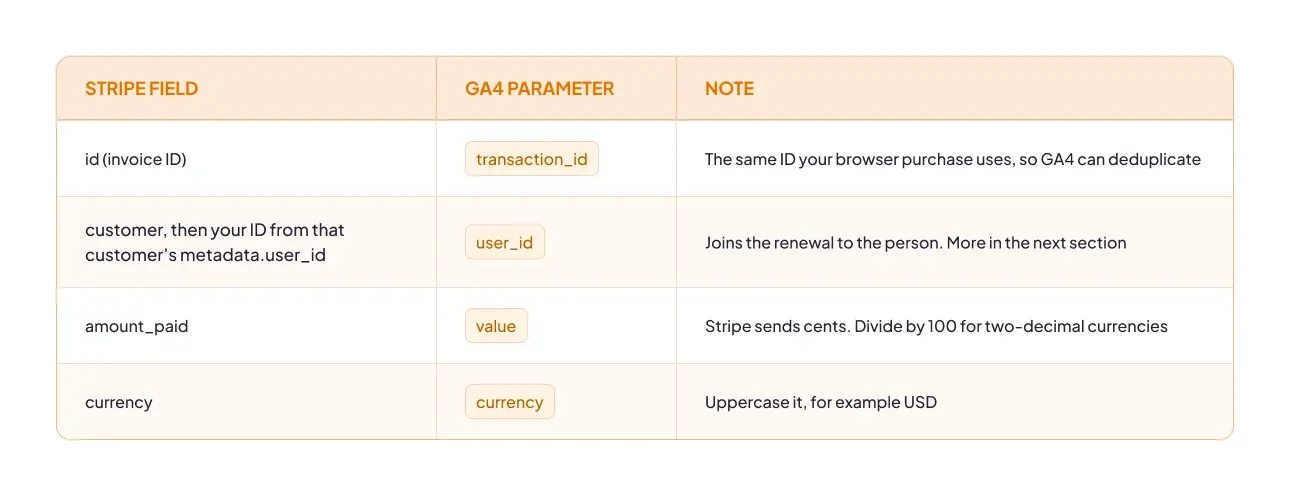
Skip any invoice where amount_paid is 0. That is a free trial, not revenue.
The filter almost everyone misses: billing_reason
Every Stripe invoice carries a billing_reason field. The first payment of a subscription arrives as subscription_create. Each renewal arrives as subscription_cycle.
This matters because invoice-paid fires for both. Your website already tracks the first payment in the browser. If your webhook forwards every paid invoice, each first payment is counted twice: once by the browser, once by the server. You have just recreated the duplicate problem you fixed in the last step.
So add one condition in your server container: only send the event when billing_reason equals subscription_cycle. Genuine renewals go to GA4. First payments stay with the browser tag that already captured them. That single rule is what keeps your GA4 subscription revenue tracking honest in both directions.
Here is what the Measurement Protocol request carries for one renewal (values are examples):
POST https://www.google-analytics.com/mp/collect?measurement_id=G-XXXXXXX&api_secret=YOUR_API_SECRET
{
"client_id": "1234567890.1712345678",
"user_id": "usr_8841",
"events": [{
"name": "purchase",
"params": {
"transaction_id": "in_1Q9aBc3eZvKYlo2C",
"value": 49.00,
"currency": "USD",
"billing_reason": "subscription_cycle"
}
}]
}
Sending billing_reason as a custom parameter also lets you split new versus renewal revenue in your reports later.
The honest limitation
Events sent through the Measurement Protocol have no session. GA4 has no browser visit to attach them to, so a renewal shows (not set) for session source/medium. The revenue is now correct, but session-level attribution is not, and no tag setting will change that. What you can do is report renewals by the customer’s original acquisition channel, which is what the next section sets up.
You do not need to rebuild your stack from scratch for any of this. If you have not done it yet, set up a server-side GTM container first, then add a custom webhook client and a Measurement Protocol tag on top. Server-side GTM has no built-in Stripe client, and its standard GA4 tag sends through GA4’s normal collection endpoint, not the Measurement Protocol.
Stitch User-ID Across Browser, Server and Your Payment Provider
GA4 normally recognizes people by client_id, a cookie value stored in one browser. That works for anything a browser sends. A renewal comes from Stripe’s servers, so it has no browser and no cookie to belong to. Without something better, every renewal is an orphan.
The something better is User-ID: your own internal identifier for a customer, the same everywhere. When the browser, the server, and Stripe all know it, GA4 can tie a renewal to the person who first signed up. The renewal still shows (not set) for session source/medium, because it has no session. But with User-ID in place, you can report renewals by First user source/medium and First user default channel group, which are user-scoped. This is the step that turns GA4 subscription revenue tracking from correct totals into correct attribution at the user level.
The identifier has to exist in three places:
- The dataLayer, on signup and on every login. Push user_id as soon as the person is known, before the purchase event fires.
- A GTM variable carried across client and server events. Read user_id in your web container, send it with every event to the server container, and set it on every GA4 tag there, including the renewal tag.
- Your payment provider’s customer record. When you create the Stripe customer, write your ID into its metadata as user_id. That is how the webhook knows who renewed.
Now check every way a person can sign in, because GA4 subscription revenue tracking is only as complete as your weakest login path. Email and password, Sign in with Google, Sign in with Apple: each one is a separate code path, and each one must push the same user_id. A User-ID that only fires on email login gives you a partial join, and the gap looks like random attribution noise.
Finally, clear user_id on logout. On shared devices, a forgotten ID attaches the next person’s activity to the previous customer, which quietly corrupts the data you just fixed.
What Changed: Revenue Coverage From 46% to 96%
These three fixes are not theory. We applied them, in this order, for a SaaS subscription business billing through Stripe in September and October 2026. Here is a single day before the work and a single day after it:
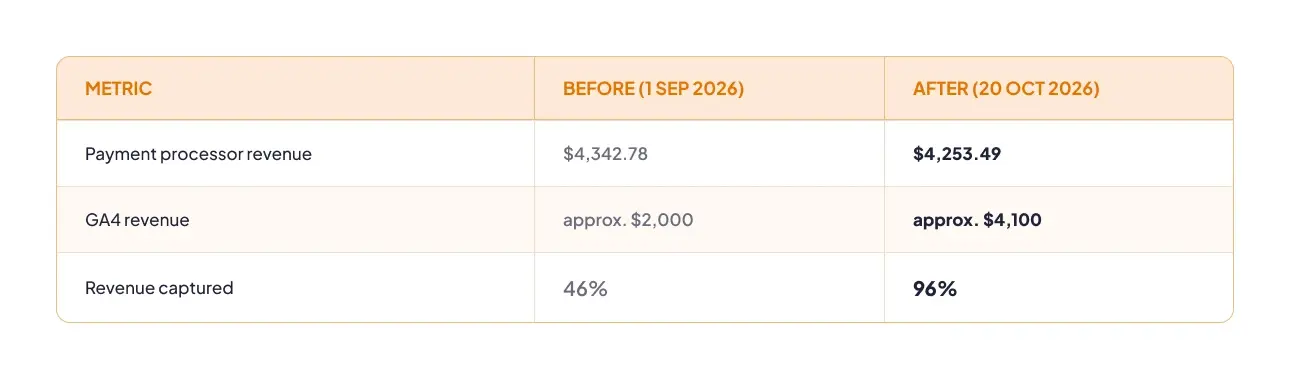
On the first day, GA4 saw less than half of what the business actually collected. On the second, it saw almost all of it. Notice that the processor figure barely moved. The business did not suddenly earn more. GA4 simply started seeing what was already there.
One good day can be luck, so we checked the full reporting window too. Across the period, GA4 sat within roughly 1–2% of the processor. That is the level at which GA4 subscription revenue tracking becomes something you can plan a budget on.
The overall GAfix tracking health score for the property moved from 54 to 70. The full implementation took two weeks, including testing and handover to the client’s team.
The lesson is not the size of the jump. It is the order: duplicates first, renewals second, and identity third. Each step was measurable on its own, so every change in the numbers had a known cause. That is what makes GA4 subscription revenue tracking trustworthy rather than just bigger.
If you want the client context, timeline, and decisions behind these figures, you can read the full engagement.
Why Your ROAS May Drop After You Fix This
Here is the part nobody warns you about. After the fix, the same client’s reported return on ad spend went down, not up:
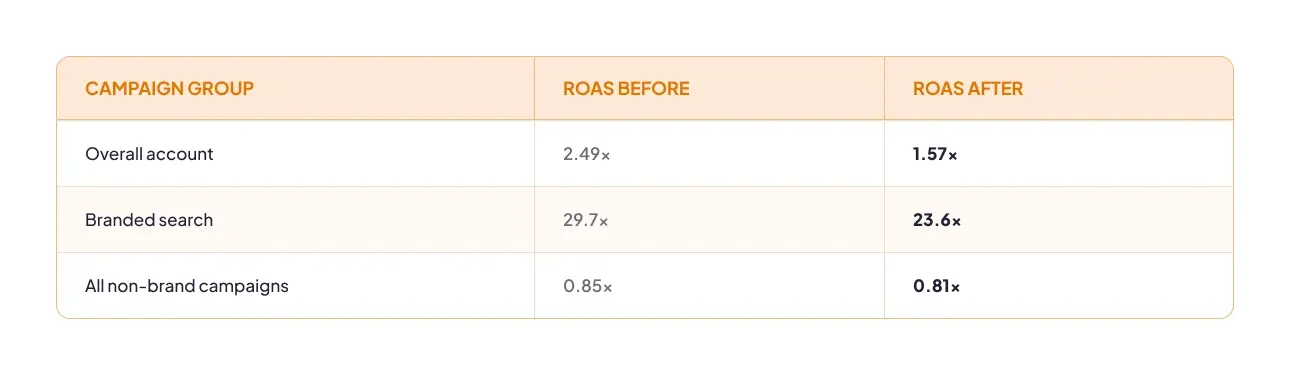
That looks like bad news for your GA4 subscription revenue tracking. It is not. The earlier figure was inflated by duplicate purchases, each one adding revenue that was never collected. The campaigns did not change. The measurement did.
Branded search moved the most, and that makes sense. People who search your brand name are often existing customers coming back to log in or pay. Repeat customers triggered the most duplicate purchases, so branded search was carrying the most phantom value.
One honest caveat: ad spend also rose 47% over the same window. Higher spend changes marginal efficiency on its own, so not all of the ROAS change comes from the tracking fix. Both effects are in these numbers.
The takeaway is simple. When reported performance drops right after a tracking fix, check whether the old number was ever real before you treat it as a regression. Accurate GA4 subscription revenue tracking sometimes delivers smaller numbers. They are the numbers your bidding should have used all along.
How to Check Whether This Is Your Problem
You can test your own GA4 subscription revenue tracking in five minutes, with two manual checks.
-
Compare one day. Pick a recent day. Note total revenue in your payment processor, then GA4’s purchase revenue for the same day and time zone. A gap tells you something is wrong, but not what, because duplicates and missing renewals net out in the total.
-
Match transaction IDs. Export the payment IDs from your processor and the transaction_id values from GA4 for the same day. IDs appearing twice in GA4 are duplicates. Processor IDs missing from GA4 are lost renewals.
Then go wider. Missing renewals rarely travel alone. The GAfix audit runs 44 checkpoints across your GA4 property, your GTM setup, and your consent configuration in about two minutes. It is read-only: nothing is stored, and nothing in your property or container is changed. You get a health score and a ranked list of what is hurting your GA4 subscription revenue tracking, and our team can help you fix it properly.
Every Renewal Counts
Your subscribers keep paying you month after month. Your analytics should keep counting them too. Fix the duplicates, send renewals from the server with a billing_reason filter, and stitch User-ID everywhere. That is the whole path to GA4 subscription revenue tracking you can actually make decisions on.
If you would rather not build it alone, GAfix can help. Our team handles server-side tracking and full e-commerce tracking implementation, so your GA4 subscription revenue tracking matches your processor and stays that way.
Start with the facts. Run a free GA4 and GTM audit today and see exactly what your setup is missing.
Frequently Asked Questions
GA4 does not track subscription renewals because they are processed on your payment provider’s servers, with no browser involved, so no tag ever fires. The first payment happens on your site and is tracked. Every renewal after it is invisible until you send it server-side, which is why GA4 subscription revenue tracking needs a server component.
You send subscription revenue to GA4 by forwarding your payment provider’s webhook through server-side GTM to GA4 with the Measurement Protocol. Listen for invoice.paid, pass the invoice ID, user_id, value and currency, and only forward invoices where billing_reason is subscription_cycle.
Your ROAS dropped because the earlier figure included duplicate purchases that were never real revenue. The new, lower number is the one your bidding should have used all along. Check whether spending changed in the same window too, since that also affects efficiency.
Yes, you need server-side GTM for the renewal half of this fix, because renewals only exist on a server. Deduplication works in your web container alone, but complete GA4 subscription revenue tracking depends on webhooks, and receiving webhooks needs a server. If you are starting from zero, set up a server-side GTM container first.
Confident Decisions Start with Accurate Tracking
Ensure your GA4 and GTM are correctly configured, reliable, and ready for scale.
Related Posts
- Best Practices

Do You Need a GA4 Consultant? 19 GA4 Tracking Problems and Who Fixes Each
Not every GA4 tracking problem needs a consultant. 19 common issues sorted into what you can fix yourself, what needs GTM skills, and what needs an engineer.
Geetanjali Khatri - Best Practices
GA4 Not Showing Data? 12 Reasons Google Analytics 4 Isn’t Tracking Your Website
Whether it never tracked or suddenly stopped changes the cause. 12 reasons, ordered by how often each one is the culprit.
Geetanjali Khatri8 Min Read - Best Practices
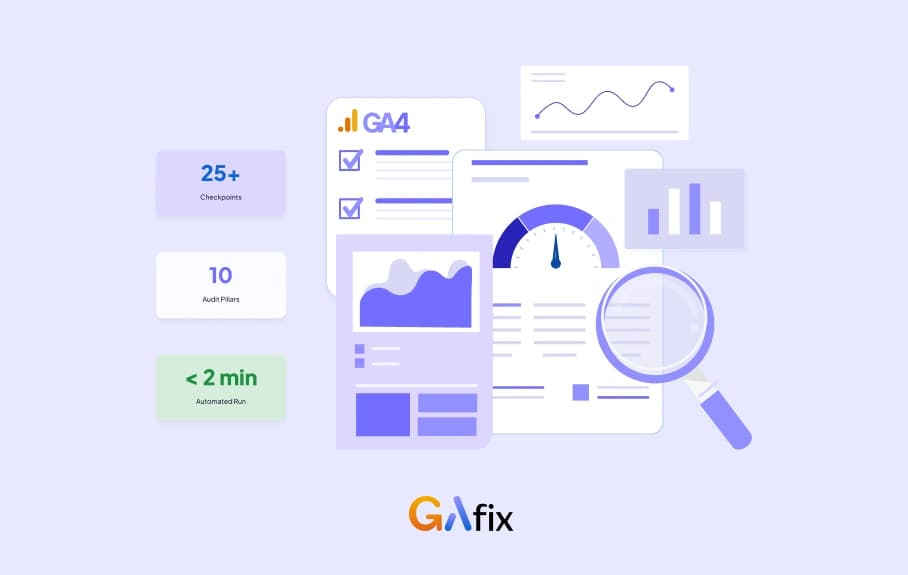
Google Analytics Audit Template: The Free GA4 Checklist (2026)
Get a free Google Analytics (GA4) audit template built on a real 10-pillar, 25+ checkpoint framework - plus a live way to run it in under 2 minutes.
Geetanjali Khatri8 Min Read