

Do You Need a GA4 Consultant? 19 GA4 Tracking Problems and Who Fixes Each
Author
 Geetanjali Khatri
Reviewer
 Rakshita Jain
A quarterly budget review is the worst place to discover your data is wrong. Yet that is where many teams first ask, “Do I need a GA4 consultant?” It usually happens when GA4 shows paid search returning almost nothing, while sales and finance report a strong quarter. One report says to cut the budget. The other says scale it.
The real cost is not the broken report. It is the decision made on top of it: a profitable campaign paused, a weak channel funded, or a forecast built on inflated revenue.
Before you ask, “Do I need a GA4 consultant?" find out where the fix lives. This guide sorts 19 common GA4 tracking problems into three tiers, so you can place your own before spending anything. For a head start, run a free GA4 and GTM audit.
Do You Need a GA4 Consultant? The Short Answer
You need a GA4 consultant only when the fix lives outside the GA4 interface. If you can repair it in GA4 settings, do it yourself. If it lives in Google Tag Manager, you need GTM skills. If it lives in code, a platform, or a CRM, you need an engineer.
That single rule answers “do I need a GA4 consultant?” for almost every case. It also gives us three tiers:
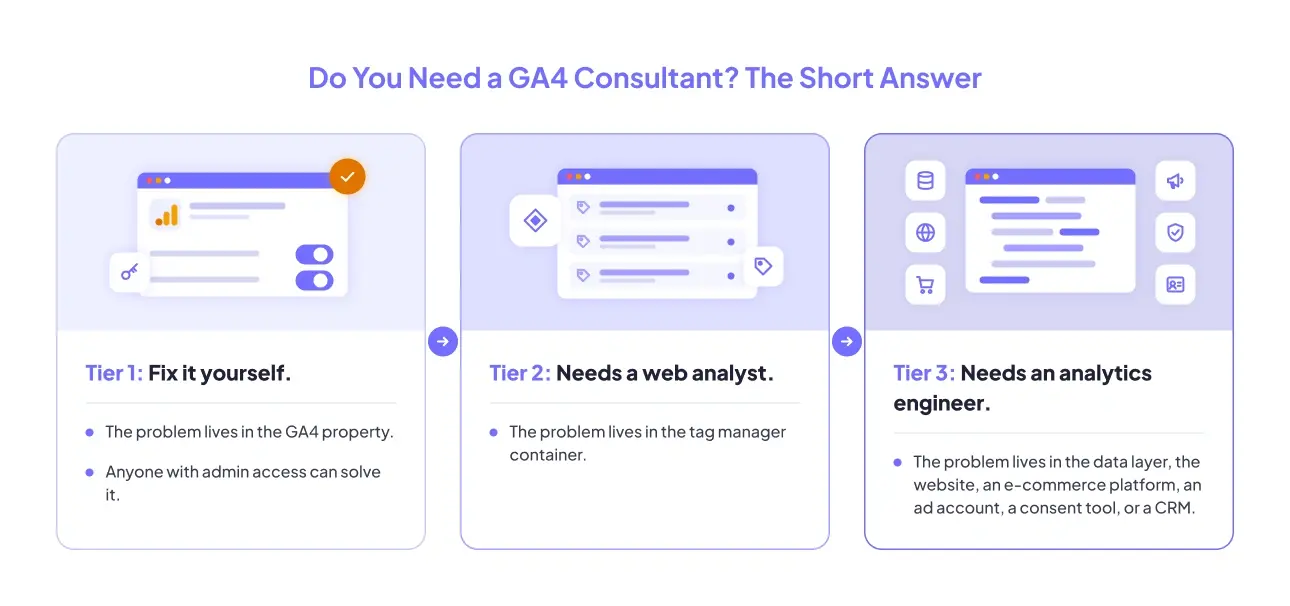
Tier 1: Fix it yourself. The problem lives in the GA4 property. Anyone with admin access can solve it.
Tier 2: Needs a web analyst. The problem lives in the tag manager container.
Tier 3: Needs an analytics engineer. The problem lives in the data layer, the website, an e-commerce platform, an ad account, a consent tool, or a CRM.
So the honest answer to “do I need a GA4 consultant?” is: it depends on the tier. Most teams have problems in all three.
When to Hire a GA4 Consultant vs Fix GA4 Tracking Yourself
The tiers are not about how scary a problem sounds. They are about who can safely make the change without breaking something else.
A setting in GA4 is low risk. A change in the container is riskier, because one trigger can affect every page of your site. A change in the data layer or checkout code can stop revenue tracking entirely, and nobody notices until the month-end report.
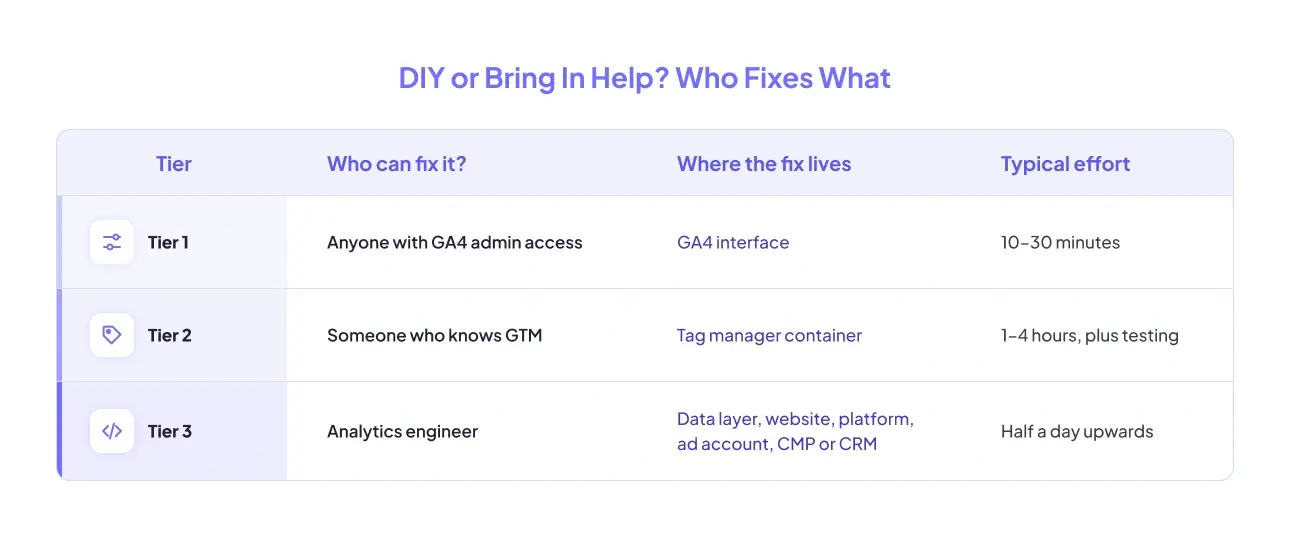
Here is the central point: the tier is decided by where the fix lives, not where the symptom appears. Almost every symptom shows up in GA4 reports. That does not mean GA4 is where it gets fixed.
So when you ask “do I need a GA4 consultant?" look past the report. Ask which system owns the broken piece. If the answer is the GA4 property, you can fix GA4 tracking yourself today.
GA4 Problems You Can Fix Yourself Without a GA4 Consultant
These six problems live inside the GA4 interface. Nobody needs paying for them. If your issue is on this list, the answer to “do I need a GA4 consultant?” is a clear no. If your numbers simply disagree with another tool, start with why GA4 and other platforms report different numbers.
GA4 Internal Traffic Not Filtered
Symptom: sessions look inflated, and visits from your team and agency are counted as real users.
Cause: in most cases, the internal traffic filter was defined but never activated.
Do I need a GA4 consultant for this? No. It is a tier 1 fix. Follow our guide to exclude internal IP traffic from GA4.
GA4 Key Events Not Showing as Conversions
Symptom: the event appears in your reports but never shows up as a conversion.
Cause: the event is arriving fine. It simply has not been marked as a key event, and the change takes around 24 hours to show.
So, do I need a GA4 consultant here? No. This one takes a couple of clicks, and our guide on how to mark key events in GA4 walks you through them.
GA4 Referral Exclusions Missing for Payment Gateways
Symptom: Stripe, PayPal, or your payment gateway shows up as the source of your sales, not the campaign that actually brought the buyer in.
Why it happens: Picture the checkout. Your customer clicks through to PayPal, pays, and lands back on your thank-you page. To GA4, that landing looks like a brand-new visit referred by PayPal, so the real source is replaced. The knock-on effect hurts: paid campaigns start to look like they lose money, while direct and referral traffic take credit they never earned.
Fix: open Admin › Data Streams › Configure tag settings › List unwanted referrals, and add every payment or booking domain your customers pass through. Stripe, PayPal, Razorpay, Shopify checkout domains, and scheduling tools are the usual suspects. Set aside ten minutes.
A word of warning before you close the tab: this list and your cross-domain settings (tier 2) have to agree with each other. So, do I need a GA4 consultant just to add the list? No. Add it, then tick it off on your GA4 audit checklist.
GA4 Data Retention Still Set to 2 Months
Symptom: your standard reports look fine, but every exploration you build stops dead at the two-month mark.
Why the split happens: standard reports use aggregated data, which GA4 keeps. Explorations use event-level data, and only that event-level data expires. GA4 sets this to two months by default.
Fix: Admin › Data Retention › set it to 14 months. It takes about 2 minutes.
Crucially, the change is not retroactive. Data that has already aged out is gone and cannot be recovered. Do I need a GA4 consultant to change it? No, just do it today. Then read about other reasons GA4 stops showing data.
GA4 Attribution Model and Lookback Window Mismatched
Symptom: conversions are credited to the wrong channel, and long B2B sales cycles are undercredited month after month.
Cause: your lookback window is shorter than your real sales cycle.
Do I need a GA4 consultant for this one? No. Review your GA4 attribution settings and match them to how long your customers take to buy.
GA4 Enhanced Measurement Switched Off
Symptom: there are no scroll, outbound click, file download, video, or site search events anywhere in your property.
An important difference: our existing post covers enhanced measurement firing badly. This one covers it never being switched on.
Common cause: the data stream was created during a rushed migration, and the toggles were left wherever the setup wizard put them.
Fix: Admin › Data Streams › Enhanced measurement. Turn each toggle on individually, not all at once. It takes about 5 minutes.
Do I need a GA4 consultant to switch it on? No. If events still look wrong afterwards, read about enhanced measurement tracking issues.
GA4 and GTM Problems That Need a Web Analyst
Each of the next six problems is fixed inside the tag manager container, not the GA4 property. That is the job of a web analyst: someone who knows tags, triggers, and variables and tests changes before they go live. Do I need a GA4 consultant for tier 2? You need GTM skills, either in-house or hired.
GTM Tag Firing Twice
Symptom: every event is doubled, conversions are inflated, and revenue looks roughly twice what it should be.
Cause: the GA4 tag is deployed in the container and also hardcoded on the site, or two containers are live at once.
Why tier 2? You must identify which source to remove without breaking the other. Do I need a GA4 consultant for this? Only if no one on your team knows GTM. Read more on duplicate and overfired GA4 events.
GTM Trigger Firing on the Wrong Condition
Symptom: an event fires on pages where it shouldn’t. A thank-you conversion fires on every page, or a form event fires the moment the page loads.
Cause: the trigger is set to All Pages instead of a specific condition, a Page Path regex is too loose, or a click trigger matches a parent element instead of the button.
Why tier 2: tightening the condition the wrong way silences legitimate fires. Worse, the damage stays invisible until a month of data is already wrong.
Before you change anything: open Preview mode, reproduce the fire, and read which trigger matched. Do I need a GA4 consultant? Not if your web analyst follows this habit. Use our checklist to audit your GTM triggers.
Conversion Linker Missing in GTM
Symptom: Google Ads conversions are attributed to direct traffic, and Google Ads reports far fewer conversions than GA4.
What the tag actually does: When someone clicks your ad, Google adds a click ID (the GCLID) to the landing page URL. The Conversion Linker tag reads the click ID and writes it to a first-party cookie on your domain. When the person converts, the sale is matched back to that click. No linker, no match.
Cause: the tag is missing entirely. Or it exists, but only fires on some pages, while the conversion happens on a page built from a different template.
Why tier 2: it has to be checked across every page type a visitor can land on: homepage, landing pages, blog posts, and checkout.
How to confirm: open Preview mode on a URL carrying a test click ID parameter, then check that the first-party cookie is written.
Do I need a GA4 consultant for the Conversion Linker? If your ad spend depends on it, getting Google Ads conversion tracking verified properly is money well spent.
GA4 Event Parameters Not Passing from GTM
Symptom: events arrive in GA4, but your custom dimension column is empty or reads (not set) for every row.
The two-sided problem: sending a parameter from the container is only half the job. GA4 ignores any event parameter in your reports until it is registered as a custom dimension in the property.
Cause A - container side: the variable is not mapped in the tag’s event parameters, or the dataLayer key name does not match the variable.
Cause B - property side: the parameter was never registered at Admin › Custom definitions.
Why tier 2: to know which half is broken, you need to read the DebugView payload and the container side by side.
What waiting costs you: registration is not retroactive. The dimension only fills from the day you create it. Do I need a GA4 consultant for this? You need someone comfortable with GTM event configuration and DebugView.
GA4 Cross-Domain Tracking Not Working
Symptom: sessions split at checkout, your own domain shows up as a referral source, and one purchase appears as two users.
Scope: this section is about two different registered domains, such as yoursite.com and checkout.vendor.com. If you need tracking across subdomains of one domain, that is a different case.
Cause: the destination domain is not listed at Admin › Data Streams › Configure tag settings › Configure your domains. Without it, GA4 does not pass the client ID in the link.
Why tier 2: it must be coordinated with the referral exclusion list from tier 1. Fix one without the other, and you get a property that looks correct but still double-counts.
What breaks it after it works: a vendor changes their checkout domain, or a redirect strips the linker parameter from the URL.
Do I need a GA4 consultant for cross-domain? If your journey crosses vendors you don’t control, proper GA4 implementation saves you from repeat breakage.
GTM Tags Not Gated to Consent Categories
Symptom: tags fire before visitors give permission, or stay blocked after they say yes.
Scope: Consent Mode defaults and consent banner wiring are covered in our Consent Mode v2 setup guide. This section is about the extra consent checks on each tag inside the container.
Cause: tags are left on “No additional consent required," so they ignore the consent state, however well your consent platform is configured.
Why tier 2: fixing it means understanding consent states and load order, not just flipping a setting. Getting it wrong is a compliance risk, not only a data problem. Do I need a GA4 consultant here? You need someone who understands consent configuration as well as tags.
If tier 2 work keeps piling up and nobody owns the container, a clean Google Tag Manager setup is often cheaper than patching it one tag at a time.
GA4 Tracking Problems That Need an Analytics Engineer
These seven GA4 tracking problems live outside both GA4 and the container. That calls for an analytics engineer: someone who can change code, test it, and deploy it safely. Not sure if you’re here yet? Run a free GA4 and GTM audit to find out. If you are, “Do I need a GA4 consultant?” usually has a simple answer: yes.
Data Layer Missing or Malformed
Symptom: there are no events to work with, or event naming changes from page to page.
Owning system: website code. It is how your site hands clean information to the tag manager.
Why DIY fails: every fix needs a developer deployment, plus an event naming schema agreed up front. This is core GA4 implementation work.
GA4 Purchase Event Firing Twice on Shopify
Symptom: GA4 reports close to twice the revenue your store admin shows.
Owning system: ecommerce platform and data layer. The usual culprits are customers reloading the thank-you page, two apps that both send a purchase event, or a theme that loads the tracking code twice.
Why DIY fails: deleting one of those sources rarely settles it. The lasting fix is deduplication built on the transaction ID, so an order counts once, no matter how often the confirmation page loads.
GA4 Not Tracking Form Submissions in an iFrame
Symptom: the form submits, the inquiry reaches your sales inbox, and GA4 records nothing at all.
Owning system: website or third-party embed. Forms from tools like HubSpot often sit inside an iFrame served from another domain. Embedded forms load in an iFrame from a different origin.
Why DIY fails: browsers block your container from seeing inside another origin’s page. The fix needs a postMessage handler or a callback from the form vendor.
Session Source Not Passing to Your CRM
Symptom: leads arrive in HubSpot or Salesforce with no source attached.
Owning system: container and CRM. The source has to be captured on the site, stored, and sent with the lead record.
Why DIY fails: it needs hidden form fields or a webhook, careful field mapping, and first-touch storage that survives across visits. This is exactly what CRM attribution work covers.
Google Ads Click ID Not Surviving the Funnel
Symptom: conversions are recorded, but not tied back to any campaign.
Owning system: website and ad platform. Unlike the tier 2 Conversion Linker problem, the tag is fine; the click ID is lost in transit.
Why DIY fails: the GCLID can be dropped by a redirect, lost at a cross-domain hop, or stripped by a form. Get Google Ads conversion tracking checked end to end.
Consent Mode Loading After GA4 Tags Fire
Symptom: conversions have been undercounted ever since a consent banner or consent platform change.
Owning system: consent platform and container. If GA4 fires before the consent default is set, your visitors’ choices are applied wrongly.
Why DIY fails: this is a load-order problem, not a setting. Google reports that Consent Mode modelling recovers more than 70% of ad-click-to-conversion journeys lost to cookie consent choices, on average. A wrong load order puts that recovery at risk. Get your consent configuration checked properly.
Browser Restrictions Capping GA4 Data Collection
Symptom: a persistent gap between GA4 and your backend that no configuration change closes.
Owning system: collection infrastructure. Ad blockers and browser privacy features stop many tags from loading at all. According to GWI data cited by Backlinko, 29.5% of internet users worldwide used ad blockers at least sometimes as of Q2 2025. That is traffic GA4 may never see.
Fix: server-side tracking, which sends data through your own server, not straight from the browser.
Do I need a GA4 consultant for tier 3 work? If you have no developer time to spare, yes. An experienced GA4 consultant can scope the fix in writing, implement it in the system that owns it, and verify it before handover.
Where GA4 Tracking Problems Actually Get Fixed
After reviewing all 19 problems, one pattern stands out. GA4 is where the problem becomes visible, and rarely where it gets repaired.
Think of GA4 as the dashboard of a car. The warning light comes on there, but the fault sits in the engine. That is why so many GA4 tracking problems survive the first fix attempt: someone edited the place they saw the symptom, not the place it lives.
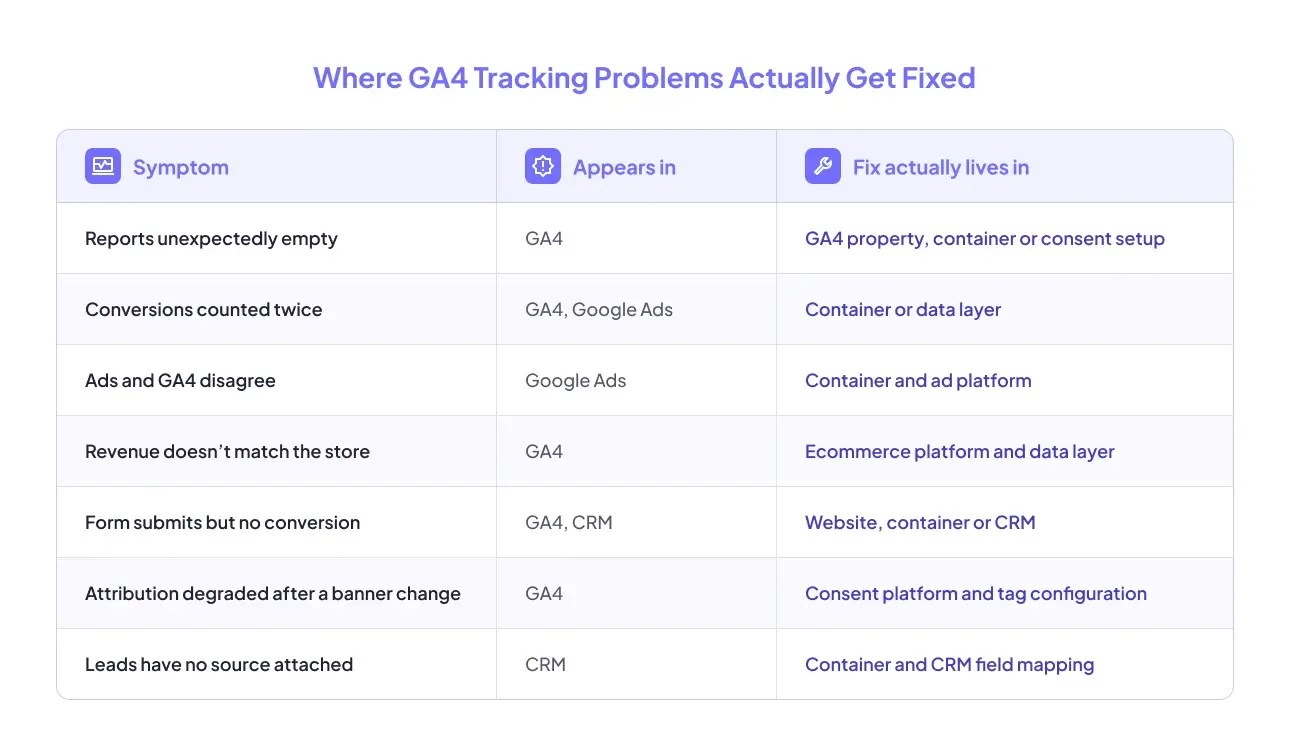
Read the right-hand column before you touch anything. It tells you who should make the change, and it answers “do I need a GA4 consultant?” faster than any report will.
How to Check Which GA4 Problems You Have
The harder part is knowing which of the 19 problems you actually have. Many of them are silent. Your reports still load, so nobody notices.
The quickest way to find out is the free GAfix audit. It runs 44 checkpoints across your GA4 property, your GTM container, and your consent compliance in about two minutes. It is read-only: nothing in your property, container, or connected accounts is modified, and nothing is stored after the run.
You get a tracking health score and your top issues ranked by severity. Then you can place each one on the triage above. Fix the tier 1 items yourself this afternoon. Hand tier 2 to whoever owns your container. Bring in help only for what is truly tier 3.
Think of it as a map, not a sales pitch.
Run a free GA4 and GTM audit and see which tier your problems fall into.
Conclusion
Broken tracking feels overwhelming because every problem shows up in the same place. But once you know where each fix lives, the fog clears. Most teams can solve a third of these problems before lunch.
So the next time a number looks wrong, don’t panic, and don’t pay anyone yet. Ask “do I need a GA4 consultant?” only after you know the tier. Fix tier 1 yourself, give tier 2 to someone who knows GTM, and save outside help for the problems that truly need engineering. Accurate data is not a luxury. It is how you make the right decision at the right time.
For tier 3, GAfix’s Expert Fix Service scopes the work in writing, assigns a senior engineer, and verifies every fix before handover.
Frequently Asked Questions
You can fix it yourself if the fix lives in the GA4 interface. Internal traffic, key events, referral exclusions, data retention, attribution settings, and enhanced measurement are all tier 1 jobs.
Hire a GA4 consultant when you see several symptoms at once, when tracking broke after a migration, or when a problem has already survived one fix attempt.
A GA4 consultant does three jobs: interprets what is broken, implements the change in the system that owns it, and verifies the result. Most of that work happens outside GA4.
Yes for tier 1, often for tier 2, and rarely for tier 3. Anything involving the data layer, checkout code, iFrame forms or server-side tracking usually does.
Confident Decisions Start with Accurate Tracking
Ensure your GA4 and GTM are correctly configured, reliable, and ready for scale.
Related Posts
- Best Practices
GA4 Not Showing Data? 12 Reasons Google Analytics 4 Isn’t Tracking Your Website
Whether it never tracked or suddenly stopped changes the cause. 12 reasons, ordered by how often each one is the culprit.
Geetanjali Khatri8 Min Read - Best Practices
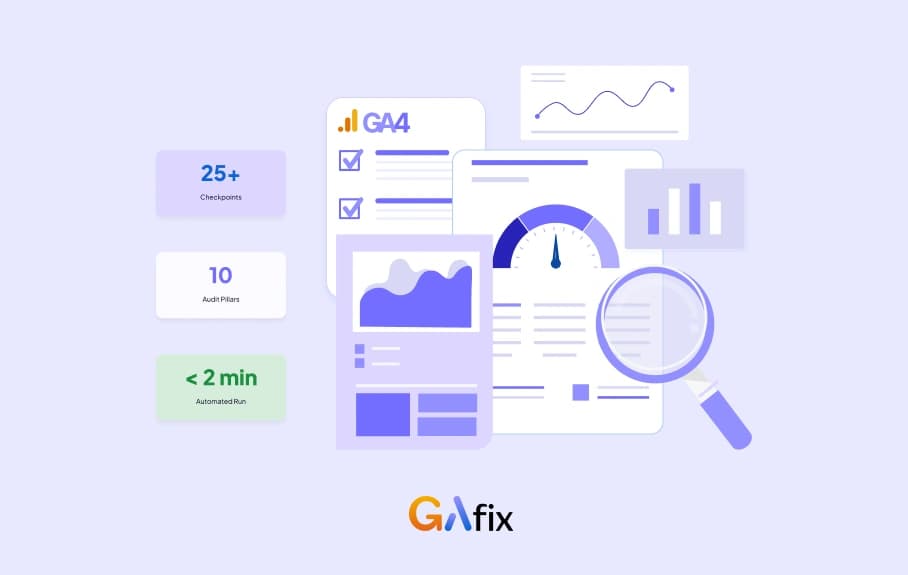
Google Analytics Audit Template: The Free GA4 Checklist (2026)
Get a free Google Analytics (GA4) audit template built on a real 10-pillar, 25+ checkpoint framework - plus a live way to run it in under 2 minutes.
Geetanjali Khatri8 Min Read - Best Practices
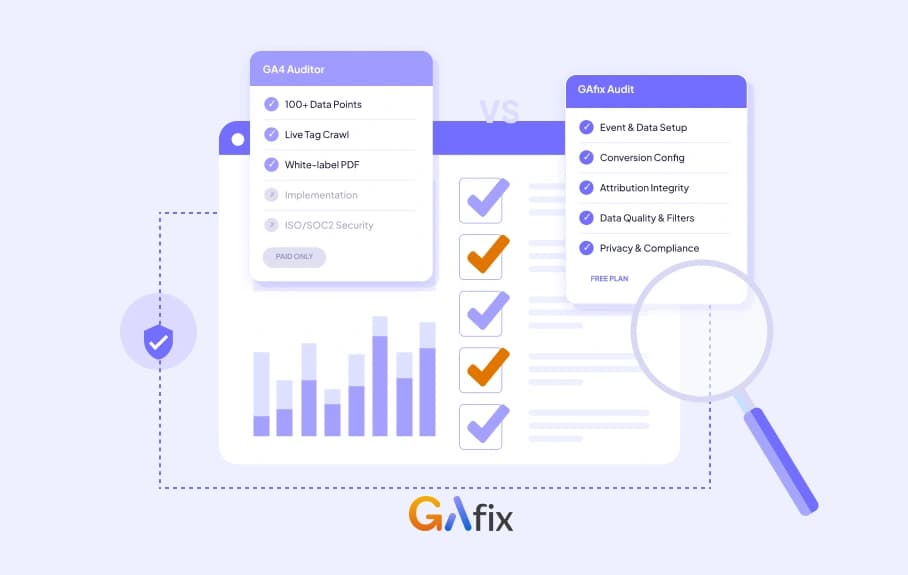
GAfix vs GA4 Auditor: An Honest, Feature-by-Feature Comparison
Compare GAfix and GA4 Auditor on features, pricing, security, and audit depth. An honest breakdown to help you choose the right GA4 audit tool.
Geetanjali Khatri9 Min Read