



%20.webp)



If you open your GA4 acquisition report and "Direct" is doing a lot of quiet work, it shouldn't be. Paid traffic sitting there with no source attached. Conversions with no channel on them. An ad variation that clearly drove a sale, but nothing in the data ties the two together.
The first instinct is to blame the campaign. However, the more common cause is that your GA4 attribution tracking depends on a single mechanism, and something between the click and the report just broke it.
Most setups lean on one mechanism: a UTM string, a tag, or a cookie and stop there. This piece covers what actually holds up: Consent Mode v2, server-side tagging for GA4, and Enhanced Conversions. By the end, you'll know which of these four layers your GA4 property already has.
Why GA4 Attribution Tracking Breaks, and Why Paid Campaigns Show as Direct Traffic
Here's why this happens. A few common, everyday things quietly break tracking for most of your visitors:
- If someone says no to cookies, GA4 can't track them directly. It has to guess instead
- Ad blockers remove tracking codes present in your UTM links before Google ever sees them
- Browsers now block third-party cookies, so GA4 often can't connect a click today to a sale later
- Sometimes a redirect or CDN accidentally strips the tracking code out of the link
If any of this happens and that was your only way of tracking that visitor, the sale just disappears from your reports. This is the same root cause behind organic social traffic being misreported in GA4: when the signal that identifies a channel disappears, GA4 files the session under whatever is left.
This isn't a configuration mistake you fix once. It's a structural weakness: one mechanism, one point of failure. The fix isn't a better UTM or a better tag. It's not relying on any single one of them. Here’s what each of the four independent layers below covers, and where most setups are already exposed.
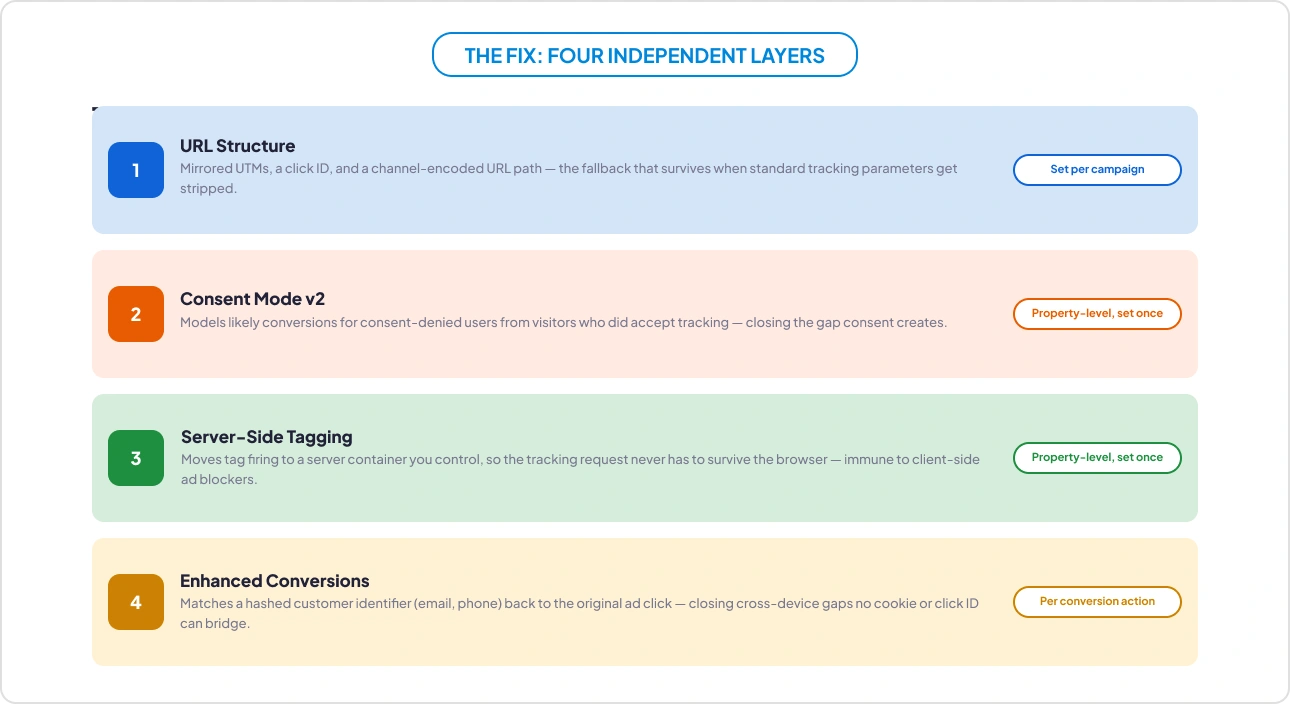
The Fix: Four Independent Layers, Not One
Resilient GA4 attribution tracking comes from stacking mechanisms that don’t depend on each other, so that when one fails, the others keep the data intact.
Layer 1: UTM Parameters, and Why One Parameter Should Never Carry the Whole Story
The easiest gap to fix, and the one most setups skip: mirror your UTM values under different parameter names. Most privacy tools and browsers are built to look for utm_source, utm_medium, and utm_campaign specifically. Thus, those names are well known, so they're easy to block. A parameter called chan or camp carrying the same value usually gets through, simply because it doesn't look like tracking.
Add two more things on top: a click ID (for platforms like Google Ads) and the standard UTMs GA4 already reads by default. A single LinkedIn ad link can carry all three at once:
/linkedin-ads/fall-workflow-launch-carousel-2?gclid=9f2Xk1&utm_source=linkedin&utm_medium=paid-social&utm_campaign=fall-workflow-launch&utm_content=carousel-2&chan=linkedin&type=paid-social&camp=fall-workflow-launch&var=carousel-2
Underneath all three sits the URL path itself: “/linkedin-ads/fall-workflow-launch-carousel-2”
It isn’t really a fourth “layer” in the same sense as the others; it’s not a parameter at all, so there’s nothing there for a stripping tool to target in the first place. That’s what makes it immune by default rather than resistant by design. It’s the last thing standing even if every parameter above it gets wiped out.
Layer 2: Consent Mode v2 Modeling for Consent-Denied Users
When a user declines consent by rejecting the cookie banner, GA4 attribution tracking loses permission to track them normally. Without a fix, that visitor’s conversion just vanishes from your reports, especially when only 25% of visitors accept all cookies on their first interaction, as per Advance Metrics’ 2023 first-click behaviour study of 1.2M+ site visitors.
Consent Mode v2 stops that from happening completely. Set up correctly, it lets Google look at the behavior of visitors who accepted tracking and use that pattern to estimate what probably happened to those who said no. This approach gives a statistically reasonable estimate instead of a blank gap in your reports.
This layer operates independently of anything in the URL. Even a perfectly structured link can't help here, because this is a property-level configuration decision, and in the GA4 audits we run, it’s common to find this either isn’t turned on or is only partially set up.
Layer 3: Server-Side Tagging GA4 with Server-Side GTM
Client-side tags, the ones that fire in the user's browser, are exactly what ad blockers are built to intercept. According to YouGov’s 2024 survey across 48 markets, roughly a quarter of consumers (25%) have installed a browser-based ad blocker, and that’s before counting the broader anti-tracking tools many browsers now build in by default. That’s still a meaningful share of your traffic where a client-side tag never even gets the chance to fire.
Server-side GTM moves tag firing to a server container you control, so the tracking request never has to survive the browser at all. It goes directly from your server to GA4 and Google Ads.
This layer doesn't care whether the client blocks anything, because the client was never in the loop for that request. It’s the closest GA4 attribution tracking gets to surviving ad blockers entirely, rather than just degrading gracefully around them. It's the same shift toward first-party tracking and Google Tag Gateway that Google is now pushing by default.
Layer 4: Enhanced Conversions for Cross-Device Attribution
Say someone taps your ad on their phone, then buys three days later on their laptop. A cookie can't follow them across devices, and neither can a click ID. So the purchase looks like it came from nowhere.
Enhanced Conversions fixes this differently. At the moment of purchase, you send Google a scrambled version of something you already collect, like the customer's email or phone number ("hashed" just means it's turned into a code Google can match but can't actually read). Google matches that code back to the same person's earlier ad click with no cookie or click ID required.
This is the one layer built specifically for cross-device journeys and long gaps between click and purchase. No amount of clever URL structure can fix this particular problem, because the click and the sale never even happen on the same device.
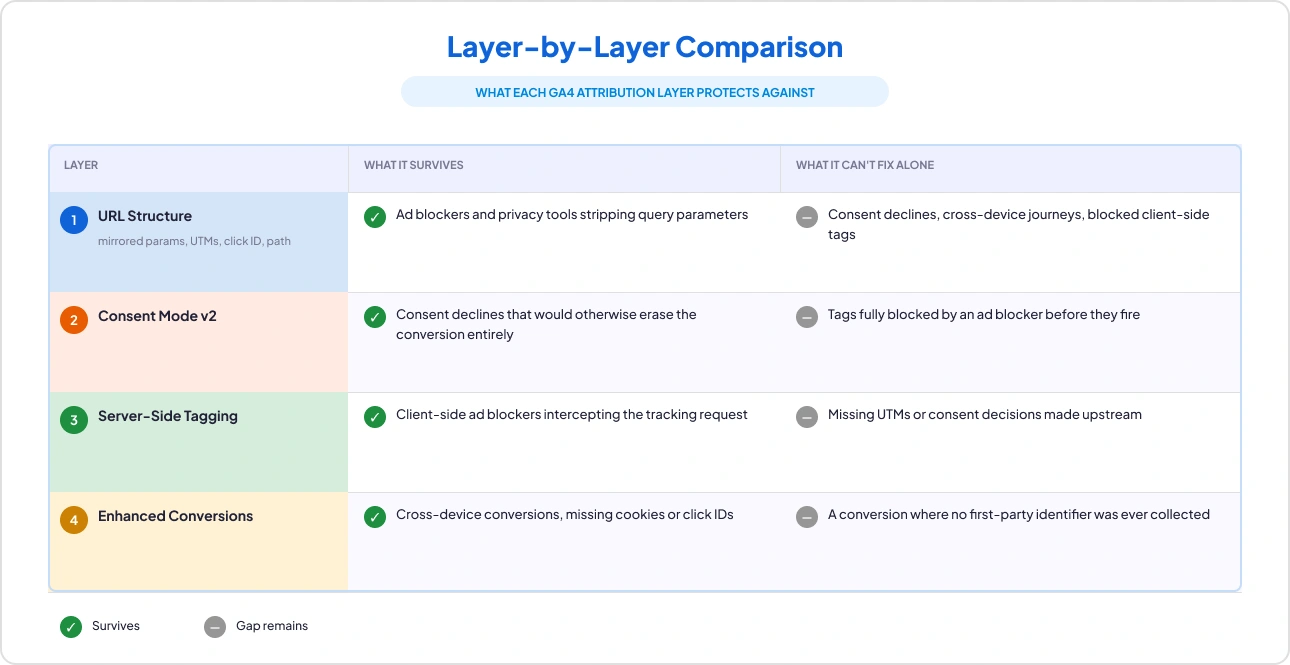
What Each GA4 Attribution Layer Protects Against
None of these four is sufficient alone. Together, they cover almost every way a single click's attribution can be lost.
A Practical GA4 UTM Parameters Pattern You Can Reuse
For the URL layer of GA4 attribution tracking specifically, a consistent pattern across channels is enough. No bespoke scheme is needed per campaign:
/linkedin-ads/fall-workflow-launch-carousel-2
/google-search/fall-workflow-launch-search-1
/email-newsletter/fall-workflow-launch-nl-1
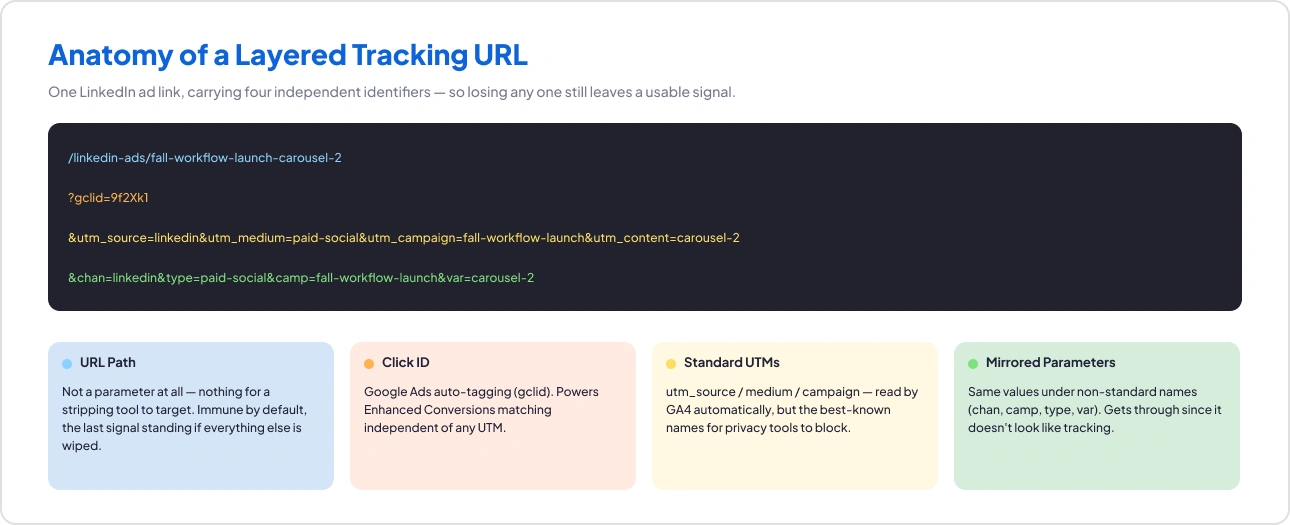
Each path encodes channel, campaign, and variation, extractable in GTM with a simple split-by-/. Layer click IDs, UTMs, and mirrored parameters on top, and Layer 1 is fully covered. The other three layers are configuration decisions made once at the property and tag-management level, not per campaign.
How to Check Whether Your Own Setup Has All Four Layers
In the audits we run, most GA4 attribution tracking setups have one, maybe two, of these layers but rarely all four. Worth confirming on your own:
- Are UTM parameters and mirrored custom parameters present consistently across paid links, and captured as custom dimensions in GA4?
- Is Consent Mode v2 implemented, and is it actually modeling conversions for consent-denied users, or just present without being configured correctly?
- Are you tagging client-side only, or does server-side GTM cover your key conversion events?
- Are Enhanced Conversions set up for the conversion actions that matter most, especially any with a long or cross-device path to purchase?
If you want to work through this systematically, the 10-step GA4 audit checklist covers each of these areas in order, and the free GA4 audit template gives you somewhere to record what you find.
Where to Check Each Layer in GA4 and Google Ads
If you’re working through the questions above, here’s exactly where each check lives for your GA4 attribution tracking setup:
- Standard UTMs (utm_source, utm_medium, utm_campaign) are read automatically in GA4’s acquisition reports. To track mirrored parameters like chan or camp, register them as event-scoped custom dimensions under Admin > Data display > Custom definitions > Custom dimensions > Create custom dimensions. Auto-tagging (gclid) is controlled in Google Ads under your account’s Auto-tagging setting.
- Consent Mode v2 lives in your Google tag or Tag Manager container. Check the gtag.js snippet or Tag Manager consent template for the ad_storage, analytics_storage, ad_user_data, and ad_personalization signals.
- Enhanced Conversions live in Google Ads under Goals > Settings > Enhanced conversions panel, where a single account-level "Turn on enhanced conversions" toggle now covers both web and leads conversions. (Individual conversion actions still have their own customer data settings, but this unified switch is an account-wide setting, not something you configure per action.)
- Server-side tagging shows up as a "Server" container in Google Tag Manager (tagmanager.google.com). If you've also set up Google Tag Gateway for advertisers, that's a separate, add-on configuration. Google recommends not to use it as a substitute for the server container itself.
One thing these four layers don’t touch: GA4’s own attribution model, set at Admin > Data display > Events > Attribution settings.
Data-driven attribution is the current default, with paid-and-organic last-click and Google-paid-channels last-click available as alternatives.
That’s a separate lever from whether a channel is captured at all. If your traffic is showing as direct, that’s a capture problem, not a model problem, so it’s worth checking the four layers above before touching attribution settings.
The Real Reason This Gets Missed
None of this is a skills problem. Most teams already know what Consent Mode, server-side tagging, and Enhanced Conversions are supposed to do. What's missing is time. Checking all four properly means opening GA4 admin, Tag Manager, and Google Ads separately, and that's easy to put off when nothing looks obviously broken yet. It's also the exact gap a quick, read-only GA4 audit like GAfix is built to close, not by replacing the check, just by doing it in a fraction of the time. It scans your GA4 property and flags things like channel grouping and Consent Mode configuration issues directly, and never stores or touches your underlying data. What you get back is a clear read on which of the four layers above you already have, and which ones you've just been assuming are working.

Frequently Asked Questions
Why does GA4 show my paid campaigns as direct traffic?

Because the signal GA4 attribution tracking uses to identify the channel didn’t survive the journey. An ad blocker stripped the UTM parameters, a redirect dropped the query string, or the click-ID cookie expired before the conversion. GA4 doesn't guess. With no source information attached, the session is filed as direct.
Does Consent Mode v2 recover every lost conversion?
No. It models conversions for consent-denied users from aggregated behaviour of consented users, which produces a statistically reasonable estimate rather than exact recovery. It also needs enough consented traffic volume to model against. It closes the consent gap; it does nothing about ad blockers that stop the tag firing in the first place. That's what server-side tagging is for.
Is server-side tagging worth it if I already use UTMs correctly?
They solve different problems. UTMs carry the source information; server-side tagging makes sure the request carrying it actually arrives. If a client-side tag is blocked, a perfect UTM never reaches GA4 at all. Server-side GTM also underpins the broader move to first-party data collection, so it tends to be worth doing regardless of your UTM hygiene.
Confident Decisions Start with Accurate Tracking
Ensure your GA4 and GTM are correctly configured, reliable, and ready for scale.


_%20A%20Practical%202026%20Guide.webp)
Subscribe To Our Newsletter


